· 13 min read
How to Use a Live Leaderboard Creator for Golf Events
Learn how a live leaderboard creator handles scoring formats, handicaps, real-time updates, phone scoring and score corrections for golf events.

Groups are out, the wind has picked up, and the shop phone keeps ringing with the same question: what's the board showing? One player has a 5 written over an 8 on his card, another insists he made par on the hole the system scored as a double, and the screen in the bar still shows this morning's practice round.
A live leaderboard creator closes that gap. Players enter hole scores in a phone browser, and the committee, the field and the spectators watch the standings move while groups are still on the course. The audience is there: the National Golf Foundation reported that 28.1 million Americans played golf on a course in 2024, with total participation across on-course and off-course formats reaching 47.2 million people.
The part most setup guides skip is the part that decides whether the event ends cleanly. A leaderboard isn't a display. It's a record, and records need rules for validation, late scores, corrections, disputes and who is allowed to see what.
Choosing a Live Leaderboard Creator
Choose a leaderboard by asking what happens when a score is late, disputed, or changed after it reaches the board. A polished display is useful, but the record behind it must make corrections clear and limit sensitive information to the people who need it.
Sports fans already expect live updates. Visa's 2024 Future of Fandom findings reported that 51% of sports fans check live statistics while watching a live event, and 47% engage with other live content during the event, according to Ausleisure's coverage of the report. The findings cover sports broadly, not golf alone, but they point to a practical expectation: players want standings to reflect scores promptly.
Use these six checks against your event:
- Formats. Confirm the system supports the formats you plan to run, including stroke play, Stableford, skins, and match play. A leaderboard that only sorts net stroke play may not suit an event with more than one competition.
- Handicaps. Check how the system applies course handicaps before relying on net standings. Incorrect handicap inputs can put the wrong player at the top, so verify a calculation against your event setup.
- Phone entry. Look for browser-based scoring through a link or QR code. Live Tourney's live scoring works in the browser, and players do not need to download an app. Consider how players will enter scores if phone signal is weak.
- Corrections. Find out whether authorized staff can correct an entry and whether the original score, editor, and time remain visible. If a system overwrites the first value, it is harder to resolve a disagreement fairly.
- Visibility. Check which information scorers, players, and the public can see. Public standings should not expose details that belong only in the scoring workflow.
- Trial. Run through the event setup and scoring workflow before committing. Live Tourney offers a 10-day free trial. Use it to check how scores enter the board, how staff handle corrections, and what spectators see.
A leaderboard earns trust when the published standings are timely and the path from score entry to correction is clear. Make those rules part of your selection, not an afterthought.
Scoring Formats and the Setup Each One Needs
Two mistakes cause almost every wrong rank on a live board: the wrong format, and a course handicap nobody checked. Settle both before anyone builds the event.
Start with the arithmetic. Under the World Handicap System (2024 revision), course handicap is the Handicap Index multiplied by the Slope Rating, divided by 113, plus the Course Rating minus par, rounded to a whole number. Take a player with an index of 14.4 on a course rated 71.8 from a par of 72, off a 125 slope:
14.4 × 125 ÷ 113 = 15.93
15.93 + (71.8 − 72) = 15.73
Rounded to a whole number: 16
That player's gross 88 becomes a net 72. Enter the index where the course handicap belongs, or pair him with the wrong tee box, and the board will disagree with the card in his pocket. He'll notice before you do.
What Each Format Sorts By
| Format | Leaderboard sorts by | Set before publishing |
|---|---|---|
| Stroke play, gross | Lowest total gross score | Format only, no handicap |
| Stroke play, net | Lowest gross minus course handicap | Course handicap per player, rounded to whole number |
| Stableford | Highest total points | Points per hole, 0 to 5 |
| Skins | Most holes won, ties carry over | Value per hole and carryover rule |
| Match play | Holes won against each opponent | Pairings and match result per hole |
Stableford is the format most often misconfigured, because the points scale has to match the one on the card: 0 for double bogey or worse, 1 for bogey, 2 for par, 3 for birdie, 4 for eagle, 5 for albatross. Set a different scale and every total shifts.
Three settings decide whether those numbers publish correctly: the format, the handicap allowance your terms of the competition set, and the tie rule. Get the format wrong and the sort column is wrong. Get the allowance wrong and half the field disputes its position. Get the tie rule wrong and two players share first with no defensible way to award the prize. The guide to golf play formats covers the combinations club events use most.
How to Create a Live Golf Leaderboard Step by Step
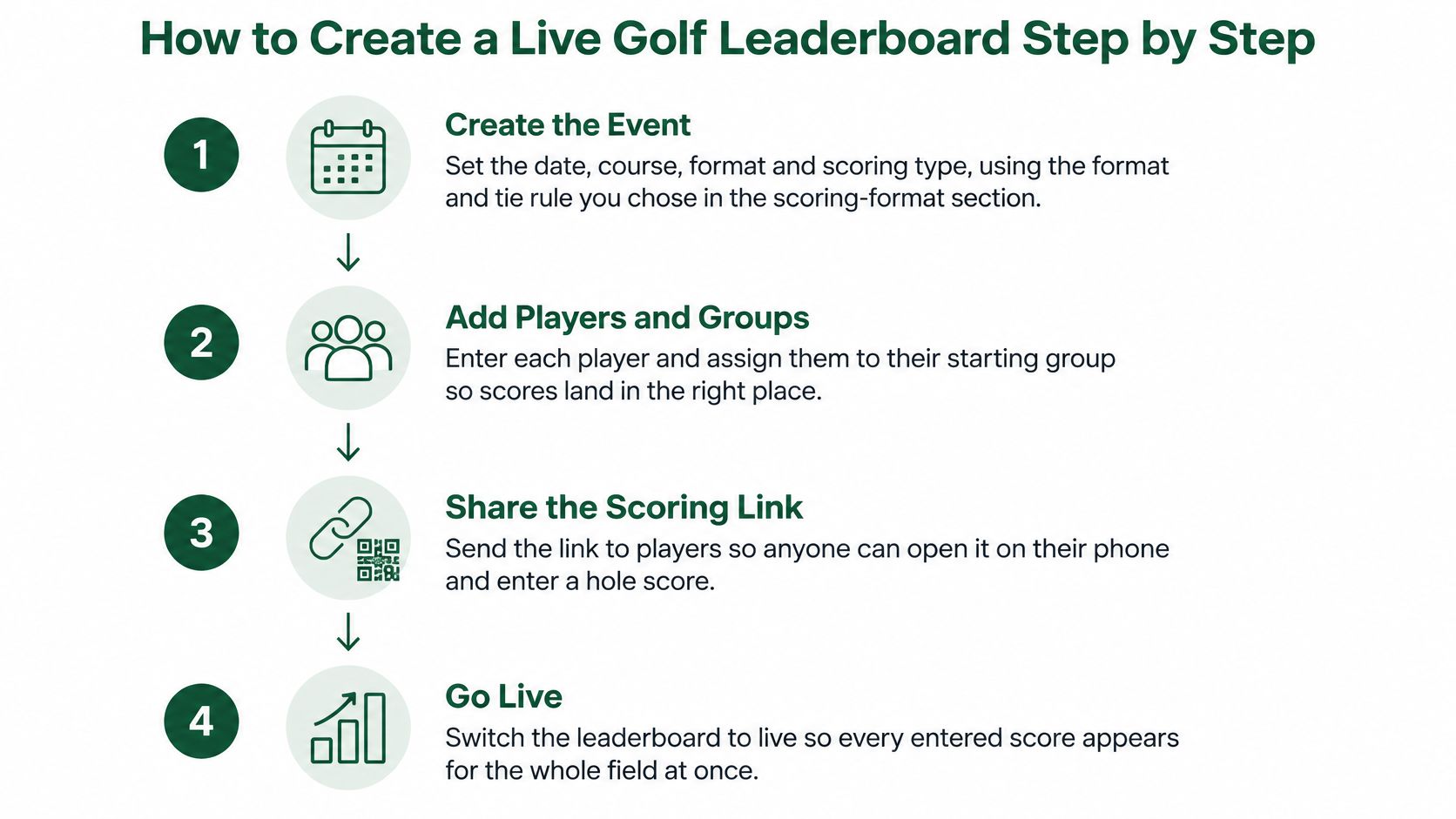
The first tee is approaching, players are checking their phones, and the board is only useful if the event setup behind it is right. Work through the settings in order, then publish once the player list, scoring details and groups are ready.
-
Create the event. Enter the date, course, format and scoring type. Match the scoring type to the competition: choosing gross when the event is scored net can put the wrong player at the top. Set these details before scores arrive.
-
Add the player list. Import names and player details, including Handicap Indexes and tee boxes. Live Tourney imports player lists in seconds without manual entry. Check the imported roster before moving on, since a misspelled name or mismatched player record can make scores harder to track later.
-
Confirm course handicaps and tee boxes. A correct Handicap Index does not guarantee the right course handicap if the tee box is wrong. Check two players against a hand calculation, then review the rest of the list. A handicap error can shift every net ranking, so resolve discrepancies before publishing.
-
Set the side games. Configure gross or net skins, deuces, closest to the pin, long drive and any other contests you are running. Live Tourney can show side games in the standings alongside the main event. Keeping those results in the same scoring workflow avoids relying on a separate spreadsheet to settle the side-game standings.
-
Assign groups and starting holes. Confirm each player is in the correct group and starting position before scoring begins. If a group is added or changed after play starts, check that submitted scores remain attached to the right players.
-
Choose the tie display rule, then publish. Review what the public board will show, and publish only after the event details are ready. A board that goes live before setup is complete can show players incomplete or misleading standings.
-
Print scorecards with QR codes. Live Tourney scorecards and reports include QR codes that open the leaderboard and scoring in a browser. Players can scan the code to reach the scoring page without downloading an app.
-
Send the scoring link. Share the link by email or text, and print it where players will see it. The live leaderboard is at the same link players use to enter scores, so there is one destination for scoring and checking standings.
Before publishing, compare course handicaps with a paper card and confirm that the player list, groups and scoring settings agree. Treat the leaderboard as the event record: the setup determines whether later standings can be understood and checked.
How Scores Reach the Board and Handle Problems
When a score changes, the board needs a clear record of what was submitted, what was checked, and who approved any correction. A reliable scoring flow accepts each submission once, validates it against the competition rules, records the event, then refreshes the standings. The article designing leaderboards at scale describes an event-driven, server-authoritative design: submissions use unique keys to prevent duplicate processing, server-side checks assess the tournament, player, hole, round and format, and an ordered leaderboard updates from a recorded event.
That architecture has a practical consequence: use hole scores to verify a submitted total. If the displayed total is 82 but the hole scores add to 84, flag the discrepancy for review rather than allowing the total to overwrite the underlying scores.
Corrections Add a Record, They Don't Erase One
A correction should preserve the original score and add a new entry that identifies who made the change. That gives staff a record of both the current value and the earlier one, which matters when a player questions a result after the round.
Live Tourney's leaderboard updates hole by hole as scores come in. The board should still distinguish a submitted score from a corrected one, so each standing can be traced back to its score history.
Validation States Beat Blind Speed
Set clear score states, such as pending, confirmed and committee-reviewed, and decide which states appear on the public board. Instant updates help players follow the round, while review protects the standings from an unchecked entry. The two needs can coexist when the board shows the status of a score instead of presenting every submission as final.
Organizers need a defined response when a phone loses signal, a score is queued, or an entry needs approval. The practical failure plan for live scoring outlines issues to plan for before play starts. For a closer look at how an individual score moves through live scoring, see how live scoring works score by score.
The Five Failures Worth Planning For
| Problem | First action | Who decides |
|---|---|---|
| Weak signal on the back nine | Keep the paper card and enter scores when signal returns | Scorer, then marshal check |
| Phone dies mid-round | Enter remaining holes from the paper card | Event staff |
| Same score submitted twice | Keep one entry and confirm it matches the paper card | Event staff |
| Late score after round closes | Hold it as pending until reviewed | Tournament committee |
| Disputed score | Compare with the signed scorecard and audit log | Tournament committee |
Keep a paper card for every group, then reconcile it after play. A repeated submission should count once, after staff confirms it matches the card.
Under the Rules of Golf (2023), the card certified by the player settles a dispute. The committee should compare the system entry with that card and the audit trail, so the original submission and any later correction remain visible.
Write this into the terms of the competition: how long a late score may stay open, who can approve a change, and which of the three tie policies applies. Set these rules before the event, so a disputed result can be handled consistently.
Making Phone Scoring Fast Enough for Players
A player walks off the 4th with wet hands, a glove tucked under one arm, and a phone that has just locked itself. The group ahead is moving, and he has a minute to enter a 6.

Live Tourney's mobile scorecard lets players enter scores in their phone browser during play, without downloading an app. The scoring link is the same link players use to enter scores and view the live leaderboard. On the course, clear confirmation matters: players need to know whether a score was accepted, and what to do if the connection drops.
Mobile entry can be harder than desktop entry. Nielsen Norman Group's mobile usability findings report average mobile task success of 59%, compared with roughly 80% for desktop website testing, and cite a later study reporting 62%. Form entry had the lowest success rate among the tasks studied, which makes score entry worth checking closely.
What To Test, in What Order
Test each task separately with golfers before the event. A combined test can hide where a mistake starts. Open the scoring link, identify the correct group, enter a hole score, correct an error, then check the submitted total. Time each task and confirm that the player can tell a score was saved.
Focus on preventing wrong entries:
- Large touch targets keep the player name and hole visible while entering a score.
- Numeric keypad entry should be easy to use one-handed, with clear confirmation after submission.
- Retry-safe submission should prevent a dropped connection from creating a duplicate score.
Loading speed helps, but it does not protect the record on its own. The Nielsen Norman Group's mobile usability findings discuss Core Web Vitals targets: Largest Contentful Paint at or below 2.5 seconds, Interaction to Next Paint at or below 200 milliseconds, and Cumulative Layout Shift at or below 0.1. Even a page that meets those targets can lead to a wrong score if accidental navigation is easy or submission feedback is unclear.
Finish with a three-person check: one regular golfer, one staff member and one older player each enter a hole, then correct a deliberate error. Confirm that the corrected score is clear before the group moves on.
Choosing Who Sees What on the Board
Three views cover most events, and each has a different audience and a different risk.
- Private scorer view. Hole-by-hole entry for the players and staff who key in scores. It shows the card in progress, who entered it and when.
- Participant standings. Rank, total and side games for registered players. Good for a group chat or a link on the club noticeboard.
- Public spectator display. Rank and totals only, no contact details, and only if the committee agrees to publish at all.
The audience for that public view keeps widening. The National Golf Foundation's industry research shows 48.1 million Americans aged six and older played golf on-course or off-course in 2025, with nearly 4 million juniors playing on-course, the highest level since 2004. Juniors and one-day corporate guests are exactly the people whose details shouldn't be published by default.
Each public screen adds exposure, so check the data before it goes out. Live Tourney's TV leaderboard displays live scores on a TV or large screen, which keeps the clubhouse view inside a room the committee controls.
The data-minimization checklist for the day:
- Confirm the view for each audience: scorers, participants, public.
- Strip phone numbers and addresses from anything public.
- Shorten names for junior events the event doesn't need to publish.
- Make every view readable: large text, strong contrast, screen-reader-friendly controls, instructions in the languages your players speak.
- Offer a QR code as well as a typed link.
- Test each display on the device it will use in practice.
Publishing names, handicaps and hole-by-hole progress builds excitement and creates exposure at the same time. Privacy-safe views show standings without turning a charity outing into a contact list.
The player view of a tournament leaderboard is worth testing with a real spectator before it goes on a big screen.
Run a Dry Run Before the First Tee
Before event day, run the scoring workflow with two test players. Enter scores for a full hole on a phone using the same link players will use to enter scores and view the leaderboard. If the scorecard or report has a QR code, scan it too. This checks the actual route players will follow, not just the organizer's setup.
Then test the record, not only the display:
- Enter a deliberate incorrect score, correct it, and confirm the correction is visible to the people responsible for scoring.
- Compare the leaderboard with the test players' paper cards. Check that it updates hole by hole as scores come in.
- Open the public view on the device planned for the event, including the clubhouse TV if it will be used.
- Confirm the tie rule and who can see each view before publishing.
- Test what happens if a score arrives late or a player disputes an entry. Decide who can correct it and who needs to know.
A phone with a weak signal can delay entry, so verify the process where players will use it. Keep a paper card available as a check, and make sure the committee knows how to reconcile a late entry without changing the record.
For a league or series, Live Tourney can carry results into season standings. Its 10-day free trial gives organizers a way to rehearse the workflow before committing. The Single Event and Live Tourney plans include live scoring, email and text communications, custom scorecards and reports, registration portals and payments, and dedicated support.
Live Tourney keeps score entry and the leaderboard at the same link, with browser-based scoring and a TV leaderboard option. Start the Live Tourney free trial and run the dry run before players arrive.