
Sep 10, 2026
scorecard live, live golf scoring, golf leaderboard, tournament scoring, Live Tourney
Learn how scorecard live works — enable real-time scoring, share mobile links with no app, embed leaderboards and fix common live event issues fast.

The first sign of trouble is usually a text from a player asking whether the leaderboard is current. A group has finished the back nine, the clubhouse screen still shows an old total, and someone at the desk is trying to reconcile a paper card with a spreadsheet. Meanwhile, players on the course want to know where they stand, but nobody wants to download another app or create another login.
A well-run scorecard live setup removes that uncertainty. Players enter scores hole by hole from a phone, totals update automatically, and staff can monitor the event without chasing every group. The workflow works especially well for charity outings, member-guest events, leagues, junior competitions, and mixed-skill fields where convenience matters as much as tournament control.
Why Live Scorecards Change the Tournament Experience
A recreational event can lose its finish before the last group reaches the clubhouse. One group uses paper, another sends a card photo, and the scoring desk waits to retype results. Players then ask for standings after the leaderboard has already fallen behind.
A live scorecard keeps the competition visible while scores are still being recorded. Players check their own cards from a phone, spectators follow standings from the clubhouse, and organizers can spot missing entries before results become final. For mixed-skill fields, a link that opens in a mobile browser avoids app downloads and account setup, while still giving everyone one current view.

Participation matters more than technical complexity
Golf participation includes far more than elite competition. The USGA reported that 94.4% of the 82 million scores posted in 2025 were recreational, and that over 75% of golfers with a Handicap Index were playing for fun (USGA participation data). That audience needs a scoring process that is clear under pressure, works on an ordinary phone, and does not make casual players learn a tournament platform.
Nine-hole formats deserve the same treatment. A shorter round should open the same scoring link, show only the relevant holes, and reach the results desk without forcing players through a full-length tournament routine. This matters for leagues, social competitions, and events with players who have different levels of technical confidence.
For organizers, the practical test is simple. Will players use the link? Can staff correct an error quickly? Can the final result be checked against the recorded cards? Live Tourney's golf tournament live scoring explains the operational choices behind a live setup. Rewards can sit alongside that workflow, with Golf Gift Vouchers available when organizers are arranging prizes or participant recognition.
How Scorecard Live Actually Works Behind the Scenes
A group finishes a hole, the scorer enters the result, and the leaderboard changes before the next tee shot. That simple sequence depends on several separate operations. The system must accept the entry, validate and store it, recalculate the total, synchronize the result, and display the correct position. If one step fails, a phone may show a score that has not reached the scoring desk.
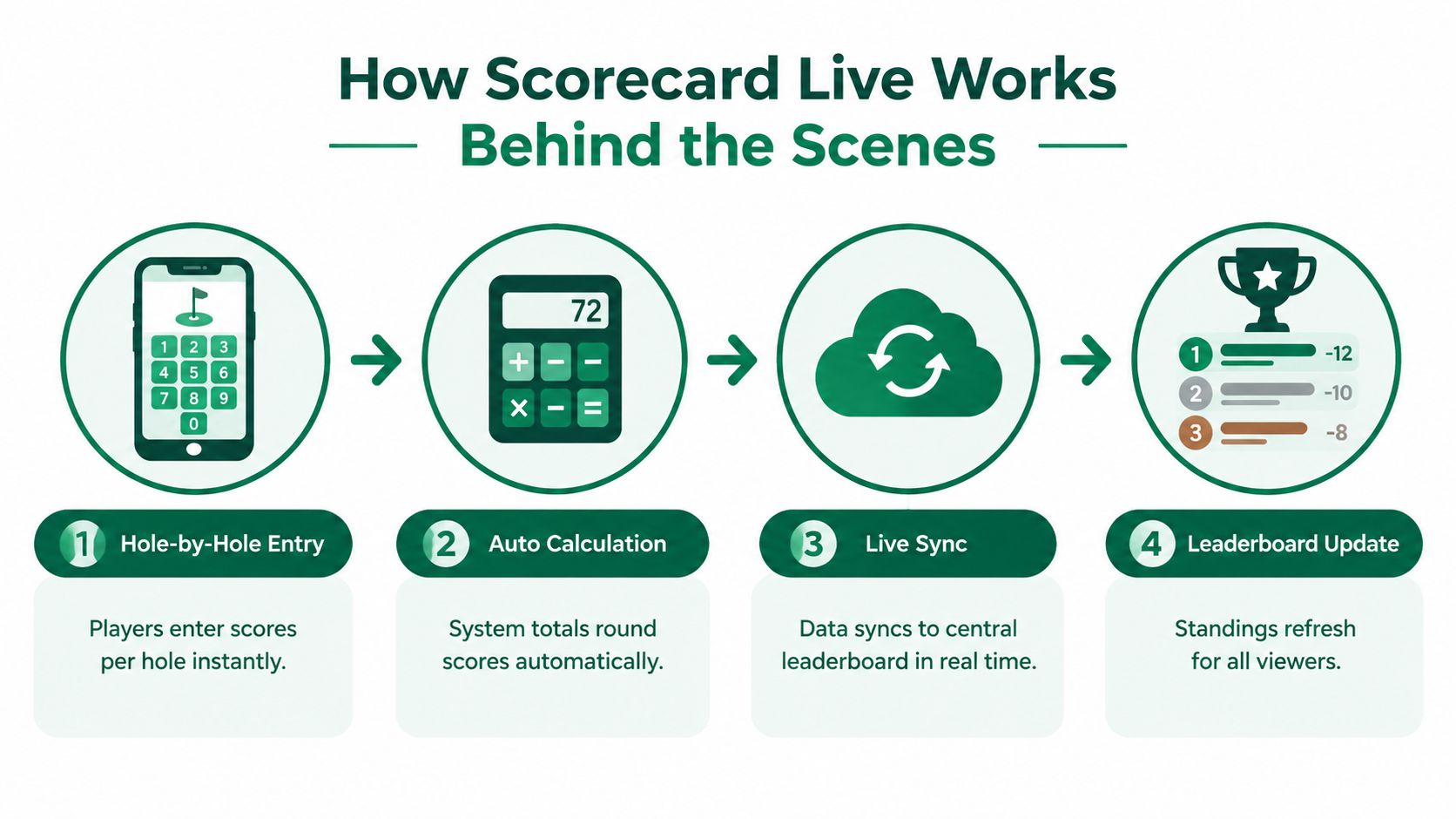
Track three states, not one
A reliable scoring model separates three levels:
Hole state: The current hole has an entry, remains incomplete, or has been finalized.
Round state: Completed holes are combined into a partial or finished score for the player or team.
Event state: Completed rounds, rankings, and format-specific rules are combined into the competition result.
This separation matters in multi-round events and mixed-skill club fields. A player can have a recorded score for the current hole, a partial round total, and an event total that includes earlier rounds. The display should identify each state clearly rather than present one unexplained number. That clarity also helps staff decide whether an apparent discrepancy needs a correction or reflects an unfinished hole.
Live golf feeds may include hole scoring, round information, and performance measures such as strokes gained. Data Golf's public materials describe live strokes-gained data, live tournament statistics, and live hole-scoring distributions, while noting that independently calculated figures can differ from official PGA TOUR values (Data Golf live scoring methodology). For a recreational event, the practical requirement is narrower: define how reloads, layups, incomplete holes, and corrected entries are handled before play begins.
Propagation is the real test
A score is useful only after it leaves the scorer's phone. It must reach the central view, update the current-hole status, and recalculate the aggregate total. Public live-score displays show how hole, round, and total information can appear together without requiring viewers to refresh manually (live golf display examples).
Professional tournament data follows the same basic structure. Sportradar separates real-time leaderboard positions from hole-by-hole scorecards and uses push channels when a player's position or score changes (Sportradar golf tracking documentation). A club event does not need tour-level equipment, but it does need clear rules for what counts as submitted, synchronized, corrected, and final.
The digital golf scorecard workflow keeps player input simple while retaining hole-level detail for staff review. That balance suits app-free, link-based scoring, where one scorer may serve a mixed-skill group and the results still need to remain auditable.
Enabling and Sharing Mobile Friendly Scorecard Links With No App
A scorer is standing at the first tee with three unfamiliar names, one borrowed phone, and a group waiting to play. The setup either works in that moment or creates delays for the entire field. Build the event, load the roster, assign pairings, choose the scoring format, and confirm the course setup before sharing any link.
A browser link removes several adoption barriers. Players tap a URL from a text message, email, tee-sheet notice, or QR code and open the scorecard in their phone browser. They do not need to search an app store, remember another password, or switch among event tools. That makes the approach practical for recreational and mixed-skill fields.

Build the event around the scorer
Assign one scorer per group instead of expecting every player to enter every result. Tell that person how to keep the phone accessible, record each player or team's score after the hole, and confirm the entry with the marker before the group moves to the next tee.
Use this setup sequence:
Prepare the roster: Enter the complete field, including guests who may not know the club's scoring process.
Set pairings early: Match each scorer with the correct group and team so nobody searches an unfiltered list.
Share several access routes: Include the link in the tee-sheet email, send it by text, show a QR code at registration, and have the starter mention it.
Test one group: Before the shotgun begins, open the link, enter a sample score, and verify that the result appears on the leaderboard.
Plan for nine holes: Label the event clearly so players understand they are scoring a shorter round rather than waiting for an unavailable back-nine workflow.
Review this mobile golf scoring app guide when deciding between browser-first scoring and a native app. For casual events, fewer access steps often matter more than a long feature list.
Keep the first hole frictionless
The first entry sets the tone. Give each group the link before it leaves the clubhouse, and place the QR code where players can find it without searching. If a scorer needs staff assistance just to open the card, participation can fall before play settles.
The National Golf Foundation has reported usage gains in golf apps since 2020, including a 7% increase in score posting (NGF app usage coverage). That finding does not mean every club event needs a native application. A browser link remains a practical starting point when the field includes players with different levels of technical comfort. It puts scoring access on the phone they already carry and gives staff a single workflow to explain.
Display and Embedding Options That Keep Everyone Updated
There isn't one correct leaderboard display. The right mix depends on who needs the information and where they'll view it. Players need a compact scorecard while walking between holes. Staff need a monitoring view with enough detail to identify incomplete or suspicious entries. Spectators want a readable ranking that makes the competition understandable from a distance.
Compare the three practical surfaces
An on-phone scorecard is best for active groups. It keeps hole-level information close to the scorer and avoids a queue at the scoring desk. A clubhouse TV creates shared attention, especially after groups begin finishing. An embedded website board extends the event beyond the property, which helps families, sponsors, and remote spectators follow results.
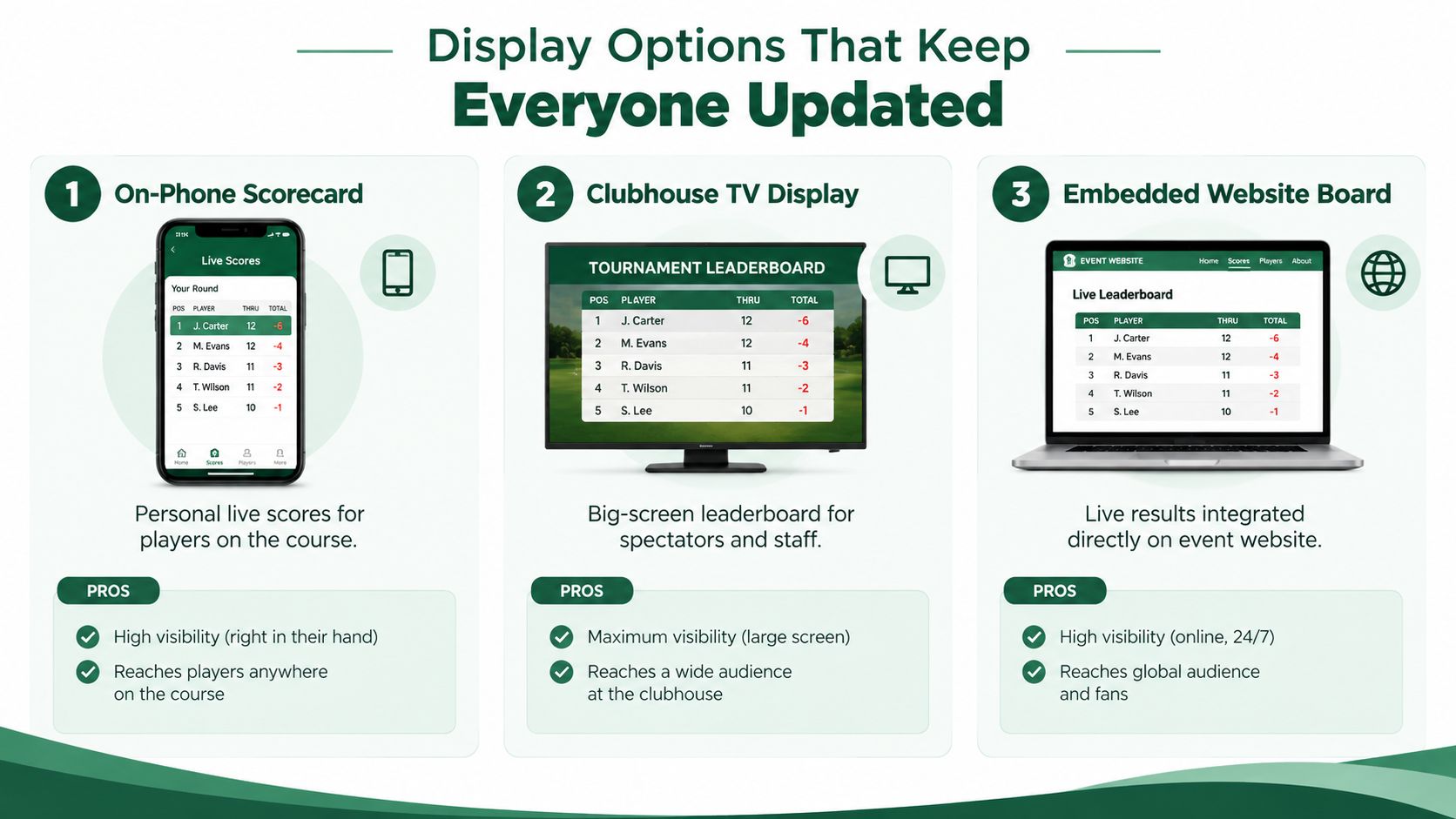
Display Option | Best For | Key Benefit |
|---|---|---|
On-phone scorecard | Players and designated scorers | Personal hole-by-hole access during play |
Clubhouse TV display | Spectators, staff, and finishing groups | High-visibility standings in a shared space |
Embedded website board | Sponsors, families, and remote viewers | Event results accessible from the organization's website |
Design for the viewing distance
A television board should prioritize rank, player or team name, and total score. Small columns that look fine on a phone become unreadable across a clubhouse. Keep hole, round, and total values distinct, particularly in multi-round events where a current-round score can be mistaken for the cumulative result.
A website board can carry more detail because viewers control the screen distance. Use it for the full leaderboard, round status, and event branding, but don't bury the leading information under decorative elements. On phones, prioritize thumb-friendly score entry and a clear indication of the last completed hole.
PGA TOUR ShotLink shows how far large-scale live scoring can go. Its history describes a system that evolved from an electronic scoreboard launched in 1983 with 19 on-site electronic scoreboards, expanded through wireless collection and distributed scoring operations, and was replaced by ShotLink after a 1999 strategy review (PGA TOUR ShotLink history). The current platform uses course maps and radar, camera, and laser sensors to make shot-by-shot data available within seconds worldwide. Club events don't require that infrastructure, but they do benefit from the same principle: one trusted data stream should feed every display.
ShotLink Pro was redeveloped and rebuilt over roughly 18 months, combining launch monitors, radar, lasers, cameras, and 4K video to map holes and track shots (AWS ShotLink Pro overview). For a recreational tournament, the equivalent priority is simpler, consistent score propagation without manual refresh.
Pro Tips to Boost Participation and Keep Scoring Accurate
Players participate when the scoring task feels like part of the round instead of an administrative burden. Give them one clear instruction, one obvious link, and one person responsible for entering the group's scores. Avoid presenting five optional workflows at registration. Choice sounds helpful, but it often produces inconsistent data.
Put responsibility in the pairing
A designated scorer is more dependable than asking everyone to enter scores independently. The scorer should enter results after each hole, while the marker confirms them. This mirrors the core verification habit required under golf scoring procedures, where players check hole-by-hole scores with the marker and cannot change a score without marker agreement or Committee approval (USGA scoring procedures).
Use a short briefing that covers:
Who enters: Name the scorer in each group before carts leave.
When they enter: Make the hole entry immediately after the group agrees on the score.
What they verify: Confirm the player, hole, and score before moving on.
What happens offline: Keep a paper backup or note unresolved holes for later staff entry.
How corrections work: Tell players not to overwrite disputed scores casually. Flag them for the Committee or scoring desk.
Practical rule: The group should agree on the score before the scorer taps submit, not after the leaderboard changes.
Make competition visible without creating pressure
A live leaderboard can encourage friendly competition when it shows useful context. Players may care about their team position, a side game, or whether a late group has moved ahead. Don't overload the display with every available statistic. A clean ranking, clear round status, and current totals are more valuable than a crowded screen.
The rules also make final certification important. A player must certify the scorecard and promptly return it to the Committee, and the player can't change it after return. A wrong score for a hole can result in disqualification if it isn't properly reported before the card is returned (Rules of Golf scoring requirements). Digital entry doesn't remove that responsibility. It gives staff a better way to spot missing information before certification.
Troubleshooting Common Scorecard Live Issues During Events
A group can finish a hole correctly while the leaderboard still shows the wrong state. In club events, the cause is often a missed entry, an incorrect player assignment, or a round that was never closed. Diagnose the symptom first, then correct the scoring record at its source.
Symptom, cause, and quick fix
The total looks stale. The hole may be saved while the round total remains open. Check the player's current-hole status, save the entry again if permitted, and confirm the aggregate total before making another edit.
A hole is missing. The scorer may have skipped it, lost connection, or advanced too quickly. Compare the digital card with the group's paper backup, enter the missing hole, and verify that the leaderboard recalculates.
A score appears twice. A slow response or connection drop can lead to a second tap or re-entry. Find the duplicate hole event, keep the correct value, and check the round total rather than changing only the displayed ranking.
The wrong player has the score. Pairing or roster data is the likely cause. Confirm the group assignment, correct the player identity at the scoring source, then review every affected hole.
A player can't open the link. The text may be truncated, the QR code may not scan, or the browser session may have expired. Send the direct link again by text and keep a printed access route at registration. This backup matters for recreational groups that may not want another app on their phones.
A late correction arrives after certification. Leave the finalized card unchanged. Follow the Committee's procedure, document the correction, and use the governing Rules of Golf requirements for returned scorecards as the authority.
Sky Sports' live leaderboard gives players a familiar expectation for current standings (Sky Sports golf leaderboard). Your event does not need to copy a professional broadcast. It does need clear player names, round status, and totals that agree with the underlying scorecard. If the public display differs from the staff record, trust the source record first and resolve the mismatch before announcing results.
Run a short pre-flight check
Before the first group starts, confirm the roster, pairings, scoring format, scorer assignments, access link, QR code, clubhouse display, and staff correction permissions. Test the link from a phone that is not connected to the staff network. During play, monitor incomplete holes and unusual totals instead of waiting for the final group.
At the finish, reconcile every hole, confirm round completion, and follow the Committee's certification process. Keep one staff member responsible for corrections so competing edits do not create a second problem.
Live Tourney provides browser-based scorecards and leaderboards, roster and pairing management, administrative score verification, edits, saves, and score locking. For a club that wants app-free participation with staff control, review the Live Tourney workflow before the event, test it with a mixed-skill group, and confirm that the shareable link and display meet your needs.
Live Tourney gives golf organizers mobile-browser scorecards, live leaderboards, roster tools, and administrative controls without requiring players to download an app. Set up a recreational tournament or mixed-skill outing around a shareable link, test the scoring flow before tee time, and invite staff to evaluate it during the event.





