· 17 min read
Golf Tournament Live Scoring: How It Works, No App Needed
Learn how golf tournament live scoring works, why it boosts player engagement, and what to look for when choosing a modern scoring platform for your course.

You're standing beside the scoring table as the last groups come in. One card is damp, another is missing a hole, and a player insists the posted skins result can't be right. The clubhouse wants to start the awards, but the committee still has to verify scores, settle ties, and decide whether a correction changes the payout.
That's the problem golf tournament live scoring should solve. It isn't a brighter leaderboard or a faster way to display totals. Done properly, it creates a dependable record of what happened, who entered each score, when a correction occurred, and which results remain provisional. The speed matters, but governance and reliability under pressure matter more.
Do players need to download an app for live scoring? Not with a browser-based system. Players tap a link from the event email or text, or scan a QR code on a cart sign, and the scorecard opens in their phone's browser. There is nothing to install and no app-store account to create, which matters most when half the field is guests playing their one outing of the year. Spectators open the same kind of link to follow the leaderboard. The rest of this guide covers how scores move from the course to the board, how to set up the day, and how to handle the corrections and ties that decide whether players trust the result.
The Moment Live Scoring Saves Your Tournament
At the 16th green during a busy club championship, three groups can be waiting on the same hole while the scoring operation tries to keep pace. A paper scorecard has a smudged 5 that might be a 4. The scorer radios the pro shop again to ask which team won the skins pot. Nobody wants to declare a result until someone confirms the hole, the marker, and the applicable handicap strokes.
Without a live process, that uncertainty spreads. Staff hold payouts, players drive back toward a hole to find a marker, and competitors begin drifting toward the parking lot before the tournament is official. The delay isn't caused by one careless person. It comes from asking the scoring desk to reconstruct an entire event after the players have already finished.
A live system moves the work forward. When a marker enters a hole score, the platform can validate it, recalculate standings, and publish the updated state while the group is still playing. Side games can be displayed from the same underlying entries, reducing the need to copy figures between a scorecard, spreadsheet, and payout worksheet.
The distinction between a live board and a trustworthy live board is important. A system should make it possible to identify provisional scores, correct an error without erasing the original entry, and show administrators what changed. The golf scoreboard explanation is useful background, but event-day decisions depend on the workflow behind the screen.
Practical rule: The best scoring process is the one that lets staff resolve exceptions while the evidence is still fresh.
The PGA TOUR's own scoring history shows how far this operational need reaches. Its first electronic scoreboard system launched in 1983 with 19 on-site electronic scoreboards at each event, expanded in 1992 into a full scoring system with inquiry and analysis computers in 60 locations, and later led to ShotLink after the TOUR chose to replace the earlier system in 1999. The PGA TOUR's ShotLink history describes the foundation of the real-time scoring infrastructure still used in modern tournament coverage.
What Live Scoring Actually Does Under the Hood
A live score travels through a sequence of checks before it becomes a public leaderboard entry. Understanding that sequence helps a head professional spot weak points before the first tee shot.
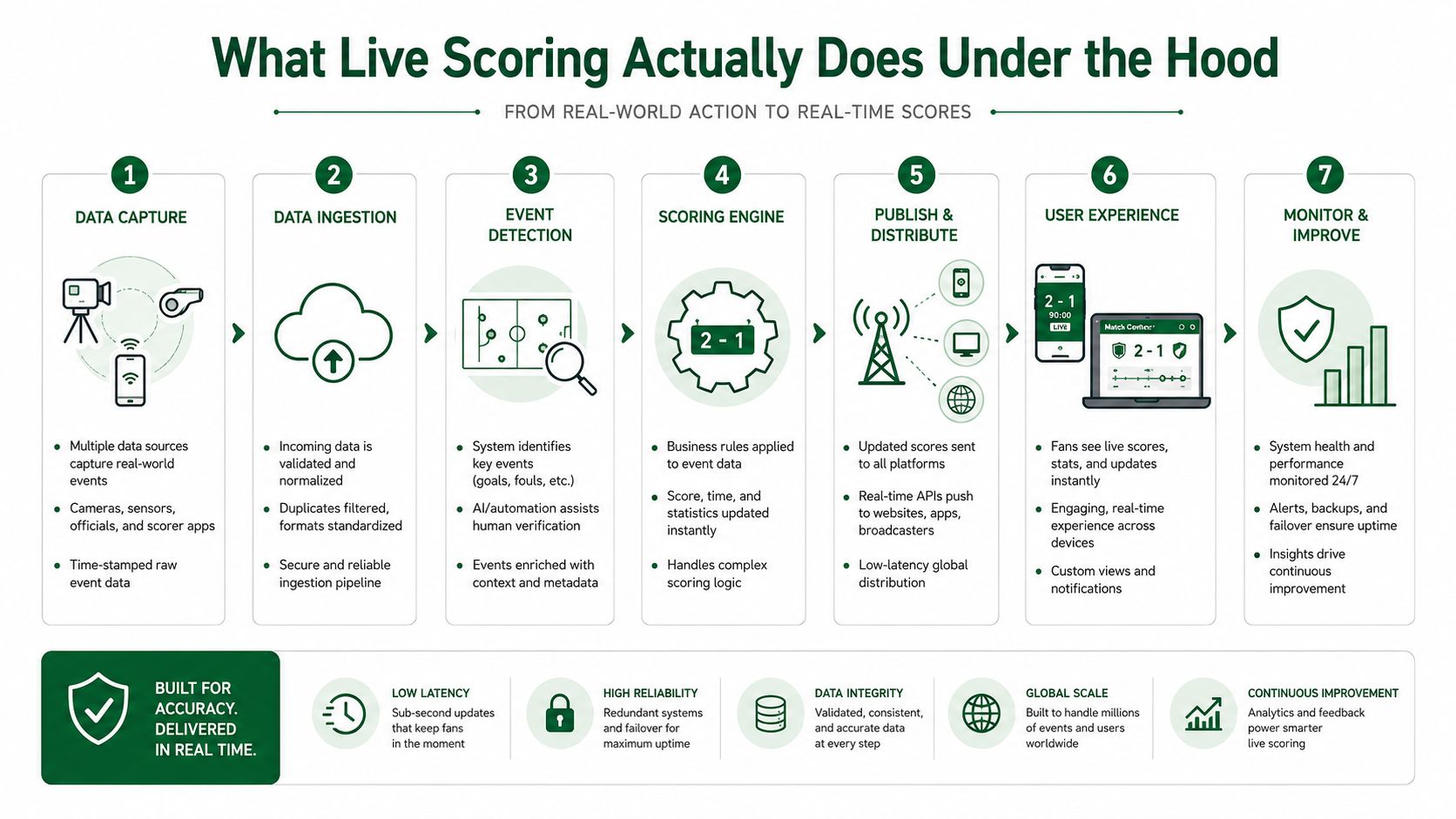
From score entry to visible standings
First, someone enters the result. That might be a player, marker, volunteer, referee, or staff member using a phone, browser, tablet, or dedicated device. The entry needs to be tied to the correct player, hole, round, and group.
Next, the device sends the entry to the scoring service. If the connection is temporarily unavailable, a well-designed workflow should preserve the entry locally and transmit it when service returns. Without that buffer, a weak signal can turn a correct score into a missing score.
The server then validates the data. It checks the event roster, tee sheet, assigned holes, round status, and handicap configuration. A score entered for the wrong player or an impossible hole sequence should be flagged rather than accepted.
The scoring engine recalculates the event. Gross totals, net standings, team positions, match status, Stableford points, skins, and other configured competitions may all depend on the same score. The platform should apply the relevant format rules instead of asking staff to recalculate each view manually.
Finally, the updated state is published. Players, spectators, the clubhouse display, administrators, and downstream systems should receive the same current version. The critical operational detail is the controlled movement of data between entry, validation, calculation, and publication.
Some systems poll for new data on a timer; others push each saved score to every open leaderboard as it arrives. Either way, a refreshed screen is only as current as the scores that have reached it.
Where delays and errors enter
A fast leaderboard isn't the same as guaranteed end-to-end latency. Delay can appear when a group submits several holes together, a cellular connection drops, a device is locked, or an administrator waits to approve a correction. Broadcast-grade shot tracking also demands more than club-level score entry.
ShotLink illustrates the upper end of the market. A PGA TOUR mobile experience exposes real-time leaderboards, play-by-play, and dynamic notifications, while the TOUR's system captures information on every shot during competition. A club event may use a simpler pipeline, but it still needs clear status labels and dependable synchronization.
App-Based Versus Browser-Based Live Scoring
The choice between an app and a browser workflow affects the first tee more than a feature sheet suggests. App-based scoring can provide a controlled environment, persistent access, push notifications, and familiar entry screens. It can also create a queue of players who need help downloading, updating, logging in, or finding the correct event.
Browser-based scoring removes much of that starting friction. A shared link or QR code lets a player open the scorecard in a mobile browser, while spectators can view standings without installing anything. There is no download step, so the first tee doesn't turn into a help desk.
| Factor | App-Based Scoring | Browser-Based Scoring |
|---|---|---|
| Entry | Persistent login and a dedicated interface | Link or QR code opens the event directly |
| Offline behavior | Often stronger when designed for local caching | Depends more heavily on browser and connection behavior |
| Notifications | Push alerts can reach registered users | Updates usually arrive through the open browser |
| Onboarding | Downloads, permissions, and account steps add friction | No app-store step, useful for guests and volunteers |
| Support burden | Staff must handle device, version, and login issues | Staff must handle browser compatibility and signal gaps |
| Iteration | Updates may depend on app-store releases | Platform changes can reach users more quickly |
| Best fit | Controlled, high-stakes events with engaged participants | Club events, outings, leagues, and spectator-heavy competitions |
The app model makes sense when the organizer controls devices, expects repeat users, and needs the most consistent interface possible. It's also useful when offline entry and push notifications are central to the operation.
A browser model usually fits mixed fields better. A corporate outing may include members, guests, sponsors, and volunteers who won't want another app for a single day. The leaderboard golf app guide provides useful context, and live play score explained compares app, text-message and browser scoring side by side. The practical rule is straightforward: choose the workflow your least technical player can use without a staff member standing beside them.
What Courses and Players Really Gain
The strongest benefit of live scoring is not that a leaderboard looks modern. It's that the scoring desk stops being the bottleneck for every decision after the round.
For the course, hole-by-hole entry reduces the number of paper cards that must be collected, deciphered, and typed into a separate file. Staff can spend more time checking exceptions and less time rebuilding totals. Skins, proximity contests, and team standings can draw from the same records, provided the platform's format rules and payout logic are configured before play begins.
For players, the experience changes at the clubhouse. They can follow their group's position, see the competition develop, and understand whether a late birdie affects a side game. The final putt no longer has to be followed by a silent wait while one employee enters every card from scratch.
Engagement depends on trust
A live leaderboard only creates value when players believe it reflects the course accurately. That means the platform should show current status, distinguish provisional results from confirmed results, and preserve an audit trail for changes. A timestamped entry gives the committee something concrete to review when a player disputes a score later.
The USGA's championship scoring procedures demonstrate the importance of disciplined communication. Referees announce each side's hole score and the match score after every hole, then relay the information to USGA Scoring for internet posting. When devices aren't used, referees radio hole-by-hole scores immediately after the hole ends using a fixed call format that includes the match number, hole number, player names, individual scores, and match score. The USGA scoring procedures show that reliable live results require structured input, not merely fast technology.

Infrastructure still matters
A phone can't transmit a score if the course connection fails. Before relying on browser or app scoring, test signal strength around tees, halfway houses, greens, and clubhouse areas. Resorts and clubs also need to think about the guest network, since a congested or poorly secured connection can undermine an otherwise sound scoring process. Ask how the scoring system behaves on a dead spot before you rely on it: a good one keeps scores entered without signal saved on the phone and syncs them when signal returns.
Score Governance, Late Corrections, and Edge Cases
Digital entry doesn't make a tournament foolproof. It makes the record easier to control, provided the committee defines who can edit a score and how that edit is recorded.
A marker may submit a score, then remember that the player made a different number on the previous hole. The platform should make the affected hole easy to find, and the committee should decide who is allowed to change it. Once a card is locked, only the committee should be able to reopen it.
Disqualification creates another test. The public leaderboard may need to remove a player from competition while preserving the round record for committee review. A weather-shortened event creates a different problem, because completed holes, revised par expectations, and the committee's declaration of results may matter as much as gross totals.
| Edge Case | Recommended Platform Response | Committee Action |
|---|---|---|
| Hole mismatch | Flag the conflicting entry and prevent silent replacement | Ask the marker or referee to confirm the correct score |
| Late correction | Preserve the original value, new value, user, and timestamp | Approve the amendment and record the reason |
| Marker dispute | Mark the score as provisional or disputed | Refer the issue to the rules official before confirming results |
| Disqualification | Change competition status without deleting the round history | Apply the event rules and communicate the status clearly |
| Weather interruption | Preserve completed holes and identify incomplete rounds | Decide how the competition will be completed or settled |
| Tie | Display co-leaders and identify the tie condition | Apply the published playoff or countback procedure |
| Side-game conflict | Recalculate affected pools from the corrected score | Hold payment until the committee confirms the outcome |
Ties deserve special attention. Some systems can flag co-leaders, but that doesn't mean they should trigger a playoff automatically. The committee must control whether the event uses a playoff, countback, shared result, or another published method.
The public-facing result should also carry a clear status. Help content in the market often explains how to start a round, enter scores, or move a round to in-progress, while giving less attention to late corrections and official-result boundaries. Golfstat's tournament scoring FAQ reflects the importance of distinguishing live information from official results.
A fast wrong result creates more work than a slow, clearly provisional one.
Setting Up Live Scoring Without a Disaster
Run setup in the same order every time. Consistency prevents the morning team from discovering that the roster is correct but the tee assignments, handicaps, or starting holes are not.
Build the event before touching devices
Start with the roster. Import player names, divisions, teams, and handicap information, then check duplicates and missing entries. A clean roster gives every later score a reliable destination.
Load the competition rules. Select the format, rounds, tees, handicap method, side games, and payout structure. Don't leave these decisions for the scoring desk once groups are already on the course.
Create pairings and tee times. For a two-tee shotgun, verify every group's starting hole and make sure the displayed assignment matches the printed materials. A single incorrect starting hole can produce apparently impossible score sequences.
Assign scoring responsibility. Decide whether the marker, a designated player, a volunteer, or staff member enters scores. Each group should know who has primary responsibility and who acts as the backup scorer if the primary device fails.
Test the real workflow
Don't test only from the office. Enter sample scores from the first tee, a distant green, the halfway house, and the clubhouse display. Confirm that an entry appears correctly, that a deliberate correction flows through to every leaderboard and side game, and that the leaderboard handles incomplete rounds without presenting them as final.
Keep a paper-card fallback in every scoring kit. Paper isn't the primary system, but it remains valuable when a battery dies, a device is lost, or a storm interrupts service. The backup card should identify the player, group, hole, and marker clearly enough for later reconstruction.
Staff the day with clear roles
A workable staffing model is simpler than most clubs expect. One person owns score entry and follow-up for groups that stop updating, one person handles disputes and corrections, and one person watches the live board during play. Larger fields may need a dedicated check-in person as well, so setup questions and scoring questions don't collide at the starter tent. One short run-through is enough training when the roles are clear: who enters scores, who checks them, and who closes the event.
Put the scoring link where players already look
Players use live scoring when getting in takes one scan. Put the QR code in the places they pass anyway:
- Cart signs: the most effective spot. Print a large QR code next to the player names and starting hole.
- Registration table: a few small, sturdy signs let players scan and get set up while they wait to check in.
- First tee: a sign near the starter catches anyone who missed the first two.
Send the link before the event, too. A short email or text that says the event has live scoring, gives the link, and says there is no app to download clears up most questions before anyone arrives. Then make a short announcement before groups head out: live scoring is on, scan the code on your cart sign, no download needed, and the leaderboard and side games update as you play. Keep it upbeat and under a minute.
Brief markers in plain language
Tell markers to enter scores after each hole, check the player name before submitting, and report a suspected mistake immediately. Explain which scores are provisional, who can approve a correction, and where players should go with a rules question.
Set a morning go or no-go decision. Confirm the roster, tee sheet, devices, network conditions, clubhouse display, support contact, and public leaderboard URL before sending groups out. Put the leaderboard URL on the clubhouse screens as well, so spectators aren't asking staff for access. If a link, display, or embedded board misbehaves on the day, the scorecard live guide has a symptom-by-symptom troubleshooting table.
Formats, Side Games, and the Rise of Shorter Rounds
A tournament calendar rarely stays inside one scoring model. Stroke play, scrambles, best-ball, shambles, alternate shot, skins, and Stableford each place different demands on the calculation engine.
| Format | Scoring Logic | Live Scoring Complexity |
|---|---|---|
| Stroke play | Add each player's hole scores for a gross or net total | Low to moderate, depending on handicap rules |
| Best-ball | Select the best eligible score within the team on each hole | Moderate, with team eligibility checks |
| Scramble | Record team results after shared shot selection | Moderate, especially when player-level records are required |
| Shamble | Combine selected drives with individual play afterward | Moderate to high because the scoring phase changes |
| Alternate shot | One team score is recorded while partners alternate shots | High, because player and team actions must remain aligned |
| Stableford | Convert hole results into points under configured rules | Moderate, with a separate points leaderboard |
| Skins | Compare eligible hole results and resolve ties under event rules | High when multiple handicap and tie rules run together |
The platform should store the underlying hole result once and apply it to the right competition views. A committee shouldn't have to type the same score into a gross leaderboard, a net leaderboard, a skins sheet, and a team report.
Side games need their own configuration. Skins, closest-to-the-pin contests, team pools, and payout tables may run alongside the primary event, but they shouldn't be allowed to obscure the official standings. The display should make clear which leaderboard answers which question.
Shorter rounds compress the decision window. In a nine-hole league or a shotgun outing, the order can change rapidly because fewer holes remain to separate players. The USGA reported more than 82 million rounds posted in 2025 and a record 14,998,824 nine-hole scores, with nine-hole scores up 5% year over year and more than 46% since 2020. Those figures support the practical point that scoring systems need to accommodate more than traditional full-round competition. The operational lesson is simple: configurable formats aren't an optional extra for a modern calendar.
Choosing a Live Scoring Platform That Fits
Rank platforms by the consequences of failure, not by the number of buttons in the demo. A beautiful leaderboard won't rescue an event if scores disappear when a group enters them from a weak-signal hole.
Use an operations-first scorecard
Reliability comes first. Ask the vendor what happens when the connection drops. Have them demonstrate offline buffering, delayed synchronization, duplicate prevention, and recovery after a device reconnects.
Score control follows. Request a live correction workflow. Ask who can change a score once it is entered, whether a scorecard can be locked after the round, and whether players can confirm a playing partner's card before it is locked. If the vendor can't show that clearly, assume disputes will become manual investigations.
Format flexibility is the next filter. Test the formats your club runs, including side games and multiple simultaneous leaderboards. Don't accept a promise that a custom workaround can be built later unless the process is already documented.
Then test the daily workflow:
- Setup speed: Can staff import a roster, apply handicaps, create pairings, and publish a tee sheet without vendor intervention?
- Player access: Can a guest begin scoring through a QR code, or does every participant need an account and an app download?
- Public display: Can the clubhouse show a readable leaderboard while players follow their own group privately?
- Administrative control: Can staff lock scores, reopen a round, change a player's status, and preserve the history?
- Commercial fit: Does pricing support the way your club runs events, without punishing larger fields or frequent competitions?
Run the demo with an actual event file, not a generic sample. Add a late player, create a tie, enter a wrong score, disconnect a device, and publish a correction. Those tests reveal more than a presentation about features.
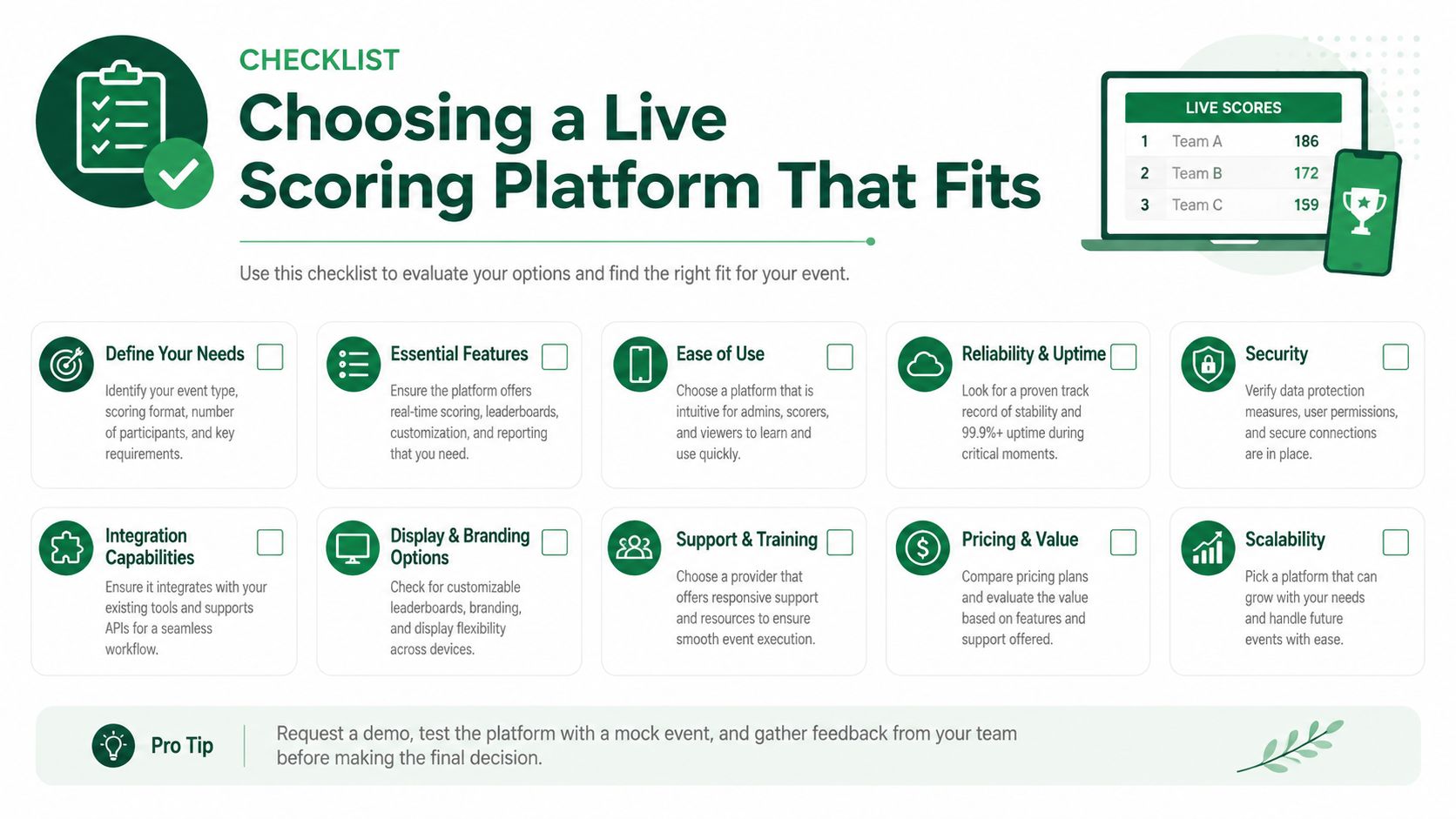
A head professional should choose the platform that remains understandable when the pressure rises. If staff can identify the source of a score, correct it cleanly, and explain the result to players, the system is doing its real job.
Running live scoring in Live Tourney
Live Tourney is web based, so neither players nor organizers download anything. Players open the event link or scan the event QR code, enter their group's scorecard code, and score in the phone's browser; scores entered without signal are saved on the phone and sync when signal returns. The leaderboard lives at the same link and updates as scores are saved, and the same scores feed net and gross standings, skins and payouts. Staff can lock scorecards after the round, turn on attestation so a playing partner confirms the card, and put the board on a clubhouse TV. See the mobile scorecard guide, the full feature list on /features, or book a demo to walk through your own event.
Live Tourney gives golf courses and event organizers browser-based live scoring, real-time leaderboards, tournament setup tools, side-game management, and payout support without requiring players to download an app. Visit Live Tourney to review the workflow and see whether it fits your next tournament, league, or outing.