
Oct 20, 2026
scorecard management tool, golf tournament software, live scoring, Live Tourney, tournament management
Compare the best scorecard management tool options for golf courses in 2026. Features, formats, export options, and how Live Tourney stacks up against legacy

The pairings are taped to the cart barn, the starter wants to know who's handling check-in, and someone's phone won't open the scoring screen. Meanwhile, your assistant is reprinting cards because a late withdrawal changed the teams. You don't need another impressive dashboard. You need a scorecard management tool that lets the staff get back to running the tournament.
Tournament Morning and the Real Question Behind the Tool
A tournament platform earns its place when the event stops following the plan. A player changes tees, a volunteer enters the wrong score, or the cellular connection disappears just as a group submits its card. That's the buying environment, not the vendor's perfectly populated demonstration event.
Start with the jobs your staff must finish. The system needs to capture hole-by-hole scores reliably, produce usable printed materials, release data your club can reuse, and fit the surrounding operational workflow. If your assistant still rekeys the roster into accounting after the awards presentation, you haven't finished evaluating the software.
Buy for the handoffs
Watch what happens when responsibility changes hands:
Player to scorer: Can someone enter and correct a score without staff interpreting the interface?
Scorer to Committee: Is there a clear distinction between provisional scores and an officially returned card?
Tournament desk to pro shop: Can staff print the materials they need?
Club to vendor: Can you retrieve usable records when the subscription ends?
These handoffs matter more than the appearance of the leaderboard. A polished display doesn't compensate for a confusing submission process or an export that strips out player identifiers.
Practical rule: Buy the workflow your least-experienced tournament employee can complete, not the demonstration your most technical employee can follow.
Comparing Live Tourney with an older system is useful, but it's only part of the decision. You're also choosing who maintains the records, who troubleshoots problems, and how much tournament knowledge remains trapped in one employee's head.
Ask vendors to run your event, using your roster and your paperwork. Don't let them substitute a simpler example when your requirements become awkward.
What a Scorecard Management Tool Must Actually Do
Evaluate the core capabilities in operational order. Start with score capture, then follow the information through standings, printed materials, roster management, and financial closeout. Otherwise, it's easy to approve an attractive screen while missing the work behind it.
Six capabilities and what “good” looks like
Capability | Operational test | Watch for |
|---|---|---|
Phone score entry | Enter, correct, verify, and submit a card with marker and player involvement | An editable total masquerading as certification |
Leaderboards and pairings | Change a pairing and check the scorer's view and standings | Different screens showing conflicting information |
Custom reports | Edit and print your scorecards and cart signs | Layout changes requiring vendor intervention |
Scoring formats | Run your actual competition and change a permitted setting | Manual recalculation outside the platform |
Roster uploads | Import existing players and resolve duplicates | Name matching that merges different people |
Payouts and emails | Calculate awards and send the correct message to each group | Staff rebuilding results in spreadsheets |
Follow a score through the system
Digital entry comes first. Have someone unfamiliar with the platform select a player, enter a hole score, correct it, and finish the card. Staff should be able to explain who can perform each action without guessing.
For leaderboards, don't settle for watching scores appear. Change a pairing, move a player between flights, and inspect what participants see. The operational question is whether everyone sees the correct competition context.
The report builder deserves the same scrutiny. Ask your assistant to change a field, adjust spacing, and print on the stock already in the shop. A printable PDF isn't necessarily a usable report-building workflow.
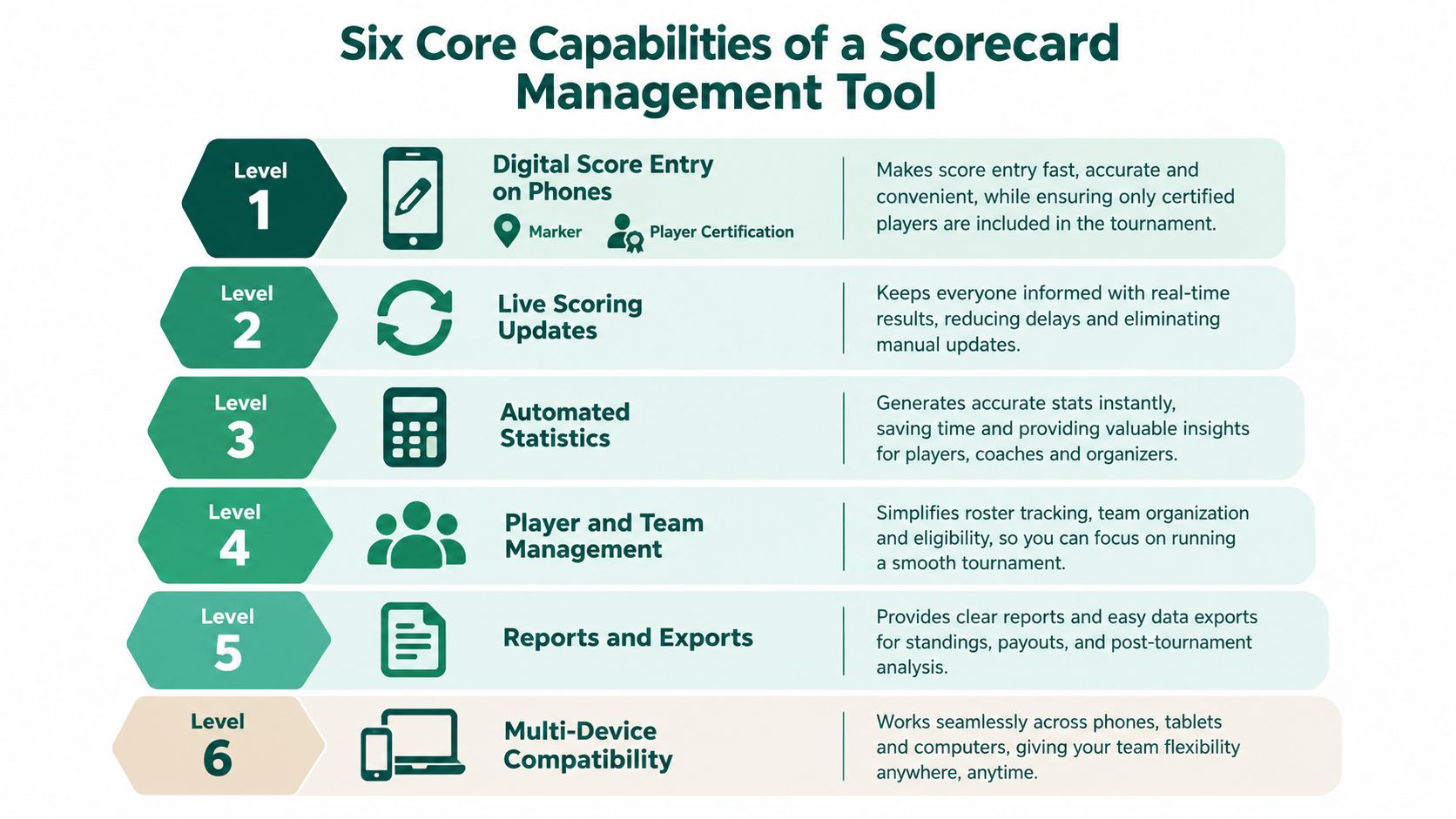
Format support means handling your stroke play, match play, stableford, skins, best ball, scrambles, Ryder Cup-style events, and round robin requirements correctly. Count workarounds, not checkboxes.
Roster uploads should preserve identities, while payouts and automated emails should finish the event without a separate reconciliation exercise. For junior programs coordinating volunteers and communications beyond golf scoring, Vanta Sports' resource on event management tools for youth sports provides a useful adjacent planning reference. Keep that broader event workflow in view without confusing it with competition-scoring requirements.
Live Tourney Versus Legacy Systems at a Glance
Most vendor comparisons rank feature lists. Rank the operating model instead: how participants reach the scoring screen, and how staff finish the work. The table below states what each architecture typically does. Score individual products, Live Tourney included, against these categories once you understand the underlying split. No two installed systems behave identically, so treat the right column as a pattern to verify in the demo, not a verdict.
Browser-based platforms vs installed-app systems
Criterion | Browser-based platforms | Installed-app systems |
|---|---|---|
App dependency | Players open a link; nothing to install or update | Requires installation, periodic updates, and account recovery through the vendor |
Setup time | Events build from saved templates in a web admin | Desktop preparation and synchronization precede event setup |
Mobile entry path | The invitation runs through to score submission | Login and event selection happen inside the installed app |
Report building | Staff edit layouts directly in the browser | Layout changes go through local configuration or vendor requests |
Printing | Output goes to any printer the browser can reach | Output depends on workstation access and installed drivers |
Format coverage | Competition formats are configured per event | Unusual formats become custom configuration or manual exceptions |
Support model | The vendor answers remotely during event hours | Escalation often routes through the club's local expert first |
Pricing model | Subscription quoted as one scope | Licenses, modules, and renewal conditions priced separately |
Migration cost | Sits in imports, validation, and staff rehearsal | Includes unwinding the dependencies the old system created |
Where the architecture shows on tournament day
App-free access is the sharpest distinction to test. A browser link removes the installation task, but identification, permissions, and poor connectivity still need answers. Walk the complete player journey rather than stopping when the page opens.
Verify each row hands-on. Follow the invitation through to a submitted score. Watch what a workstation update does mid-morning. Ask who picks up the phone during event hours. Request every price component in writing. Claims collapse quickly under a stopwatch and a real pairing sheet.
An installed app can still be the right call when members know it and the club depends on established configurations. Don't discard working processes because a competitor looks cleaner. Equally, don't treat years of accumulated workarounds as proof the existing system is safer.
For the presentation side, PSW Events' explanation of how electronic leaderboards work is a useful companion resource. Keep the display decision separate from the scoring decision: a screen in the clubhouse must show the correct result, not merely an attractive result.
Run the same event, the same staff member, and the same expected outputs through both architectures before subscription terms enter the conversation.
Formats, Printing, and Score Exports That Actually Hold Up
Bring a competition that has caused trouble before. Use a multi-round event with team changes, a match-play result requiring clarification, or a round robin with your actual tie-breaking conditions. Ask the vendor to identify what's native, what requires configuration, and what leaves the platform altogether.
Don't assume advertised support covers your interpretation of a format. Test single-round and multi-round scoring, stableford points, skins eligibility, best-ball selection, and Ryder Cup-style team totals against results your Committee has already checked.
Printed output is still operational output
Scorecards, tee sheets, cart signs, and bag tags need different information and layouts. Ask staff to edit them without developer assistance, then inspect the printed result rather than approving the preview. Use the custom golf scorecard guide to prepare the fields and layout requirements you want demonstrated.
Certification also needs more than a signature-shaped box. The USGA's scorecard procedures distinguish hole-by-hole gross scores, player and marker certification, prompt return, and the Committee's responsibility for totals. Require the software to preserve those responsibilities instead of asking players to certify arithmetic.
Export the relationships, not just the results
Request a sample export before signing:
Player records: Stable identifiers, tee assignments, team membership, and relevant handicap fields.
Competition records: Hole scores, format settings, adjustments, and final status.
Financial records: Registration references, payments, refunds, and payout reconciliation.
Integration details: Available CSV fields, API access, field mapping, and responsibility for failed transfers.
Handicap workflows need particular care. The USGA's competition guidance distinguishes the Playing Handicap used in competition from the full Course Handicap used for handicap-posting calculations, and assigns stroke allocation and posting responsibilities to the Committee.
A system that exports clean, understandable records is a better long-term purchase than one that requires staff to reconstruct the event from screenshots.
Mobile Accessibility and Performance Acceptance Tests
“Mobile friendly” isn't an acceptance test. Ask for measured performance and make a staff member complete the scoring workflow under inconvenient conditions. A quick leaderboard is irrelevant if the next tap submits the wrong score.
Use Google's real-user Core Web Vitals guidance to set acceptance targets of LCP at or below 2.5 seconds, INP below 200 milliseconds, and CLS at or below 0.1, assessed at the 75th percentile. Record time-to-first-byte and score-submission error rate alongside those measures.
Test the interaction, not just the loading screen
The WCAG 2.2 mobile guidance provides the accessibility framework; require your complete scoring flow to remain usable at 200% text zoom, without horizontal scrolling or obscured controls. Include authentication, player selection, entry, correction, submission, and standings.

Treat the graphic's functional timings and offline behavior as demonstration prompts, not established product guarantees. Require the vendor to show which behaviors it supports and how it measures them.
Staff iPhone on club Wi-Fi: Complete the workflow with enlarged text, keyboard navigation, and a screen reader. Check visible focus and actionable error messages.
Player's Android on cellular: Interrupt connectivity during submission, reconnect, and confirm that the score wasn't lost or duplicated.
Sunlit course device: Test one-handed entry, portrait and landscape orientation, touch-target size, and accidental-tap cancellation.
Don't rely on red and green alone to communicate scoring states. Require text or another non-color signal, and check that controls don't shift beneath someone's finger.
The mobile golf scoring app guide can help frame the player-access discussion. Your purchase decision should still rest on the observed test results.
A visible “saved” message must mean the system preserved the score, not merely that the player touched a button.
Finally, submit concurrent corrections and inspect the rankings. Record unresolved defects and retest them before committing the club.
Migration, Privacy, and Junior Event Governance
Consider a club preparing to switch while an existing multi-day competition is still underway. The assistant imports members into the new platform, finds duplicate records, and discovers that the old roster uses different identifiers. This is a migration rehearsal scenario, not a reason to move an active event halfway through.
Keep the current competition in its established system. Build the replacement alongside it, designate the owner of the master player record, and reconcile imports before staff invite participants.
Rehearse the transfer before opening registration
Assign responsibility for the unglamorous work:
Roster reconciliation: Decide which record wins when names, contact details, or identifiers conflict.
Historical access: Preserve the records needed to answer later scoring and payment questions.
Correction history: Require actor, timestamp, previous value, new value, and reason for consequential edits.
Cutover approval: Have the tournament director sign off after a full-event rehearsal.
Alignmint's checklist to migrate your nonprofit's records is a useful cross-sector planning reference. Apply its migration context to the club's own records and responsibilities rather than assuming a golf-specific import will resolve everything automatically.
Low friction still needs controlled access
A volunteer entering scores doesn't need the same permissions as the Committee. Require role-based access, consent controls, private leaderboard options, retention settings, deletion procedures, and a usable data export.
The industry guide on golf technology and governance flags additional COPPA considerations for children under 13. For junior events, involve the club's privacy adviser before publishing names or enabling public profiles; don't treat an organizer's access as a substitute for appropriate consent.
Posting responsibility also needs an owner. The USGA's same-day posting guidance explains its role in playing-conditions calculations and overnight updates. Use the GHIN score-posting guide to prepare staff questions about that handoff.
Keep paper cards and an authorized staff-entry process available. A dead phone shouldn't exclude a player or erase the verification process.
How Live Tourney Stacks Up Against Legacy Systems
Live Tourney runs scoring and tournament administration in the browser. Players enter scores through a link rather than an installed app, and the organizer side covers roster uploads, a report builder for scorecards, cart signs, tee sheets, and bag tags, plus payout calculations and dynamic participant emails. That is the verifiable core of the product.
Everything beyond that list is a claim the buyer still has to verify. Browser delivery removes download friction at the first tee, but it says nothing about whether your league's Ryder Cup-style format rebuilds correctly, whether a round robin with your exact points structure scores properly, or whether the payout output matches what your treasurer expects. Bring your own data to that conversation, and compare it against the installed system your staff already knows.

Put the speed claim on a stopwatch
The platform's minutes-rather-than-hours positioning is a testable proposition, not a substitute for measurement. Have your assistant build an unfamiliar event, then reuse its template for the next one. Include roster cleanup, print revisions, and participant communications when assessing staff workload.
Don't convert a setup demonstration into an assumed season-long saving. Record your own preparation effort across the kinds of events you run. Participation and setup-speed uplift claims also need supporting evidence before they belong in a club's business case.
Ask whether the offered package includes a no-onboarding-fee arrangement, a free trial, and in-house support. Confirm who answers during your event hours and what happens when the first contact can't resolve a scoring problem.
Buying advice: Switch when the new workflow removes recurring work you can identify and test. Don't switch merely to replace an unfashionable interface.
Clubs with frequent outings, rotating volunteers, and download-related player friction should evaluate a browser-based alternative promptly. Clubs with dependable member workflows and specialized competition configurations can wait until a replacement proves those requirements. Where both descriptions apply, run a controlled side-by-side evaluation instead of assuming either modern or legacy means safer.
A 30-Minute Buyer Scorecard You Can Actually Run
Bring a representative roster, a completed event with known results, and the person who'll operate the software. Use the meeting to expose failure points, not to tour every menu. Let the employee drive while the vendor answers questions.
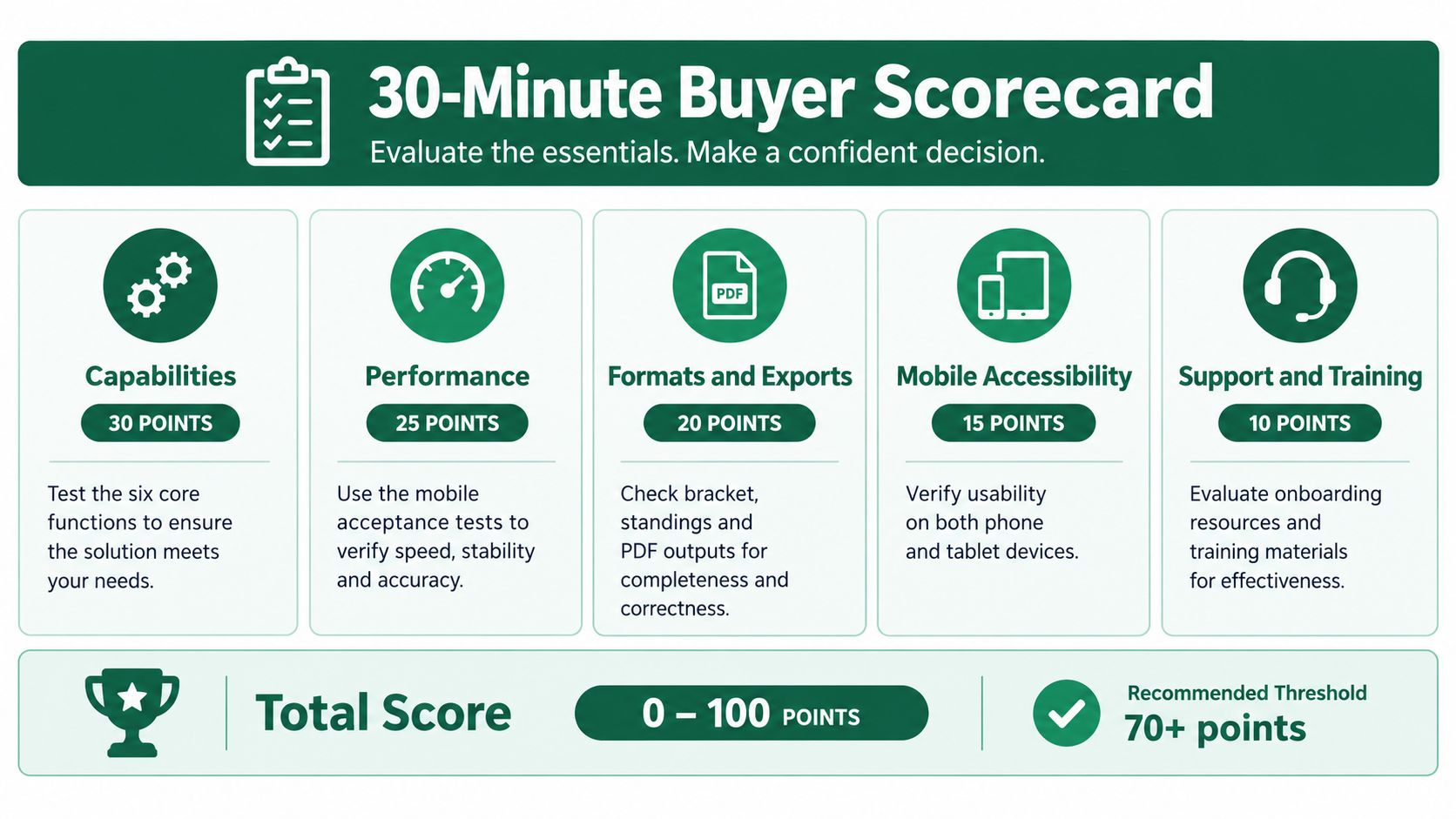
Weight the decision around your calendar, then record evidence rather than impressions.
Category | Weight for your club | Required evidence | Shortlist result |
|---|---|---|---|
Capabilities | Critical or supporting | Complete entry-to-closeout workflow | Record |
Performance | Critical or supporting | Measured results and submission reliability | Record |
Formats and exports | Critical or supporting | Correct results and usable exported records | Record |
Mobile accessibility | Critical or supporting | Completed accessibility checks | Record |
Integration | Critical or supporting | Demonstrated transfer and reconciliation | Record |
Privacy and governance | Critical or supporting | Permissions, consent, and correction controls | Record |
Support and pricing | Critical or supporting | Written scope and escalation process | Record |
Make the weighting reflect the work
A high-volume league should emphasize reusable preparation, roster continuity, and closeout. An invitational-heavy club should prioritize competition correctness, verification, and printing. Charity and corporate outings should put participant access and volunteer usability near the top.
Treat the graphic's point allocations as an optional worksheet, not a validated purchasing threshold. A critical failure shouldn't disappear inside a respectable total score.
Ask the vendor to recover an interrupted submission, reverse an authorized mistake, and export the completed event. Then ask who handles the same problems when the tournament director is unavailable.
Standardize on a modern platform when it passes the operational tests across your calendar. Keep a hybrid approach when outings benefit from a simpler access path but member competitions still depend on proven configurations, provided staff can maintain clear record ownership.
Staff-meeting takeaway: Choose the system that completes our real tournament workflow with the fewest manual handoffs and no unresolved critical failures.
Live Tourney offers browser-based scoring alongside tournament administration, report building, and event closeout tools. Visit Live Tourney and bring your roster, print layouts, and toughest competition format to a demonstration so your staff can test operational fit before committing.





