
Sep 18, 2026
custom golf scorecard, golf scorecard design, golf scorecard template, Live Tourney scorecards, golf tournament printing
Learn how to create a custom golf scorecard from layout to print. Design tips, templates, export specs and Live Tourney setup for flawless events.

The first sign of a tournament problem often appears at check-in. Players are ready to go, but the scorecards show outdated yardages, the handicap row is missing, or the writing area is so tight that staff start making corrections by hand. That small delay follows the group onto the course and later creates questions when scores need to be certified.
A well-built custom golf scorecard prevents those problems before the first tee shot. It gives players a clear paper record, gives staff dependable information for reconciliation, and can connect with digital scoring and live leaderboards. Modern golf data services already expose hole-by-hole records across the PGA Tour, DP World Tour, LPGA Tour, Korn Ferry Tour, and other major circuits, including par, yardage, and round-by-round scoring history through services such as Tour Tips golf data. The practical lesson is simple: the scorecard is both a printed tool and a structured data layer.
Why a Great Custom Golf Scorecard Changes Your Event
At registration, a player asks which tees apply. A volunteer checks the tee sheet and finds that the printed card shows something else. The line stops while staff explain the correction, mark the margin, and hope the same issue does not reach the scoring table.
That problem starts before check-in. A custom golf scorecard is an operating document, not just branded stationery. Its printed fields establish the information players record, while its structure should match the data used for scoring and leaderboards in Live Tourney. If those two versions disagree, staff must reconcile them by hand.

Paper and digital scoring need the same truth
Hole assignments, tee information, scoring format, and player details should describe one consistent event across the card and the digital system. A printed card with outdated information can send a marker to the wrong row, leave a handicap instruction unclear, or create an exception that someone must correct later.
Live Tourney can use event scoring data for results and live leaderboards. The card therefore acts as a visible data layer: players enter scores against defined holes and rows, and staff can compare the paper record with the digital result. Clear alignment supports golf score tracking without turning every discrepancy into a manual investigation.
A well-planned card also supports certification. Players and markers can find the required fields, record strokes in the correct places, and sign off with fewer questions. That matters for net scoring, handicap dots, side games, and events with multiple rounds.
Practical rule: Build the scorecard around the decisions players and staff must make, then reserve the remaining space for branding.
Choose the format according to the event. A single-round card may be enough, while a folded card or multi-panel layout may better support several rounds or scoring products. The right choice reduces corrections at registration, keeps recording consistent on the course, and gives staff a cleaner paper record during results review.
What Every Custom Golf Scorecard Must Include
Build the information inventory before choosing a visual theme. Any field staff or players need on tournament day belongs in the design before sponsor panels and decorative elements take up space. The card should also support the scoring workflow in Live Tourney, where clearly defined holes and rows make paper entries easier to compare with digital results.
Build the scoring side first
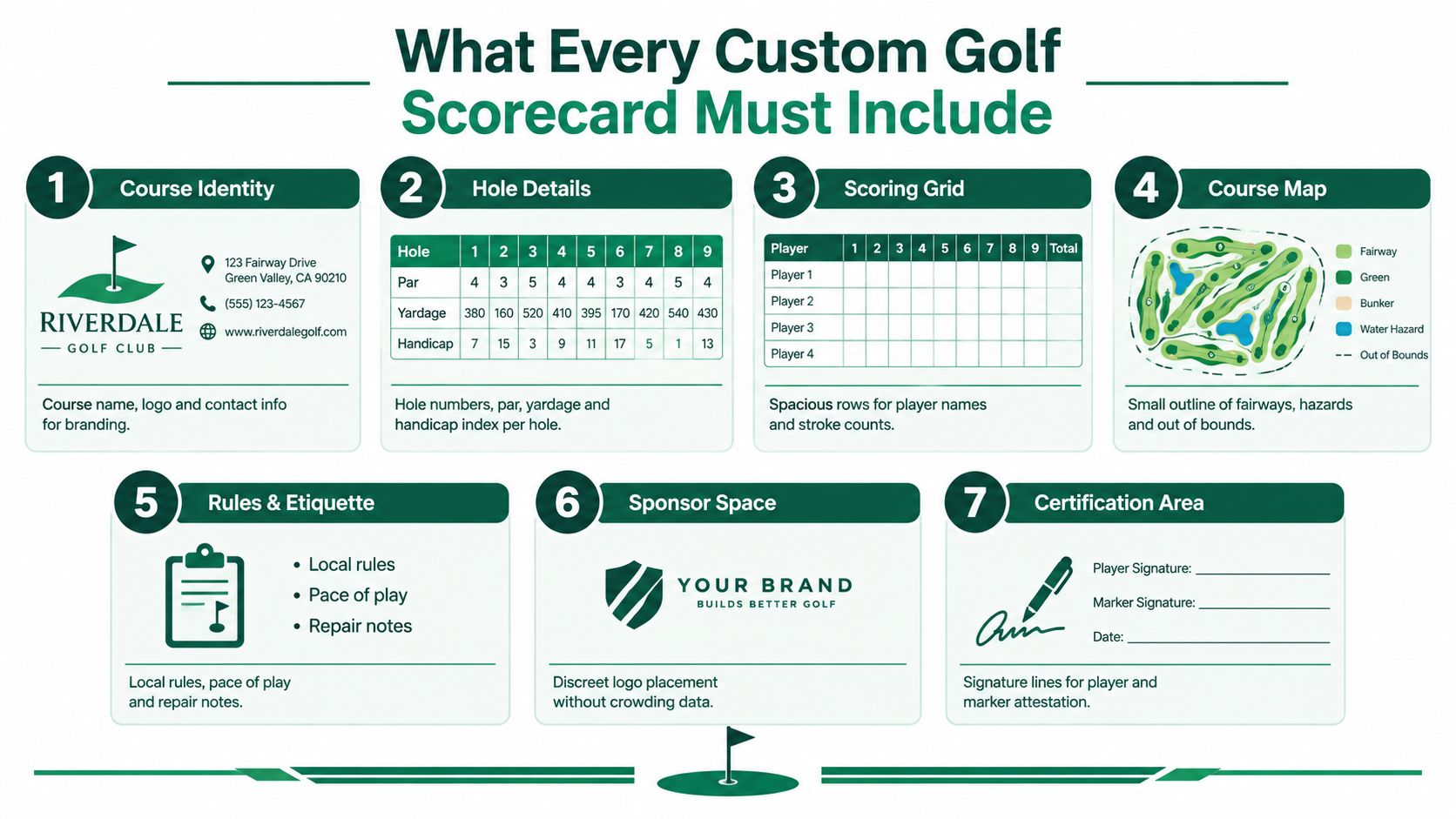
The scoring grid is the card's working surface. Include:
Course identity: Show the course name and logo so players can confirm the card at a glance.
Hole details: List hole numbers, par, multiple tee yardages, and the handicap index for every hole.
Player lines: Provide clear rows for player names and stroke counts, with enough writing room for the marker.
Course information: Add the course rating and slope when the event format requires them.
Local rules: Put event-specific rules where players can find them without checking a separate handout.
These fields affect more than appearance. Missing information leads to handwritten corrections, unclear instructions, and paper records that are harder to reconcile with the digital leaderboard. The LiveTourney guidance also stresses readable hole data and complete tournament information.
Arrange the content for quick decisions. Keep the hole grid prominent, group tee information in a consistent order, and separate rules from the main scoring rows. A player should be able to identify whether a number is par, yardage, or handicap without stopping to interpret the layout.
Match the card to the format
A single-round individual event can use a compact card. A multi-round tournament may need separate round areas or a clearly labeled card for each round. Sponsor-heavy outings can use a folded or multi-panel format, provided the fold does not cut through a score row or separate related information.
Reserve space for penalties, marker notes, provisional information, and format-specific adjustments. Designs that fill every inch push staff toward margins, logos, or unrelated holes when a correction is needed.
Before sending the file to print, compare it with the official course data and event setup. Check every tee set, par, handicap index, rating, slope, and local rule against the information staff will use at registration and scoring. That final comparison catches the small mismatches that slow check-in and require reprints.
Designing a Readable and Brand Ready Layout
A scorecard may look polished on a large monitor and still fail on a cart seat, in bright sunlight, or beside a pencil. Since players and staff read it while moving through the event, the layout must support quick marks and quick decisions. In Live Tourney, clear fields also reduce scoring corrections when paper results are entered into the digital leaderboard.
Give handwriting priority
Common flat-card formats include 8.5×3.67 inches, 6×8 inches, and 4.5×12 inches. Folded cards add room for sponsor messages, local rules, or several tee sets, according to specialty scorecard production guidance. A narrow card travels easily but restricts writing space. A larger or folded format provides room, though its panels require careful planning.
Set the scoring grid before adding sponsor material. Player name lines and stroke cells need enough separation to prevent marks from running into neighboring rows. Give penalties, marker notes, and corrections their own annotation area. Empty corners disappear quickly once a player needs to explain a score.
Use sans-serif fonts for hole data, yardages, and numeric tables. Serif or display type can suit the course name and branding, but compact numbers become harder to distinguish when letterforms are decorative. Keep critical text around 8 pt minimum for practical arm's-length legibility. This matters during registration and scoring, where a confusing label can create a correction that later needs to be reconciled in Live Tourney.
Keep branding inside a clear hierarchy
The event identity should be visible without competing with the scoring grid. A course logo in the header, a restrained sponsor panel, and consistent color use usually produce a cleaner result than oversized marks scattered across the card.
Match the scorecard to the visual system used on signs and player materials. The tournament logo guide provides context for keeping event branding consistent while leaving functional content easy to read.
Use white space as part of the layout. It separates tee sets, helps players scan the grid, and preserves room for a clarification when a score needs review. Assign sponsors a defined zone instead of interrupting hole information. A branded card still has to function as a live scoring reference.
Test the card on the course
Print a sample at final size. Place it on a cart seat or dashboard, write on it with a pencil, and check it in outdoor lighting. Ask someone unfamiliar with the design to locate the par, handicap index, and player score lines. Hesitation shows where the layout needs revision.
Check folds, pale colors, and writing areas before the full run. A fold across a score row or branding that disappears in sunlight can make a well-designed card unusable. Readability protects the event experience and keeps paper entries cleaner when staff update the leaderboard.
Exporting and Printing Without Costly Reprints
A scorecard can pass a screen review and still fail at the printer. The usual causes are incorrect color settings, missing bleed, a fold in the wrong place, or a scoring grid that becomes hard to read outdoors. Check the production file and the physical use case together before approving the run.
Prepare the artwork correctly
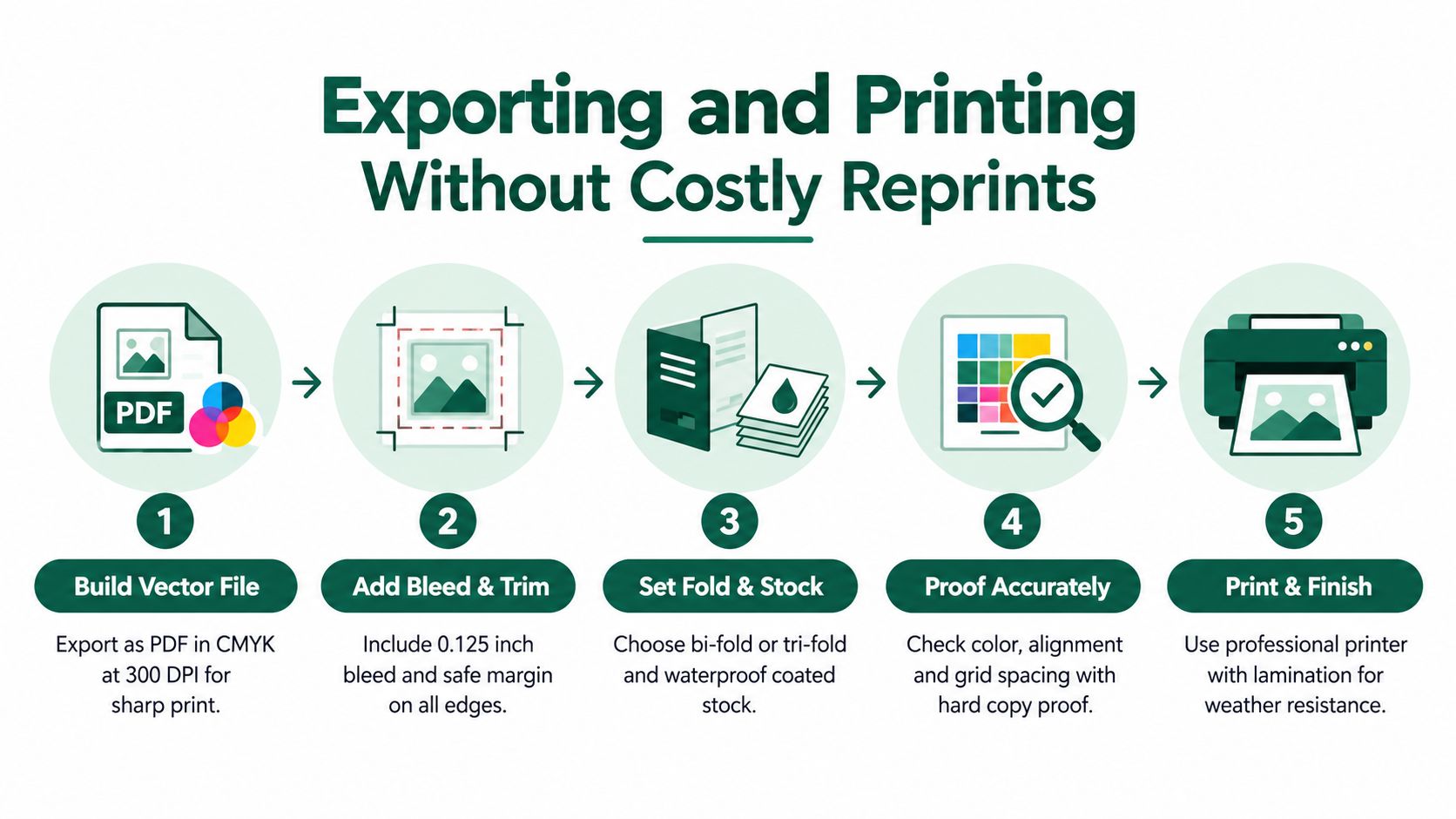
Supply a vector PDF, AI, or EPS file in CMYK at 300 DPI. Include approximately 0.125 inch bleed beyond the trim line, and keep critical text and marks about 0.25 inch from the edges. These settings give the printer room to trim cleanly without cutting into names, hole numbers, or scoring fields.
Inspect the fold marks and panel order before exporting. A file can meet technical specifications and still open in the wrong sequence, placing rules or sponsor information where players expect the scoring grid. Since the card feeds hole-by-hole entries into later scoring and leaderboard updates, panel order is an operational issue, not only a design issue.
Choose size and stock for use
Flat formats such as 8.5×3.67 inches, 6×8 inches, and 4.5×12 inches balance portability with writing space. Folded or multi-panel cards provide room for local rules, sponsor ads, several tee sets, or extra scoring information, but every added panel creates another fold and alignment point to proof.
For outdoor use, thick uncoated stock such as 250gsm or higher lets pencil and ink remain usable. Glossy or heavily coated surfaces may look vivid, yet they can resist writing and reflect course light. Confirm the stock with the printer if moisture is likely.
The same production discipline helps with related tournament materials. If apparel is being produced alongside the cards, designing event T-shirts can keep logos, colors, and sponsor treatments consistent without changing the functional scoring hierarchy.
Use a controlled production workflow
Gather the source data: Confirm tee yardages, pars, handicap indexes, course rating, slope, and local rules.
Build the grid: Place hole numbers, scoring rows, and required player fields before promotional content.
Proof folds and trims: Check panel alignment, safe margins, and opening order.
Print a sample: Review the physical card rather than relying only on the digital proof.
Test outdoors: Write on it and inspect numeric legibility in actual course lighting.
Keep the approved proof with the event records. If a sponsor, tee assignment, or scoring field changes, staff can identify the affected version before printing again. Check related pieces, including bag tag printing, against the same roster and branding details so printed information matches what Live Tourney uses for scoring and leaderboard updates.
Implementing Your Custom Golf Scorecard in Live Tourney
The printed card works best when it mirrors the tournament's digital setup. In Live Tourney, staff can use the customizable report builder to generate scorecards, tee sheets, cart signs, and bag tags from event data and roster information. That reduces the risk of typing the same player or pairing details into several separate documents.
Start with roster and pairing data
Upload or enter the roster, assign players to pairings, and confirm tee selections before generating reports. Treat the roster as the source of truth. If a player changes groups, update the event data first, then regenerate the affected report rather than correcting several printed pieces by hand.
The report builder can support the operational formats staff need, including printed scorecards and related event documents. Build the card around the actual competition, whether that means an individual round, a multi-round event, or a format with additional side-game information.
Configure scoring before players start
Review the scoring format before distributing cards. Net formats may require handicap dots or other hole-level indicators. Side games need clearly labeled fields so players know what to record, while match play or team formats may require a different grid from stroke play.
Live Tourney also supports browser-based scoring, so players can access a scorecard through a link without downloading an app. They can enter hole-by-hole scores and follow real-time leaderboard updates, while the printed card remains useful as a physical reference and certification record.
That combination changes the role of the paper card. It isn't competing with digital scoring. It provides a stable on-course record while structured scores move to the leaderboard and event reports.
A paper scorecard records the round. A connected scoring workflow makes the information useful before the round is over.
Run a staff test with a sample player record. Enter scores, inspect the leaderboard, check the net indicators or side-game fields, and verify that the printed version matches what appears in the browser. Staff should also know how to handle a late roster change and where dynamic event emails direct players for scoring access.
Final Checks and Tips for Flawless Tournament Day Use
The final review should resemble the day itself, not a quiet design meeting. Put the card in a staff member's hand, compare it with the official course information, and make them use it while moving through the check-in and scoring process.
Verify the information
Check each hole's par, yardage, and handicap index against the current course data. Confirm course rating, slope, tee names, player lines, local rules, and any format-specific indicators. A beautiful card with one incorrect hole detail still creates work for the starter and scoring team.
Then inspect production details:
Trim and folds: Confirm that no critical text, score row, or logo sits too close to an edge or fold.
Writing surface: Test pencil and ink on the actual stock, including under outdoor light.
Staff workflow: Run a sample score from entry through leaderboard display and certification.
Player changes: Update a test roster record and confirm that regenerated reports reflect the change.
Storage: Keep cards flat, dry, and organized by event or round so staff don't distribute an outdated version.
Improve the next run
Ask starters, scorers, and players where they hesitated. Record whether the issue involved missing information, cramped writing space, unclear labels, or a digital handoff that wasn't obvious. Those observations are more valuable than another round of decorative revisions.
A custom golf scorecard earns its place when it reduces questions, prevents corrections, and carries accurate information from registration to results. Review it as both a printed object and a live data interface, then adjust the next version based on how people used it.
Live Tourney gives golf courses and event organizers customizable scorecards and tournament reports, browser-based scoring without app downloads, roster and pairing management, and live leaderboards. Visit Live Tourney to connect your next custom golf scorecard with a faster, more reliable tournament workflow.





