
Oct 22, 2026
roster management software, golf tournament software, live scoring, tournament management, Live Tourney
Discover how roster management software streamlines golf event scheduling, player assignments, and team coordination with ease.

The tournament is tomorrow, and your desk is covered with roster printouts, sticky notes, and a spreadsheet nobody wants to touch. A sponsor has changed a guest, a player says they've paid, and the starter has a different tee sheet from the pro shop. You don't need another list of names. You need staff to work from information they can trust.
Why Roster Management Software Matters for Golf Events
The hardest roster problem isn't entering a golfer's name. It's making sure a late change reaches everyone who needs it without creating another correction somewhere else.
Consider a guest replacement before a charity outing. Staff need to confirm the replacement's eligibility, assign the correct partner, update the cart sign, and send the right arrival instructions. If each task lives in a separate file, someone has to remember every dependency.
Roster management software should make those dependencies manageable. The practical benefit isn't a prettier spreadsheet. It's a controlled process for moving a participant from registration to the starting tee and through the competition.
What the working day should look like
Staff should be able to distinguish a confirmed entrant from a waitlisted guest, identify unresolved payments, and see which assignments still need attention. A correction should have a clear owner rather than disappear into a phone message.
Operational task | Disconnected workflow | Connected roster workflow |
|---|---|---|
Guest replacement | Edit separate lists and notify staff individually | Update the event entry and review affected assignments |
Payment query | Search messages and payment records | Check the linked transaction status |
Tee-sheet publication | Circulate another attachment | Publish an identifiable current version |
Check-in exception | Write a note for someone else | Record the issue against the participant |
The same discipline applies beyond golf operations. If an outing includes refreshments, reviewing The Matcha Bike's event bookings for the mobile matcha service belongs in the event-planning workflow, while the vendor receives only the attendance and service information it needs, not the full player database.
Practical rule: Give each operational detail a defined home and a person responsible for keeping it current.
Software won't resolve an unclear cancellation policy or decide who approves substitutions. Those are management decisions. What it should do is make the agreed process visible, repeatable, and less dependent on whoever remembers the latest conversation.
What Roster Management Software Does
For golf events, roster management software connects participant records to event operations. Evaluate it as a chain of linked tasks, not a collection of isolated screens.
The player database holds identifying information and contact details. Registration creates an event entry. Payments establish financial status, pairings and tee times organize play, scoring records competition results, and reporting turns those records into usable documents.

Follow the information through the event
Start with the player registration form. Ask whether each field serves an actual purpose: eligibility, communication, payment reconciliation, competition setup, or participant care. Collecting information because the form allows it creates unnecessary administration.
Then follow a registration into the tee sheet, scoring view, confirmation email, and final report. Staff shouldn't have to retype the same accepted information at each stage.
Registration: Look for required fields, waitlist handling, clear confirmations, and a manageable correction process.
Competition operations: Check pairings, tee assignments, supported scoring formats, and leaderboard publication.
Outputs: Inspect scorecards, cart signs, bag tags, exports, and post-event summaries rather than accepting a reporting checkbox.
Browser access changes where staff can do this work. Reported adoption estimates indicate that more than 80% of businesses use at least one SaaS application, providing context for the broader move toward subscription-based, browser-accessible tools described in Quantumrun's SaaS market overview.
For a club, the practical question is whether authorized staff can work from the shop, check-in desk, or another location without passing files between computers. Browser delivery still requires testing against the course's actual connectivity.
Keep staffing responsibilities distinct from player management. If volunteers need shift assignments and attendance coordination, consider dedicated volunteer software from VolunteerBadge alongside the tournament platform. A connected workflow doesn't require every task to happen inside the same product.
Live Tourney vs Legacy Tournament Tools
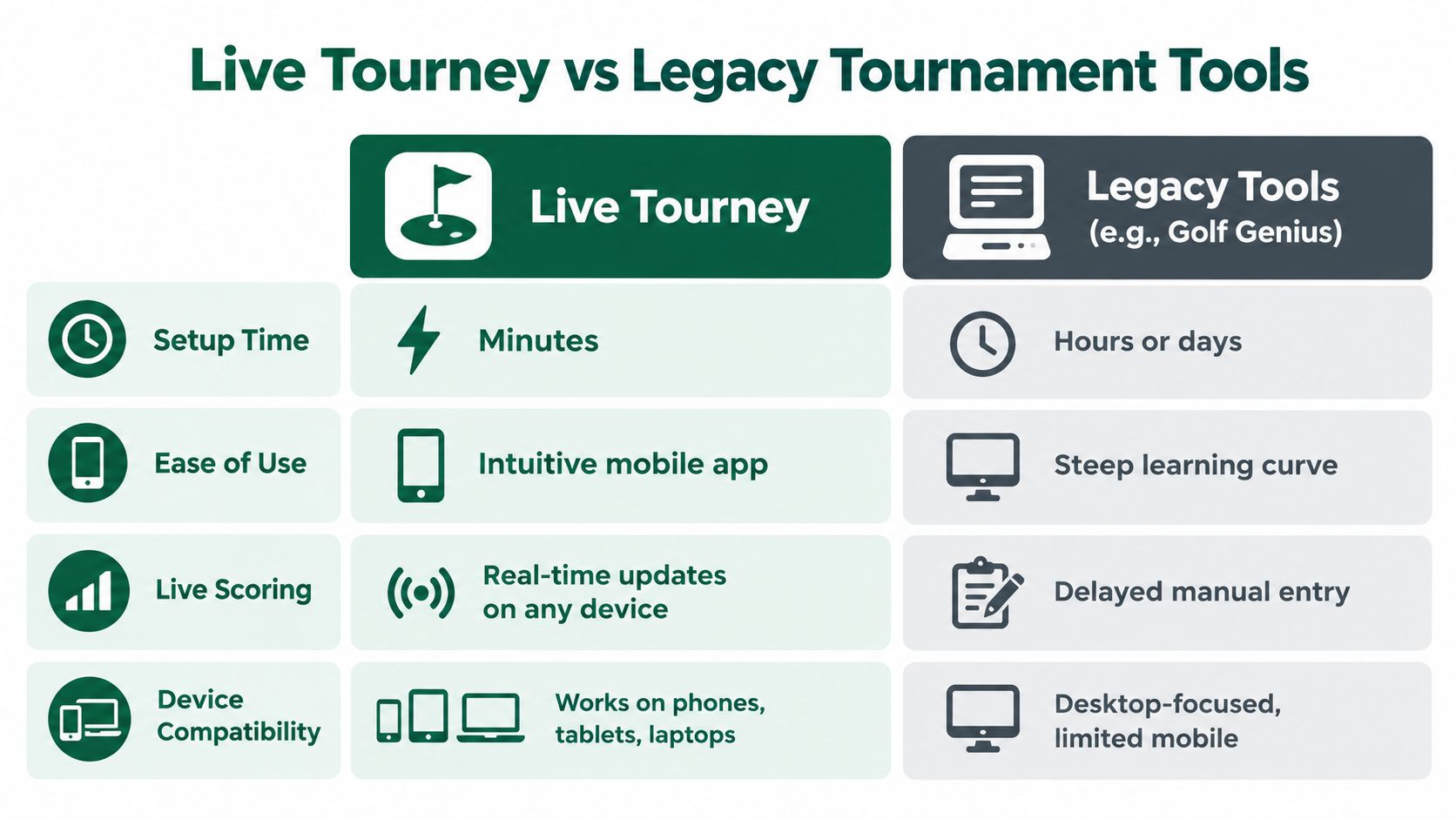
Compare Live Tourney with established tools such as Golf Genius using a real event, not an assumption that newer software is automatically easier or older software is automatically more capable. Neither the age of an interface nor the length of a feature list proves operational fit.
The table below is a buying framework, not a measured performance ranking. Product-specific timing, pricing, and support commitments need confirmation during evaluation.
Live Tourney vs Legacy Tournament Tools
Criterion | Live Tourney | Legacy Tools |
|---|---|---|
Setup time | Test roster upload, event configuration, and publication together | Include existing templates and staff familiarity in the test |
Ease of use | Evaluate its focused web-based management workflow | Assess the screens staff actually use, not the entire menu |
Live scoring | App-free score entry and live leaderboard workflow | Verify the current scoring options of each specific product |
Device support | Test browser use on phones, tablets, and laptops | Check current mobile and browser capabilities directly |
Pricing | Request the complete subscription and service terms | Include modules, renewals, and any migration expense |
Support | Confirm available assistance and escalation arrangements | Account for existing relationships and specialist knowledge |
Complex formats | Demonstrate every format your calendar requires | Check whether established configurations justify retaining the system |
Live Tourney provides roster uploads, tournament management, app-free scoring, and live results. Those functions make it a relevant option when staff want a focused event workflow, but they don't establish that it will outperform an incumbent under your conditions.
The visual comparison below should be treated as product positioning, not an independently measured benchmark. Established products shouldn't be assumed to lack live scoring or mobile access.
Compare the awkward tasks
Ask an assistant professional to replace a withdrawn player after scorecards have been prepared. Have another staff member correct a tee assignment and explain how the revised information reaches players.
Don't let the vendor perform every demonstration. Your staff need to operate the system after the sales call ends.
An established platform may remain the sensible choice when the club relies on configurations, historical records, or competition procedures that would be expensive to rebuild. Conversely, retaining software solely because someone knows its workarounds isn't a strong reason to renew.
Buy for the tasks your staff must complete under pressure, not for the longest demonstration.
The deciding question is whether the alternative removes work without introducing unacceptable gaps. A simpler interface is useful only if staff can still complete the difficult parts of your calendar.
How to Evaluate Roster Software Performance
A polished demonstration tells you little about a busy registration deadline. Use a reproducible workload so every candidate faces the same conditions.
Keep the roster size, participant count, rule complexity, network connection, and simultaneous activity consistent. Measure completed work, failed actions, and delayed updates rather than relying on how quickly a screen appears to open.
Run an operational acceptance test
Prepare representative data: Use a privacy-safe copy of the fields and event structures your staff handle.
Exercise concurrent work: Have staff edit assignments while other users look up players, submit scores, and request reports.
Measure the complete action: Record the time from saving a change to seeing the correct result in the participant-facing view.
Check failures deliberately: Interrupt a request, repeat a submission, and review how staff recover without duplicating records.
Record p95 latency, API response time, database latency, throughput, and error rate where the testing environment exposes them. These measures align with BrowserStack's benchmark-testing guidance, which also emphasizes resource usage and real-device testing.
A fast typical response isn't enough if staff occasionally wait through long delays during publication. Set acceptance targets before testing, and distinguish application delays from weak course connectivity.
Test data quality separately
Import deliberately malformed names, duplicate email addresses, missing handicaps, inconsistent dates, and changed contact details. Require an understandable outcome for every row: accepted, normalized, rejected, or flagged for review.
Zero silent data loss is a useful acceptance standard. Stable identifiers, traceable revisions, formal validation, and downstream consistency are central to the data-quality practices discussed by Vanta Sports.
Operational readiness also requires an owner for unresolved risks. GM GROUP Services' comparison of the best risk management tools 2026 can serve as a separate resource when considering how to track responsibilities and mitigation work; it isn't evidence of tournament-software performance.
Finish with a written pass-or-fail record. A vendor promise to address a problem later shouldn't count as a successful test today.
Use Cases Across Tournament Types
Choose roster software against the events you run, not the most elaborate competition you might organize someday. A recurring league and a corporate outing can share a player database while requiring very different operating procedures.

Match the workflow to the competition
Club tournaments need defensible eligibility and handicap handling. The USGA recommends that entrants have a Handicap Index and, when an index is required for entry, submit the value effective on the entry date, as explained in its competition-entry handicap guidance.
Weekly leagues benefit from reusable settings, manageable substitutes, and clear round availability. Test whether staff can make a weekly adjustment without rebuilding the event.
Corporate and charity outings need sponsor and guest handling, understandable registration, payment reconciliation, and check-in views that make exceptions obvious. Review golf pairing software considerations against sponsor groups, partner requests, and late withdrawals.
Junior programs require careful guardian communication and participant-specific access decisions. Competition convenience shouldn't determine who can view a child's information.
Team formats need different scoring logic
A Ryder Cup-style event needs more than a team label beside each name. The standard Ryder Cup format uses two teams of 12, with 28 matches over three days: four four-ball and four foursomes matches on each of Friday and Saturday, followed by 12 singles matches on Sunday.
A win earns a team point, while a match tied after 18 holes earns each side half a point, according to that format description. Your local version may differ, so demonstrate session availability, partner changes, and points aggregation using your own competition terms.
Match play also requires hole-level outcomes rather than a leaderboard based solely on cumulative strokes. The DFW Ryder Cup format explanation describes holes won, lost, or halved as the basis for match results.
A platform supporting these formats still needs to demonstrate your particular configuration. Don't assume that a format name in a menu guarantees the roster, substitutions, and scoring rules your committee intends to use.
The Integration Problem Nobody Talks About
The central roster problem is identity, not storage. A club needs to recognize the same golfer across its membership records, point-of-sale system, payment processor, handicap source, and tournament entries.
A name alone is a weak matching method. People change surnames, use preferred names, share contact details, and register through someone else. Staff need a stable player identifier and a clear process for resolving uncertain matches.

Separate identity from event details
Keep the durable player record distinct from the event entry. Partner, division, tee, cart assignment, payment status, side games, and waiver status belong to an event context and shouldn't overwrite unrelated membership information.
Assign authority by field. The membership system might own membership status, the payment processor transaction outcomes, and the tournament platform competition assignments.
Handicap handling needs particular care. The USGA distinguishes Handicap Index, Course Handicap, and Playing Handicap, with allowances depending on competition format in its competitions and handicaps guidance. Evaluate golf handicapping services against that distinction rather than treating every handicap value as interchangeable.
Map fields explicitly: Document destinations, accepted formats, blank-value behavior, and ownership.
Control merges: Require review before combining uncertain player matches.
Preserve history: Confirm that past results remain associated with the correct person.
Plan the exit: Request a usable export containing identifiers, event entries, and historical records.
Prefer clean boundaries over unnecessary replacement
A focused tournament tool can be the stronger choice when it exchanges the required information cleanly and leaves functioning club systems alone. An all-purpose suite may be preferable when it removes reconciliation and meets the club's broader requirements.
The trade-off is responsibility. Connected tools require someone to monitor failed transfers and resolve conflicts; an integrated suite requires scrutiny of whether its modules share consistent records.
Migration checkpoint: Don't cancel the incumbent until staff have verified both the imported records and the exported history.
A connector's existence isn't the finish line. Ask what happens when a transfer fails, a record changes in both systems, or the club changes vendors.
Privacy Permissions and Accessibility Considerations
A scoring link should let someone score, not browse the registration office. Access must follow the person's role and task, especially when an event includes guests, juniors, volunteers, sponsors, and guardians.
Begin with a permission map before importing participant information. Decide who needs contact details, payment status, emergency information, and competition data, then test those decisions using actual role accounts.
Build privacy into the working process
Limit visibility: Give scorers scoring access and check-in staff the information needed to resolve arrivals. Don't expose financial or emergency details by default.
Test shared links: Forward a scoring link, open it outside the intended session, and check what an unintended recipient can see.
Define retention: Record why information is collected, how consent is handled, and when event-specific records should be removed.
Revoke access: Include former volunteers, departing employees, shared tablets, and downloaded exports in the closeout procedure.
Separate payment boundaries: Verify which financial details remain with the payment processor and what tournament staff can access.
These are operational safeguards, not a substitute for jurisdiction-specific legal advice. Broader concerns about connected golf technology and participant experience are discussed in PwC's golf-technology guidance.
Test accessibility where people will use it
A mobile-friendly label doesn't establish usability outdoors. Check text contrast in glare, touch-target size, readable status messages, and whether someone can recover from an incorrect entry without guessing.
Staff screens should support keyboard navigation and clear focus indicators. Participant workflows should provide alternatives to gesture-only interactions and error messages that explain what needs fixing.
Use privacy-safe malformed data during training so employees can practice correcting fields without exposing real participant details. Include a shared-device exercise: sign in, complete a task, sign out, and confirm the next user can't recover private information.
Keep an assisted scoring or check-in process available. App-free participation can remove a download step, but it doesn't mean every golfer has a suitable device or can comfortably complete the workflow.
Pricing Considerations and Implementation Tips
The subscription price is only part of the buying decision. Total cost of ownership includes staff effort, transition work, ongoing administration, and the cost of retrieving your information when the agreement ends.
In a collection of SaaS benchmarks, 52% of buyers cited productivity improvements as a purchasing reason, while 49% identified cost as the most important selection factor, according to Bubble's SaaS statistics analysis. For a golf operation, those priorities belong in the same calculation: what will the software cost, and what work will staff still need to do?
Get a complete commercial picture
Ask for written terms covering subscription billing, event limits, payment-related charges, onboarding, training, support tiers, integrations, renewal conditions, and exports. Don't assume that a feature shown during a demonstration is included in the quoted package.
For a focused event platform: Confirm which operational needs it covers and which existing systems remain necessary.
For an established suite: Identify the configurations and institutional knowledge you'd lose by switching.
For either option: Price the complete operating arrangement rather than comparing headline subscriptions.
Live Tourney's no-onboarding-fee approach and free trial make it possible to evaluate its event workflow before committing. Confirm the current terms and use that evaluation period for an actual acceptance exercise, not just a guided tour.
Implement around staff responsibilities
Start with a representative event and an agreed field map. Assign someone to approve migrated records, someone to verify competition settings, and someone to reconcile financial outcomes.
Train staff by responsibility rather than showing everyone every menu. The starter needs confidence in the current tee sheet; the check-in team needs exception handling; the competition administrator needs reliable scoring and reporting.
Keep a fallback procedure for event day and define the point at which the new system becomes authoritative. Switch when staff can run the workflow and explain how to recover from mistakes, not merely when the upload finishes.
Live Tourney offers roster uploads, registration and payment workflows, app-free scoring, and live leaderboards for golf events. Visit Live Tourney to arrange an evaluation, then bring a representative roster and your hardest event-day changes to test whether it fits your club's operation.





