
Jul 24, 2026
golf scoring, tournament software, live leaderboard, golf operations, event tech
Learn how real time golf tournament scoring works, the benefits it delivers, and what golf courses need to run it smoothly with a clear implementation plan.

Tournament morning gets messy in the same familiar way. A few groups finish early, a few scorecards sit in a cart pocket, and someone in the shop is trying to answer a player who wants the leaderboard before the last group even turns in. That's usually the moment paper scoring stops being “good enough” and starts becoming the bottleneck.
Real time golf tournament scoring solves that bottleneck by moving the work from hand calculation to live updates. It's not just a nicer display for players, it's a different event workflow, one that changes how the round gets entered, checked, and published.
The Moment Paper Scoring Breaks Down
The breakdown usually doesn't happen on the first tee. It happens at the turn, when a handful of scores are missing, one group is late, and staff are trying to reconcile totals while players are asking whether they're tied for first or already out of it. Paper still works in calm conditions, but tournament days rarely stay calm for long.
That's why a lot of operators end up moving toward digital golf scorecards. Once the scorecard itself lives in a browser or phone workflow, the score doesn't have to wait for someone to read it, transcribe it, and add it by hand.
The real pain is not the writing, it's the chase
The issue isn't that paper is hard to understand. It's that paper creates three extra jobs at once. Someone has to collect it, someone has to verify it, and someone has to publish the result after everything is already over.
That delay matters more than most clubs expect. Players want updates while they're still competing, not after the prizes have already been announced in the clubhouse. Staff also lose time to the same questions over and over, especially when the field is large enough that nobody can memorize where each group stands.
Practical rule: if your team spends the back half of the round reconciling scorecards instead of managing the event, the scoring process is already costing you more than the software.
The shift to real time golf tournament scoring is really a shift from post-round cleanup to live event control. Once you see it that way, the rest of the workflow makes a lot more sense.
What Real Time Golf Tournament Scoring Means
Real time golf tournament scoring means a score entered on the course reaches a central leaderboard fast enough to matter while play is still underway. A practical golf score tracking guide explains the core idea plainly, the moment a player enters a score on a phone, it syncs to the leaderboard, which is the main difference between live scoring and the old collect-it-later routine (golf tournament scoring guide).
What matters is the event workflow behind that update. One side is what the player sees, the other side is what the system is doing in the background.
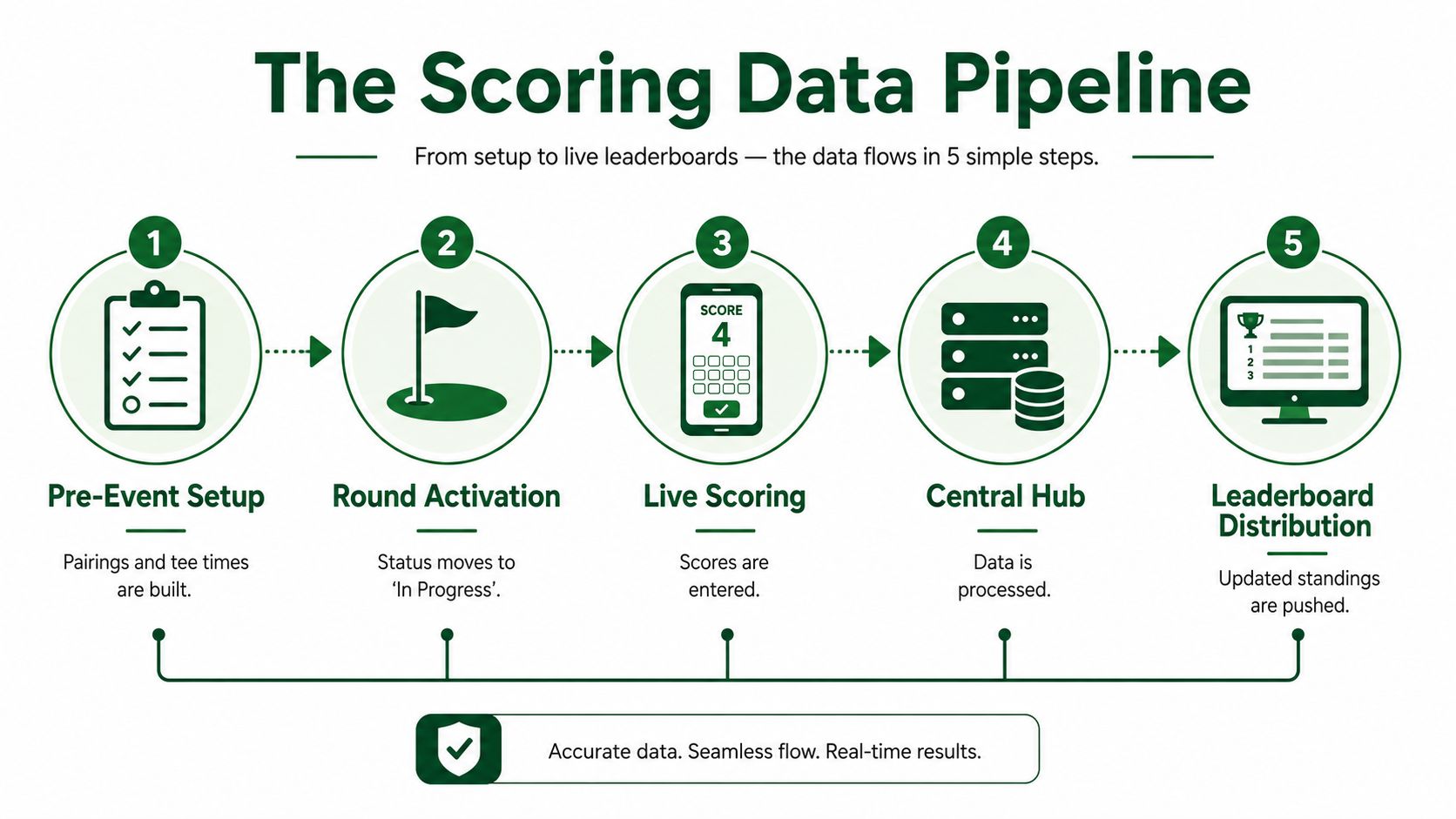
The player flow and the data flow
From the player's point of view, the process stays simple. A golfer opens a scoring link, enters a score, and sees the event update without waiting for staff to retype anything. Squabbit Golf shows one browser-based approach where tournaments are built in a web interface and scored from a phone or watch, with no app download required.
Behind that interaction, the system is doing more than changing a number on screen. It reads the score, recalculates standings, and pushes the leaderboard so every user is looking at the same version of the truth. That is why real time golf tournament scoring works well for stroke play, and it also handles formats where team standings or net adjustments can change the order before the round ends.
The same logic shows up in other live-data environments. The comparison that matters is not the sport, it is the data path, information enters, gets processed centrally, then gets distributed with little delay. EsportsOdds normalized match data is a useful reference for how live event data is structured across different competitive settings.
What changes for a board or committee
You do not need a technical explanation to sell this internally. Real time golf tournament scoring lets scores post live, keeps the leaderboard current, and removes the end-of-round hand arithmetic that slows staff down. That gives boards and committees a clear reason to move away from paper without asking them to learn the system architecture first.
For clubs that already track events manually, the operator benefit is practical. Live scoring cuts down on score entry delays, reduces the back-and-forth over who is tied where, and gives staff a current view of the field while players are still on the course. It also fits the broader golf score tracking workflow, where the main job is not just storing numbers, but keeping the event moving with less manual reconciliation.
The important part is that the system is not just digital. It is live, central, and state-driven. That difference is what makes it useful during an actual tournament, not just after one.
How the Event Data Pipeline Works
The cleanest way to understand real time golf tournament scoring is as a state machine. The event starts with pairings and tee times already built, then the round is moved to In Progress, scores are entered live, and once play is done the round is switched to Completed to lock the results (Datagolf live-scoring guide, tournament management live scoring workflow).
That sequence matters because each state changes what the system is allowed to do. While a round is active, the platform accepts writes and recalculates standings. Once the round is completed, it stops accepting new live changes and publishes the final version. This is how operators avoid the chaos of a leaderboard that keeps changing after prizes are already being handed out.
Why locking the state protects trust
A live leaderboard is only useful if people trust it. If a score changes while someone is announcing winners, or if a late edit reshuffles the top of the board, the event feels amateur even if the software is technically working. Locking the round gives staff a clear boundary between live play and final reporting.
The setup has to be right before the first score is entered. The Datagolf live-scoring guide says all tournament data should be finalized before live scoring begins, and the draw needs to be available first. That matters for operators who expect the platform to clean up an unfinished event plan. It will not.
The best live-scoring systems do not fix poor setup, they expose it faster.
The data path is where the core work happens. Pairings and tee times are created, scores flow into a central system, the leaderboard recalculates, and the final state is published once the round closes. In other live-event environments, the same basic structure applies. The comparison that matters is not the sport, it is the path the information takes, from input to processing to distribution with little delay. EsportsOdds normalized match data is a useful reference for how that kind of live data is organized.
For tournament operators, the main diagnostic question is simple. If the leaderboard looks wrong, is the problem in the input, the state, or the publishing step? Thinking in those three buckets makes troubleshooting much faster than staring at a single broken screen.
Live scoring platforms also depend on clean workflow discipline. The operator enters or confirms the round state, the scoring app receives live updates, and the system pushes a current board back out to staff and players. Vendors like Squabbit Golf build that flow into their tournament tools, which helps, but the savings come from setup quality and fast correction, not from the interface alone.
Why Operators Are Switching to Live Scoring
Operators switch because live scoring changes two things at once, the player experience and the staff workload. On the player side, the event feels active instead of delayed. On the staff side, the tournament stops depending on post-round reconciliation to get results into the room.
The scale numbers matter here too. Squabbit says its tournament software supports more than 30 tournament formats per event and can accommodate up to 1,000 players and 500 teams in a single event (Squabbit Golf). That is not a novelty feature for a small outing, it shows how real time golf tournament scoring fits into normal event operations for large fields and mixed formats.
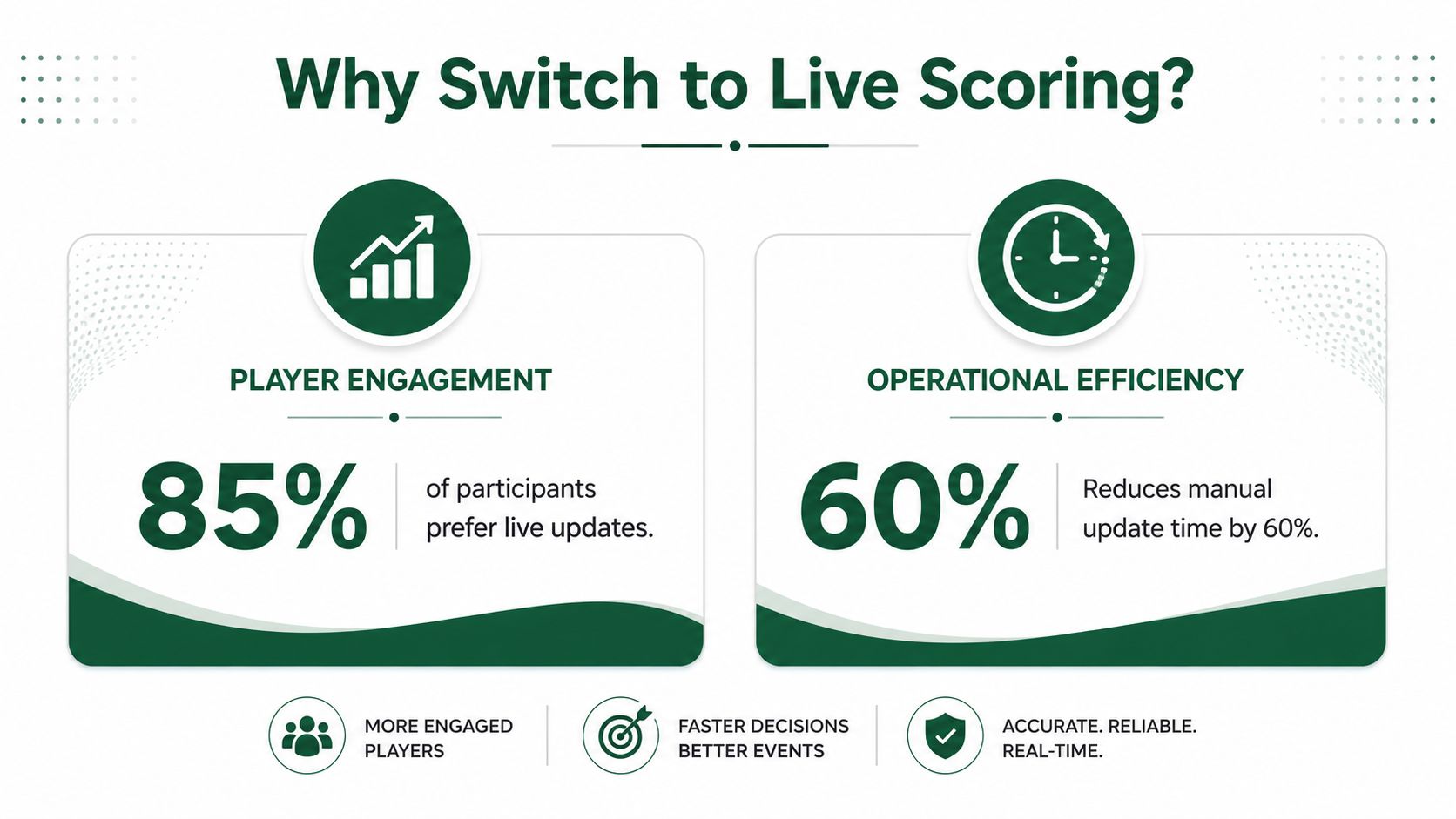
Where the time savings show up
The savings do not come from one magic button. They show up in smaller places, fewer calls to the shop, fewer manual totals, fewer corrections after the round, and fewer arguments about what the standing really is. When scores are moving live, staff spend more time managing the event and less time reconstructing it.
That change matters on event day. A pro shop does not need another stack of scorecards to sort through, and an organizer does not need to chase down the last group before posting a result. Live scoring trims the back-and-forth that usually eats up the end of a tournament, especially when several teams finish close together and every score has to be checked twice.
The other benefit is cleaner follow-up. Once the scores are already in a structured system, post-round reports are easier to publish, and marketing follow-up has better data to work with. That does not mean every event becomes perfect, but it does mean the record of the event is easier to reuse.
Live scoring also reduces the gap between competition and communication. Players do not have to wait for a staff member to confirm who is leading. They can watch the event evolve while they are still on the course, which keeps the tournament feeling current instead of finished too late to matter.
Formats and Scale Real Time Scoring Supports
The wider the format mix, the more value real time golf tournament scoring delivers. Straight stroke play is the simplest setup, but most operators deal with events that create different pressure points on the leaderboard. Match play needs head-to-head status, scrambles need team-level handling, skins need hole-by-hole visibility, and Ryder Cup style formats need team context layered on top of individual scores.
Here's a simple comparison of where the pressure comes from:
Format | Typical Field Size | Leaderboard Pressure | Key Real Time Need |
|---|---|---|---|
Stroke play | Varies by event | Moderate to high | Immediate individual totals |
Match play | Usually smaller brackets | High | Pairing status and hole results |
Scrambles | Teams of multiple players | Moderate | Team totals and shared scoring |
Skins | Small to medium fields | High | Hole-by-hole updates |
Ryder Cup style team formats | Mixed team groups | High | Team points and match status |
Round robin | Varies by league or series | High | Repeated result tracking across rounds |
Scale changes the staffing problem
At higher volume, the staffing issue changes fast. Squabbit Golf is a good example of that shift because it supports large event fields and team counts, which makes live scoring less of a nice extra and more of the way the event stays under control.
Handicap integration matters just as much. Squabbit says it integrates with the World Handicap System to automatically track handicaps and calculate course handicaps from slope and rating. For associations, leagues, and many charity events, that feature often decides whether live scoring is just a convenience or the main scoring method.
The bigger the field and the more moving parts, the less room there is for manual correction later. Real time golf tournament scoring earns its place when the event stops being simple.
A Practical Playbook for Running Live Scoring on Event Day
Event day runs smoother when the scoring plan is treated like part of tournament setup, not an afterthought. The goal is to make the round easy to start, easy to monitor, and hard to break. That means the staff routine matters just as much as the software.

Before the first tee shot
Finalize pairings, lock the draw, and make sure tee times are loaded correctly. Test the scoring link before players arrive, because a dead link at check-in is one of the easiest ways to create avoidable friction. If the course has weak coverage in certain spots, identify those holes early so staff know where score entry may lag.
A few practical checks help a lot:
Pairings are final: Don't open live scoring while pairings are still changing.
Scoring link works: Test it from a normal phone, not just from the office Wi-Fi.
Course connectivity is mapped: Know where cell service is weak before the round starts.
Staff know the fallback: If live entry fails, everyone should know who takes the backup score.
During the round
Once the round is marked In Progress, monitor for missed holes, obvious entry mistakes, and groups that aren't updating. The scoring device should belong to one clearly assigned person, not to whoever happens to be nearby. If a dispute comes up, route it to one staff member so the leaderboard doesn't become a debate wall.
Keep the scoring flow boring. Boring means repeatable, and repeatable means the leaderboard stays believable.
The fastest way to lose the value of live scoring is to let too many people edit the same event at once. One owner, one review path, one live board.
After the round
Switch the round to Completed, then run final reports, export scorecards and tee sheets, and send any recap emails from the same data set. That final lock is what turns a live event into a finished record. If the state isn't closed properly, staff can end up with a leaderboard that's still open to edits long after the prizes are announced.
The common problems are usually simple. Missed score entry, weak connectivity, or someone updating the wrong group account for most of the trouble. The fix is less about fire-fighting and more about defining the workflow before the first group tees off.
Technical and Staffing Requirements You Should Plan For
Good live scoring should feel fast without making staff chase the technology. The practical benchmark is clear from Sportradar's golf integration documentation, which recommends polling leaderboard and scorecard data every 3 to 5 seconds while a tournament is in progress (Sportradar golf integration documentation). That polling rhythm is a good reminder that live systems are built for short, frequent updates, not long waits between refreshes.
Browser-based scoring is now a major implementation pattern. ShotLink is described by the PGA TOUR as technology that captures and reports vital information on every shot, by every player, in real time during tournament competition, which sets the expectation for low-latency event propagation at the high end (ShotLink history). Squabbit also says users can build tournaments in a browser and score from a phone or watch, with no app download required for the web version (Squabbit Golf).
What your team actually needs
A workable staffing model is usually simpler than people expect. One person owns scoring entry, one person handles disputes or corrections, and one person watches the live board during active play. Larger events may need a dedicated check-in person as well, mainly to keep setup and live scoring from colliding at the starter tent.
The software side should be evaluated on plain compatibility first. If players can open a link and score on a phone, adoption is easier. If they have to install an app before the round starts, some percentage of the field will hesitate, especially in charity or corporate settings where the event isn't their main focus.
Leaderboard golf app guidance is useful if you're comparing browser-first scoring against app-heavy alternatives, because the core issue is not the label, it's whether people can use the system quickly on tournament day.
Training should be short and specific
Don't overtrain the staff. One short run-through is enough if the workflow is simple and the roles are clear. The primary goal is not technical mastery, it's operational certainty, who enters scores, who checks them, and who closes the event.
If the system feels slow, the problem is usually not the leaderboard itself. It's usually setup, connectivity, or unclear responsibility. That's why a clean workflow matters more than a flashy interface.
Vendor Checklist, ROI Questions, and Best Use Cases
A vendor comparison should start with workflow, not marketing. Ask whether the system supports app-free browser scoring, whether it handles the formats you run, and whether handicap logic is built in rather than stitched on later. If the platform can't support your most common event types, it's going to create more admin work than it removes.
Live Tourney is one option in this space, with web-based live scoring, real-time leaderboards, and back-office tools such as roster uploads, customizable reports, tee sheets, cart signs, bag tags, dynamic emails, side games, and payouts calculation. That mix matters because tournament staff usually need more than score entry once the event gets busy.
Questions that expose real ROI
Ask vendors how much setup time their workflow saves before event day, how live scoring participation is handled, and what happens when the round needs a correction after it's already in motion. Those questions surface whether the platform is designed for actual tournaments or just polished demos.
You should also ask:
Format coverage: Can it handle your leagues, outings, and championships without workarounds?
Handicap support: Does it calculate net play automatically when needed?
Reporting tools: Can staff export the right scorecards, tee sheets, and summaries without rebuilding them?
Support quality: Will someone answer when the event is live, not just when sales is open?
Where live scoring pays back fastest
Weekly leagues benefit because repeat use rewards a simple workflow. Charity outings benefit because players want visible progress and sponsors like a cleaner finish. Corporate events benefit because live updates keep the room engaged. Junior programs and association championships benefit because staff need a reliable record and a clear leaderboard without extra admin.
The best use cases are the ones where score visibility matters during play, not only after it ends. If your events depend on fewer disputes, cleaner reporting, and less time spent stitching results together, real time golf tournament scoring is usually worth serious consideration.
If you're weighing a live-scoring change for your next season, review your current event setup, map the points where staff lose time, and compare them against a browser-based workflow that fits your field sizes and formats. For a direct look at how that can work in practice, visit Live Tourney and evaluate whether its scoring and tournament tools match the way your team runs events.





