Aug 30, 2026
charity golf tournament registration, golf tournament management, charity event planning, golf registration software, tournament fundraising
Master charity golf tournament registration with this step-by-step guide. Learn form design, pricing, payments, sponsorships, and day-of check-in strategies.

Three weeks before the tournament, the registration spreadsheet has 47 inconsistent rows, several paper forms are sitting in a drawer, and a sponsor has emailed asking whether a fifth golfer can join a foursome. Nobody knows which players have paid, who needs a meal adjustment, or whether the sponsor's logo is ready for the signage deadline.
That situation is common when organizers treat charity golf tournament registration as an administrative task. A well-built registration system does more. It captures revenue while buyer intent is high, collects the data needed to run the event, supports sponsorship fulfillment, and gives your organization a cleaner path to future donor communication.
Registration fees are often the largest single revenue line for smaller and mid-sized outings. One industry breakdown connected to National Golf Foundation research estimates that player registration typically contributes 35% to 50% of total event revenue, while a 100-player tournament may generate roughly $10,000 to $20,000 from entry fees alone (charity golf tournament fundraising breakdown). Treat the form like a revenue system, not a digital sign-in sheet.
Why Registration Is Your Biggest Fundraising Lever
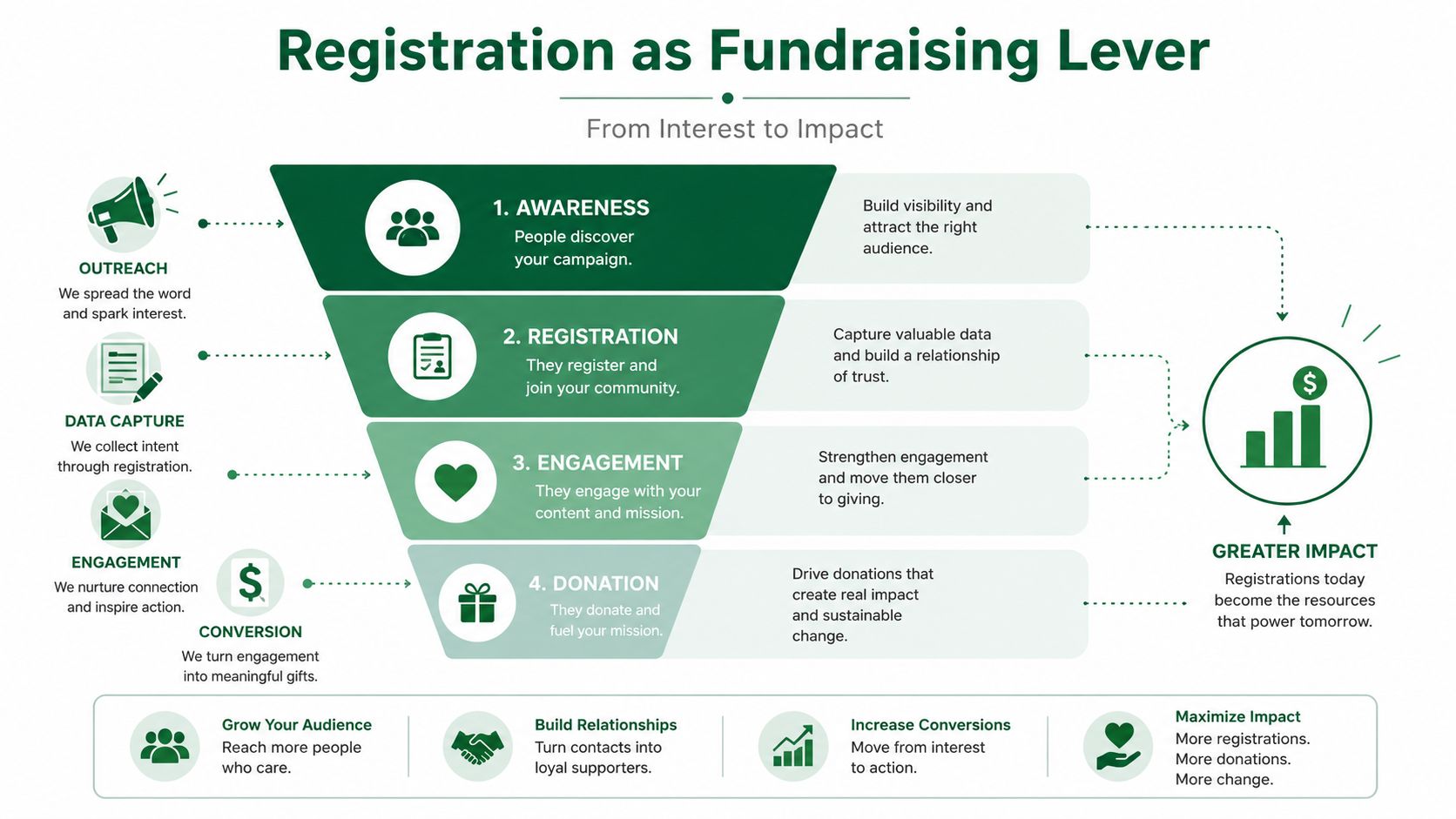
A golfer registers by email, a company sends its team list in an attachment, a sponsor pays by check, and another player calls to add a mulligan package. By tournament week, staff are comparing inboxes, payment records, handwritten notes, and a spreadsheet that no one wants to edit. Revenue gets missed while the committee tries to determine who paid, what each player ordered, and which sponsor benefits remain outstanding.
A centralized registration page gives every transaction one structured record. Participants can submit contact details, team preferences, sponsor attribution, meal requirements, apparel information, and add-ons through the same workflow. The page also serves as the public reference for the date, course, format, schedule, policies, and package inclusions. Registration guidance recommends sending promotion from email, social media, newsletters, organization websites, and QR-code flyers to one event website instead of spreading disconnected paper forms across multiple channels.
The money is collected before the event
Registration captures the golfer at the point of commitment. Offer relevant extras while that decision is fresh, including mulligans, raffle entries, on-course games, merchandise, or an additional donation. A separate request after checkout, or a sales conversation at the course, adds friction and leaves purchases unmade.
Keep the base entry clear. A player who wants only tournament access should finish quickly. Someone willing to give more should see voluntary options with a plain explanation of how the funds support the cause. Pricing and form design work together here. A confusing package structure can reduce completion, while well-labeled choices raise the value of each completed registration without pressuring the buyer.
Registration data supports retention
A name and payment amount provide limited follow-up value. Record whether the participant played individually, joined a corporate team, sponsored a hole, volunteered, purchased an add-on, or donated beyond the participation fee. That context supports a specific thank-you message, a sponsor fulfillment update, or a future invitation instead of a generic receipt.
The category is large enough to justify disciplined intake. Philanthropy News Digest summarized National Golf Foundation research describing about 140,000 charitable golf events annually in the United States, with more than 15 million participants and almost $3 billion each year, as cited through the National Golf Foundation fundraising context. The linked resource is a calculator that summarizes this industry context, not the primary research publication, so organizers should treat the figures as cited background rather than a substitute for the original study.
Registration connects participation, giving, and future communication. Poor data collection weakens immediate revenue and makes donor retention harder.
Practical rule: If a detail affects payment, pairing, hospitality, sponsorship recognition, or follow-up, capture it once in the registration workflow instead of asking staff to reconstruct it later.
Designing a Registration Form That Converts
A registration form converts when it answers the golfer's practical questions and removes unnecessary work. Start with a short event summary that shows the date, location, format, schedule, price, inclusions, fundraising purpose, and key policies. A visitor shouldn't have to search through an old email to learn whether the fee covers green fees, cart rental, dinner, contests, or gifts.
Put essential fields first
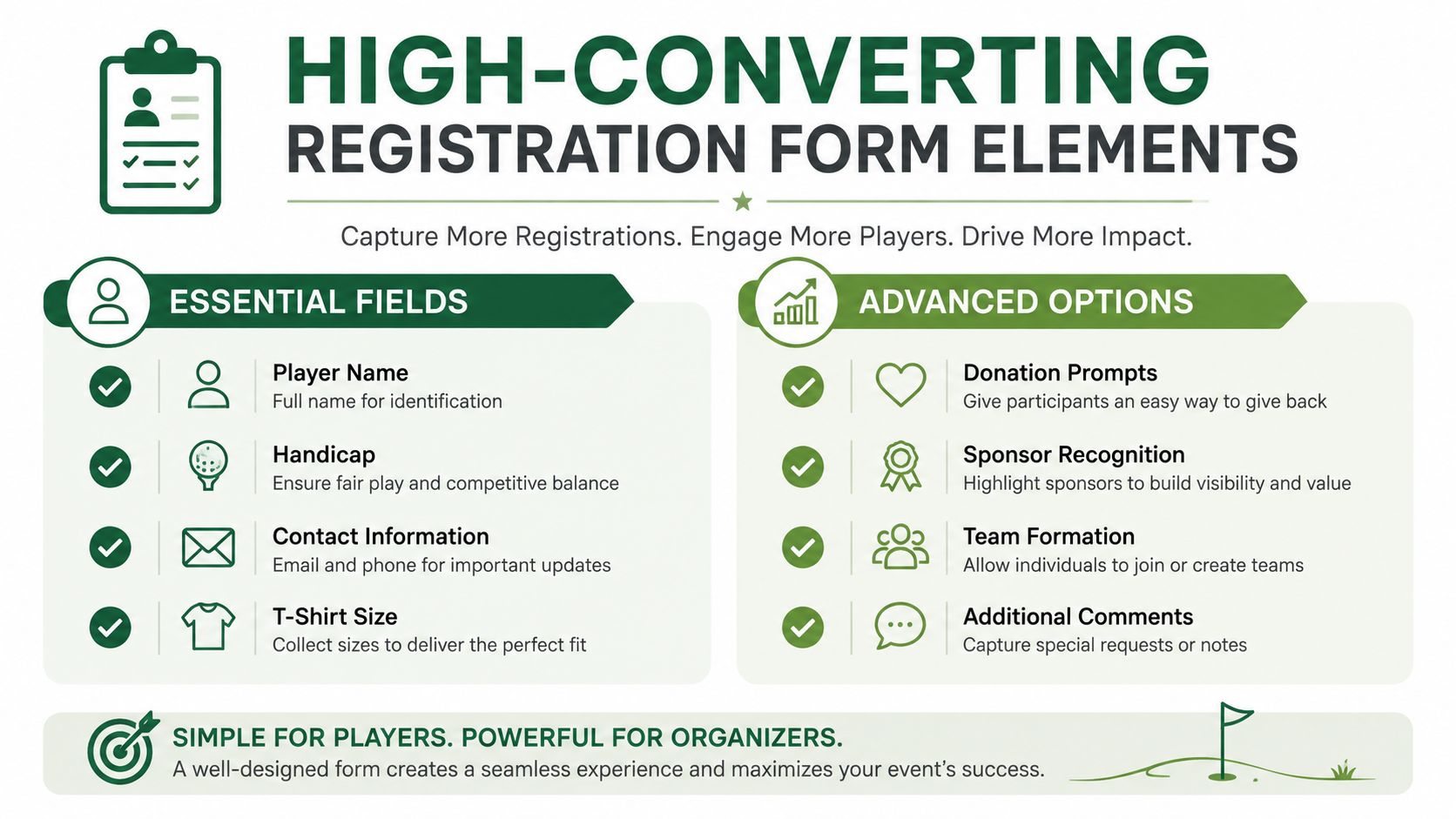
Collect the information required to run the event, then ask for useful enrichment data. A sensible sequence is:
Purchaser details: Name, email address, phone number, and address.
Player details: Each golfer's full name, handicap information, and apparel size if merchandise is included.
Team information: Team captain, requested teammates, company affiliation, and pairing preferences.
Hospitality details: Dietary restrictions, meal preferences, and relevant accessibility notes.
Sponsor information: Company name, website, recognition language, logo upload, and contact person.
Fundraising options: Donations, raffle tickets, mulligans, contests, merchandise, or other add-ons.
Policies and waivers: Refund, weather, conduct, media, alcohol, cart, and participation terms.
The registration guidance from GolfStatus specifically emphasizes complete contact fields, including name, address, email, and phone, along with sponsor information and event-specific details such as dietary preferences and apparel size (golf tournament registration form guidance). Don't make every question mandatory. Requiring information that staff can collect later adds friction without improving event control.
Use conditional fields to keep the form relevant. A sponsor should see logo and recognition fields, while an individual golfer should see team pairing and meal questions. A team captain can enter the team purchase once, then invite teammates to complete their own player details through a follow-up link.
For longer forms, group related questions into clear steps and display a progress indicator. Save-and-continue functionality is useful when a purchaser needs to confirm teammate information. Mobile usability matters because golfers often register from an email or social post on a phone. Test the entire flow on a small screen, including payment, waiver acknowledgment, file upload, and confirmation.
Make the page the operational source
Your form should not exist separately from the event website. Put the format, scoring method, schedule, contests, policies, sponsor packages, and contact information beside the registration button. A clear page reduces repetitive questions and gives every committee member the same information to share.
If you're comparing flexible form builders, an organizer may also review a best Typeform alternative platform when the event needs conditional logic, structured data collection, or payment-related workflows. For a golf-specific starting point, this golf tournament registration form template can help your committee decide which questions belong in the form before anyone starts designing fields.
Pricing Strategy and Ticket Types That Maximize Revenue
Registration earns more when the price reflects both the event's cost base and the donor's willingness to give. Add the course fee, cart rental, meals, gifts, processing costs, signage, and other committed expenses, then decide how much of the fundraising target registration should carry. The charity golf tournament planning checklist from RedSwing cites typical charity player pricing of about $125 to $300 per player and recommends opening registration 2 to 3 months before the event, with an early-bird period during the first 2 weeks.
Treat the entry fee as one part of the revenue model, not a profit forecast. For example, a 100-player event at $150 per player would generate $15,000 before expenses. Sponsorships, auctions, donations, and add-ons may produce additional funds, but the registration price still determines how much of the base cost must be covered before those activities begin.
Build packages around buying behavior
Offer a simple individual option, a team option, and sponsor packages. An individual ticket suits a golfer buying for themselves. A team package lets a company or friend group commit with one purchase instead of coordinating four separate payments. Sponsor packages should provide defined visibility or hospitality, rather than just rename a player purchase.
A package page should answer four questions before the buyer reaches checkout:
What does the fee include? State whether it covers greens fees, cart rental, meals, gifts, contests, or other items.
Who is it for? Label individual players, teams, sponsors, guests, and non-playing supporters clearly.
What recognition is included? Specify signage, website placement, announcements, team participation, or hospitality.
What happens after purchase? Explain how team members submit details, when logos are due, and how receipts are handled.
The price needs to sit beside its inclusions and charitable receipt treatment. One Calgary charity event lists $1,550 per team or $387.50 per individual, with a stated tax receipt of $250 per team or $62.50 per individual (Calgary charity golf registration example). Another event lists an $880 plus GST team-of-four fee that includes green fees and power cart rental, while a separate charity tournament lists $300 per person including green fees, a golf cart, and dinner (resort charity golf registration example). The comparison is useful because buyers can judge value without emailing the committee for basic details.
Use scarcity without confusing the buyer
An early-bird price can encourage earlier commitment and improve cash flow. Give it a visible end date and one clear purpose. Avoid overlapping discounts, coupons, team exceptions, and special codes that volunteers cannot explain or reconcile. A single early-bird price followed by a standard price is easier to administer and easier for buyers to understand.
Ticket Type | Price Point | Conversion Rate | Revenue Impact | Best For |
|---|---|---|---|---|
Individual player | About $125 to $300 | Track by package and campaign | Core entry-fee revenue | Solo golfers and smaller donors |
Team of four | Set from the event cost base | Track as completed teams | Faster capacity commitment | Corporate groups and friend groups |
Sponsor package | Set by deliverables and budget | Track by tier | Visibility-led fundraising | Businesses and community partners |
Add-on purchase | Set against prize or service cost | Track attach rate | Increases revenue per registrant | Mulligans, raffles, contests, and donations |
Use the table as a planning framework, not a universal pricing formula. The course contract, audience, mission, sponsor market, and charitable receipt rules should determine the final price. Track which package each campaign sells, then adjust future messaging and offers based on completed purchases and add-on participation.
Payment Processing and Sponsorship Management
Payment design determines whether registration feels finished or remains an open administrative task. Choose a system that can accept individual purchases, team payments, add-ons, and sponsor transactions while producing a reliable record for each buyer. Individual golfers may prefer card checkout, while corporate sponsors may need an invoice and purchase-order process.
Before launch, define the payment states your committee will use: paid, invoiced, partially paid, awaiting check, refunded, and canceled. Staff should never have to interpret a free-text note to know whether a team has secured its place.
Give team captains a clear role
For group registration, one captain should be able to purchase the team package and provide teammate details later. The confirmation email should contain a direct link or clear instructions for each player to submit their name, handicap information, contact details, meal needs, apparel size, waiver, and any pairing information.
Set reminders around the stated payment and registration deadline. A hard cutoff can protect capacity and prevent last-minute uncertainty. One 2026 charity golf registration form states that registration closes on September 25, 2026, and full payment is required by that same date to guarantee a spot (2026 registration and payment example). Your own terms should say whether an unpaid reservation is held, released, or moved to a waitlist.
Treat sponsors as a separate workflow
Sponsors need a different intake path from players. Capture the company name, billing contact, recognition name, logo file, website, preferred wording, tax information where relevant, package selection, and fulfillment status. Assign one staff owner to each sponsor so that logo approvals and signage deadlines don't disappear inside the player-registration queue.
Tier Level | Typical Price Range | Key Deliverables | Registration Data Required |
|---|---|---|---|
Title or presenting | Set by audience and inventory | Naming, prominent branding, announcements, hospitality | Legal company name, logo, contact, billing, recognition copy |
Hole sponsor | Set by signage and recognition value | Hole signage and event recognition | Logo, sign wording, company contact |
Cart or beverage | Set by included visibility | Cart, beverage, or hospitality branding | Logo, fulfillment contact, delivery details |
Contest or meal sponsor | Set by the sponsored experience | Contest or meal recognition | Logo, prize or service details, announcement copy |
Sponsorship and player deadlines may need to differ. One 2026 tournament closed sponsorship registration on April 14 and player registration on April 24, while another set an August 1 sponsorship deadline to protect signage recognition even though player registration stayed open until the field filled (sponsorship deadline example). Use separate dates when production requires it.
For committees managing several event costs, a practical event budget planning resource for churches can help organize categories, approvals, and accountability. The golf-specific sponsorship workflow can then be documented in this charity golf tournament sponsorship packages guide.
Legal Requirements and Data Collection Best Practices
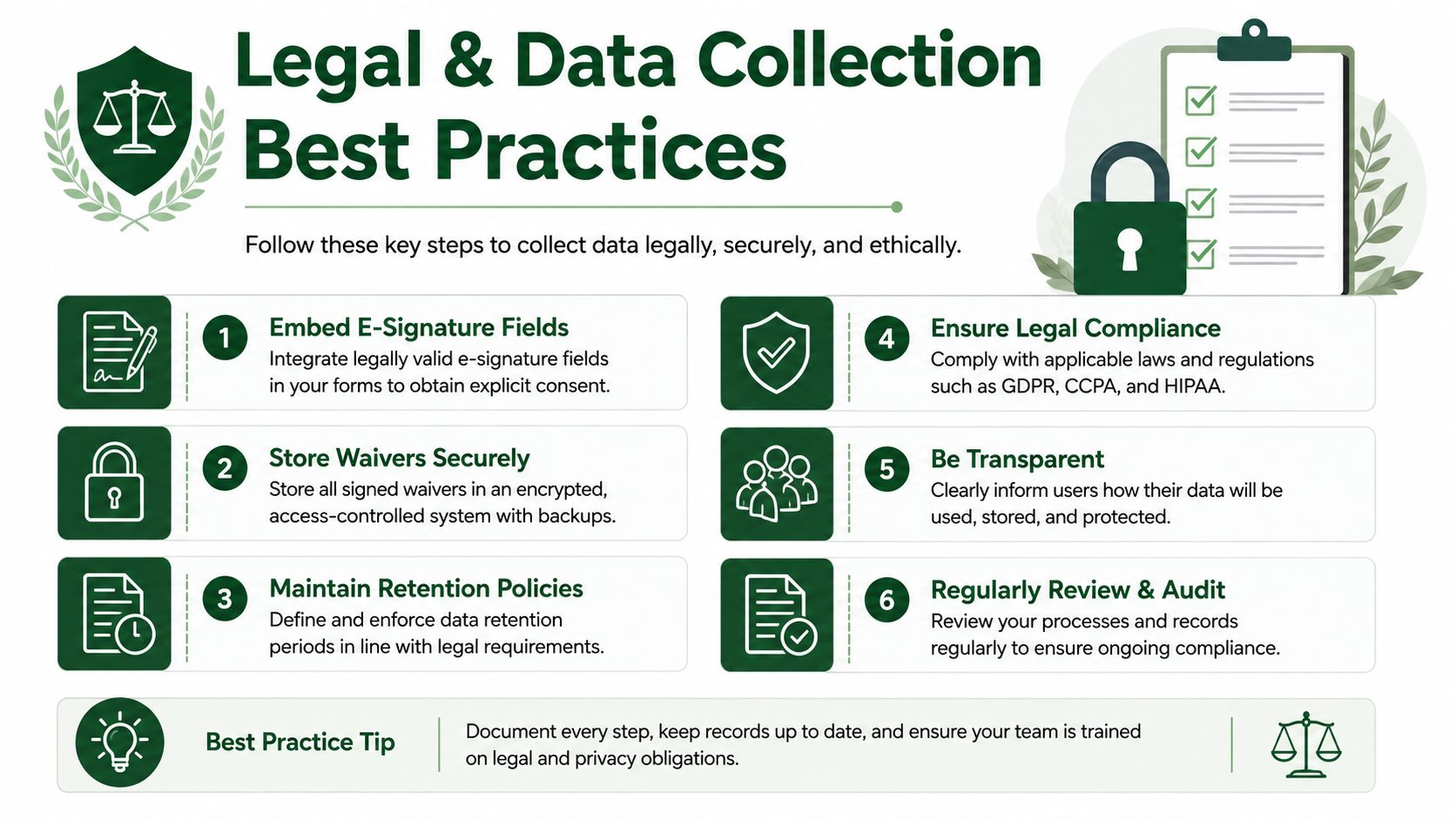
A registration form protects the organization only when participants complete the required acknowledgments. Embed the waiver and consent process directly into checkout instead of relying on a paper sheet at check-in. Separate the liability release, photo or media consent, cart-operation acknowledgment, and conduct terms so participants can understand what they're accepting.
Store the submission timestamp, registrant identity, and version of the terms accepted. If the course supplies its own waiver language, have the organization and venue agree on which document applies and who retains it. Your attorney or insurance adviser should review the final language because legal requirements vary by location and event structure.
Collect enough data to serve people well
The registration record should support both tournament operations and donor stewardship. Require fields that affect pairing, communication, payment, and delivery. Make sensitive or less urgent questions optional unless the event needs them.
Operational essentials: Name, email, phone, handicap information, team relationship, and apparel size when applicable.
Hospitality details: Dietary restrictions, meal preferences, accessibility notes, and emergency information when your safety plan requires them.
Relationship markers: Sponsor connection, volunteer status, donor history, and permission for future communication.
Privacy controls: A clear explanation of how the organization stores and uses participant information.
Centralize the data in a CRM or event system with controlled access. Segment records by player, sponsor, donor, volunteer, and team captain so the post-event communication matches the relationship. Payment card data should be handled through a PCI-compliant processor, and organizations with relevant registrants should address GDPR or CCPA obligations with appropriate privacy notices and retention practices.
Data principle: Collect information because someone will use it, not because the form allows unlimited questions.
Export the final roster before tournament day and keep a secure backup accessible to authorized staff. Include player names, teams, payments, waivers, dietary needs, sponsor links, and contact details. A backup won't replace a reliable platform, but it gives the check-in team a practical fallback when connectivity or account access fails.
Day-of Check-in and Scoring Integration
Tournament morning exposes every shortcut taken during setup. If the registration database is clean, volunteers can welcome players, confirm payments, resolve missing details, and move groups toward the first tee without rebuilding the roster. If the data is scattered, the registration desk becomes a manual sorting operation just when golfers expect speed.
Place check-in stations where players naturally arrive, such as the clubhouse entrance or practice area. A tablet-based workflow can search by golfer, team, or purchaser and show whether the player has paid, signed the waiver, received a cart assignment, and supplied required details.
Prepare the roster before the first arrival
Create a check-in view that answers the questions volunteers hear most often:
Who has arrived? Mark each player as checked in and identify no-shows.
What does the player need? Show missing waiver, payment, meal, apparel, or team information.
Where should the player go? Display team, cart, starting position, and any special instructions.
What does the sponsor receive? Confirm signage, logo, hospitality, and recognition requirements.
Pre-populated scorecards or digital scoring groups should use the same names and handicap information collected during registration. Assign one person to handle exceptions, rather than having every volunteer edit the underlying roster.
Connect scoring to communication
A scoring system should receive the confirmed team roster without repeated manual entry. Live leaderboard tools can then show results as teams submit scores, while the registration system remains the source for contact information, receipts, and follow-up. For organizers evaluating scoring workflows, this guide to golf tournament live scoring provides a useful reference point.
Don't promise a smooth integration until you test it with realistic records. Run a rehearsal using a team captain, an incomplete player profile, a late payment, a no-show, and a replacement golfer. Confirm that the leaderboard, scorecard, cart assignment, and email record all use the corrected name.
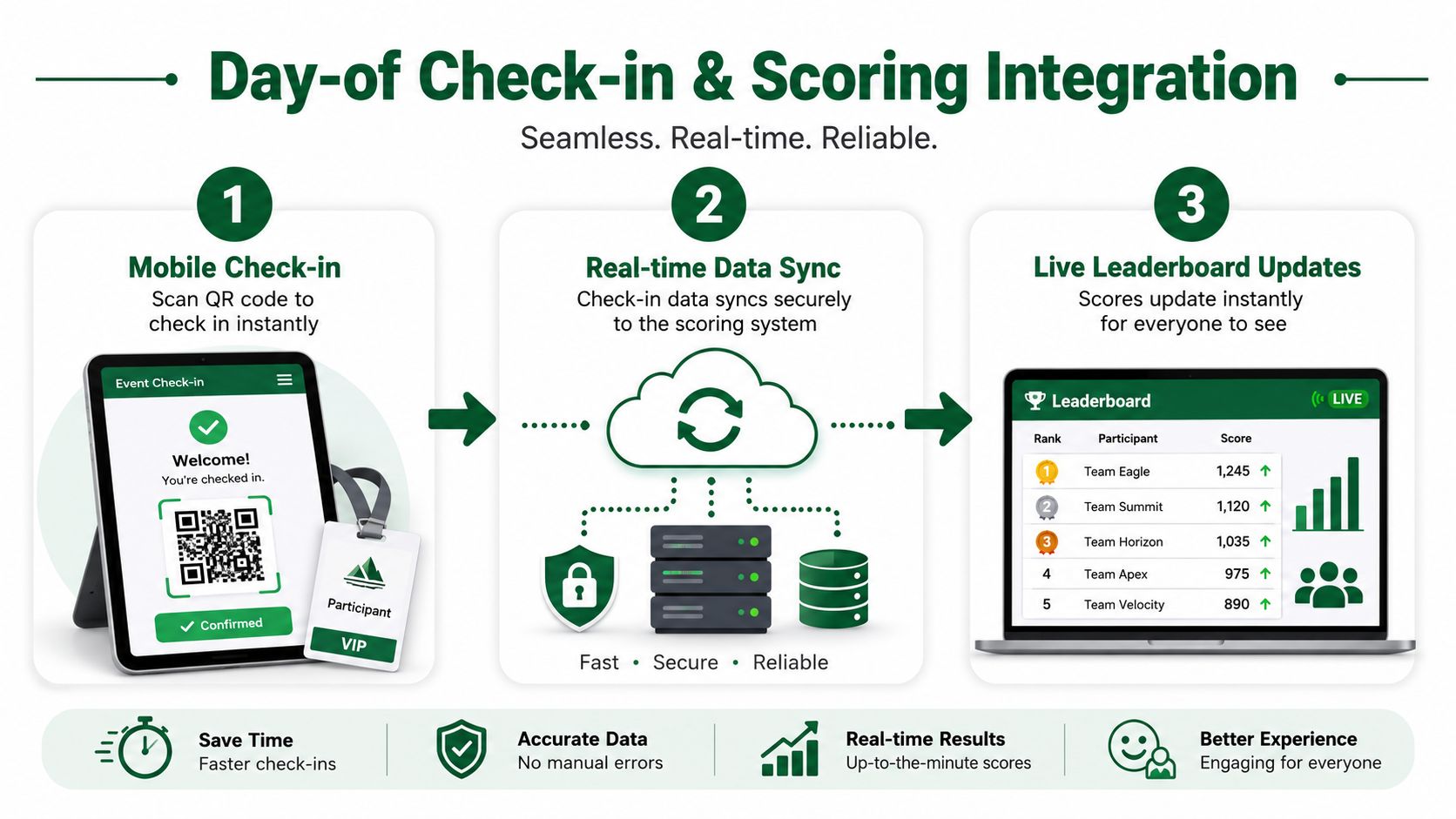
After play, use the final roster and results to trigger thank-you messages, donation receipts, sponsor acknowledgments, and a short impact update. That follow-up should distinguish the golfer who paid an entry fee from the sponsor who funded visibility and the donor who added a contribution.
Your 90-Day Registration Launch Timeline
A registration launch less than 60 days before the event leaves committees scrambling for teams, sponsor logos, complete waivers, and usable player data. Set an owner for each task, then define the evidence that marks it complete. Registration should build the fundraising pipeline, not merely record attendance.
Use the planning checklist to schedule the website, form, and payment setup early. The goal is to test the revenue path before promotion begins, including package selection, payment confirmation, donor details, and reporting.
Days 90 to 61
Platform owner: Select registration and scoring tools, create the event record, and confirm staff permissions.
Finance owner: Set the cost base, package prices, tax-receipt treatment, and payment settlement process.
Registration owner: Draft fields, team logic, add-ons, waivers, confirmation emails, and refund or weather policies.
Sponsorship owner: Approve tiers, recognition deliverables, logo specifications, and the sponsor fulfillment deadline.
Marketing owner: Publish the event page and prepare email, social, newsletter, and QR-code promotion.
Open registration 2 to 3 months before the event. If it suits the audience and budget, use the first 2 weeks for early-bird pricing. The first milestone is a completed transaction that proves the form captures the right data, processes payment, sends confirmation, and feeds reporting. Use the charity golf tournament checklist to check the launch sequence.
Days 60 to 31
Activate the early-bird package, contact prior team captains, and give sponsors a clear reason to commit before their recognition deadline. After the first registrations arrive, inspect the records instead of focusing only on volume. Check handicaps, team fields, waivers, add-ons, communication permissions, and donor information. Missing fields can weaken follow-up and reduce future giving.
Use confirmed sponsor names or team participation as social proof only with permission. Keep campaign messages tied to the cause and the player experience. For broader promotion ideas, review this guide to golf tournament marketing in 2026, and label future-facing recommendations as planning guidance rather than established results.
Days 30 to event day
Run a complete form test, verify waivers, reconcile paid and unpaid teams, confirm sponsor assets, and rehearse check-in. Export the roster, store a secure backup, test the scoring connection, and document a manual fallback for payment or connectivity problems.
The final checkpoint is sponsor fulfillment. Assign an owner and status to every logo, sign, announcement, and hospitality promise. A reliable registration record should support the golfer's purchase, the sponsor's commitment, the volunteer's roster, and the charity's follow-up.
Live Tourney provides a web-based registration portal with optional payment collection, roster and pairing management, waivers, add-ons, real-time scoring, and live leaderboards. Visit Live Tourney to assess whether its registration and tournament-management tools fit the charity outing.