May 18, 2026
tournament schedule, golf tournament software, event planning checklist, live scoring, golf operations
Plan and execute a flawless golf tournament schedule. Our step-by-step guide covers formats, checklists, contingencies, and using software for live results.

Most tournament schedule problems don't start on event day. They start a week earlier, when the pairings live in a spreadsheet on one laptop, the sponsor list changed twice, three players asked to play together, and nobody's sure which version of the tee sheet is final.
That's why I don't treat a tournament schedule as a document. I treat it as an operating system for the event. It tells staff what happens when, tells players where they need to be, and gives you a way to respond when reality changes. If it only works when printed, it's not a real schedule. It's a snapshot.
A professional event feels smooth because the schedule is doing more than listing names. It's coordinating registration, pairings, scoring, pace, announcements, awards, and the hundred small adjustments that happen between sunrise and the last putt.
The Foundation of Your Tournament Schedule
Tournament scheduling has always been a logistics problem, even when the game looked nothing like modern golf. Medieval tournaments were announced a fortnight, about 14 days, in advance, and one event at Lagny-sur-Marne in 1179 reportedly drew 3,000 knights, which tells you large competitive gatherings have needed disciplined planning for a long time (medieval tournament scheduling history)).
The lesson holds up. Big events don't get easier because software exists. They get easier when you make the right decisions early.
Start with the event outcome
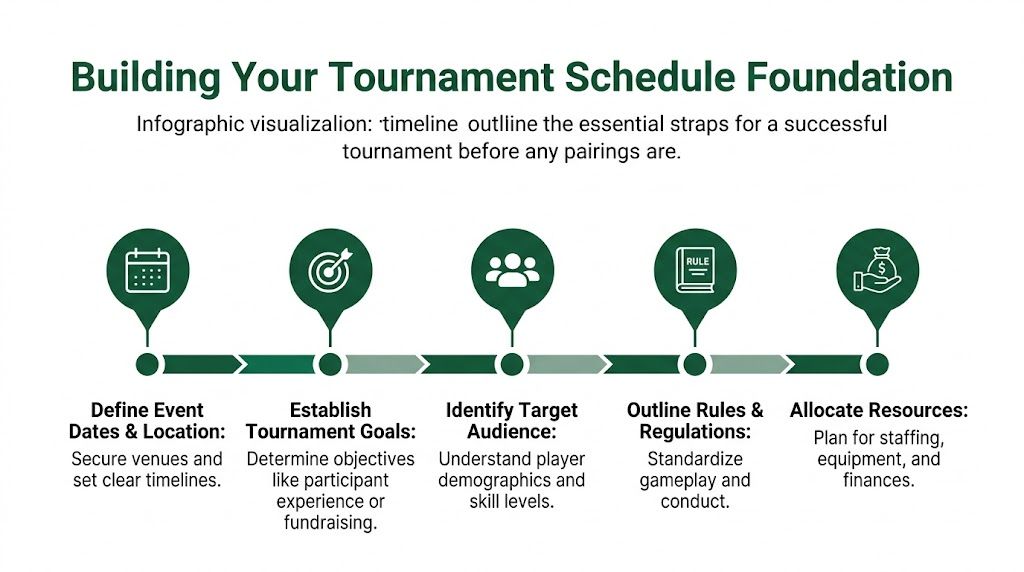
Before you assign one tee time, answer a simple question. What is this event supposed to feel like?
A member-member, a corporate outing, and a club championship can all use the same golf course, but they shouldn't use the same tournament schedule logic. One needs social energy and a clean awards window. Another needs competitive integrity. Another needs sponsor visibility and easy check-in.
I usually sort events into three buckets:
Experience-first events want smooth arrivals, minimal waiting, and a social finish.
Competition-first events need clear rules, balanced pairings, and less interference from ceremony.
Fundraising events need room for sponsor activations, contests, food timing, and donor recognition.
If you're working through charity logistics, this guide to planning a nonprofit golf fundraiser is useful because it forces you to think beyond golf operations and into donor flow, sponsorship, and event-day staging.
Build backward from the first tee
Most schedule mistakes happen because directors build forward. They pick a date, throw in some pairings, and hope the rest fits. The better method is to reverse-engineer the day.
Practical rule: Start with the immovable moments, then fit everything else around them.
Your immovable moments usually include:
Course access and setup window
When can staff stage carts, signage, scorecards, and contest holes?Player arrival requirement
How early do players need to arrive for registration, breakfast, range time, or announcements?Competition start structure
Is this a shotgun, split tee, or tee-time flow?Scoring and post-round timing
How long will score collection, verification, and leaderboard review take?Awards, food, and sponsor commitments
If lunch, dinner, raffles, or speeches are involved, they need schedule protection.
A reliable planning rhythm helps. Lock the venue and format first. Then lock player communications, sponsor obligations, staffing assignments, and printed materials. The pairings should come after those decisions, not before.
For a broader operations checklist, this golf tournament planning guide is a solid companion because it pushes the planning conversation past tee times and into execution.
What works and what doesn't
Here's the pattern I see most often.
Approach | What happens |
|---|---|
Planning around objectives | The tournament schedule supports the kind of day you're actually trying to run |
Planning around habit | You inherit last year's structure, even if this year's event is different |
Building backward from event day | Staff know deadlines, players get timely communication, and changes are easier to absorb |
Building pairings too early | Every late registration creates rework across carts, scorecards, and check-in |
A schedule looks polished when the groundwork is boring and disciplined. That's usually a good sign.
Choosing the Right Schedule Format
A lot of pros ask whether a shotgun start or tee times are better. That's the wrong question. The right question is which format makes this specific event easier to run well.
Modern competitive events often use staged structures and more complex competitive flows. Penn State's reporting on its Tech Tournament showed a competition with a multi-place prize structure and structured stages, which is a good reminder that format drives scheduling complexity (structured competition stages example).
For golf, that same principle shows up fast. A one-day charity outing and a multi-round match play event don't belong on the same scheduling template.
When a shotgun start makes sense
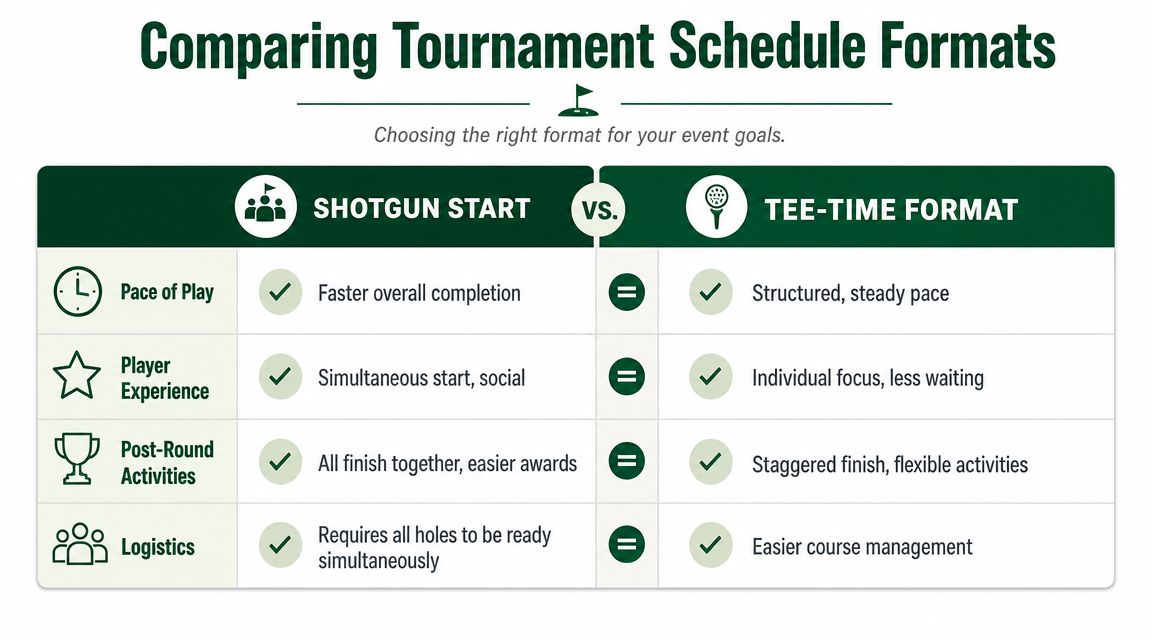
Shotgun starts work best when the day needs a shared rhythm. Everyone begins together. Everyone finishes in a tighter window. That makes food service, sponsor remarks, awards, and live scoring displays much easier to stage.
Use a shotgun when:
You need a single finish window for lunch, dinner, raffles, or awards
The event is social by design and players benefit from a shared start
You want easier staff coordination at scoring and post-round gathering points
The trade-off is operational pressure before the start. Every hole has to be ready. Every cart sign has to be right. Every starting announcement has to be clear. A shotgun looks simple to players, but it asks more from staff in a compressed window.
If you want a deeper breakdown of setup and logistics, this explanation of what is a shotgun start in golf is worth keeping handy.
When tee times are the better call
Tee times are steadier. They spread your operational load across the day and usually fit competitive golf better, especially when the event needs order more than spectacle.
Tee times fit when:
You want predictable check-in flow instead of one large arrival wave
You're running a serious competition where pace and conditions matter
The course needs flexibility because public play, maintenance, or mixed use is still in the picture
They do create a different challenge. Your field finishes in waves, not together. That can make awards awkward unless you plan around it. If the first groups finish long before the last, you need food timing, scoring timing, and communication timing that keep early finishers engaged.
A simple decision table
Format | Best for | Watch out for |
|---|---|---|
Shotgun | Outings, fundraisers, association days, events with a shared meal | Heavy setup demands before the horn |
Straight tee times | Club championships, qualifiers, multi-round events | Staggered finish complicates awards |
Split tees | Larger fields that still want flow control | Extra coordination at both starting sides |
If the event is built around togetherness, a shotgun usually helps. If it's built around competition, tee times usually age better over the day.
For round robin or group-stage structures tied to match play or league formats, it helps to understand the logic before you build the calendar. This overview of how round robin scheduling works is a useful reference when your event involves pods, flights, or recurring matchups.
What doesn't work is choosing a format because "that's how we always do it." A tournament schedule should serve the event. Tradition only helps when it still matches the job.
Building and Communicating Your Schedule
Once the format is locked, the actual work starts. At this stage, a clean concept can still fall apart. Pairings drift. Requests pile up. One sponsor wants to be with another. A member asks not to play with a certain group. Someone needs an early slot. Someone else can only arrive late.
That's why tournament scheduling should be treated as a constrained optimization problem, not a clerical task. Operational research frames it that way for a reason: you encode the format and constraints, then solve from there, because manual scheduling gets brittle as the number and density of constraints grow (constrained optimization approach to tournament scheduling).
Build the pairings in the right order
Don't start with names. Start with constraints.
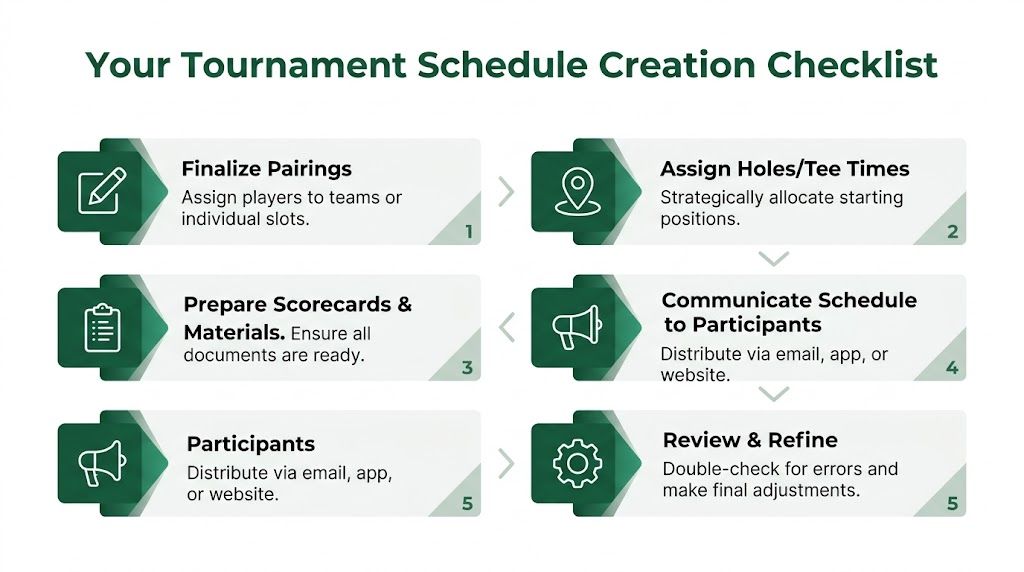
A clean build order looks like this:
Lock hard constraints first
Tee windows, blocked holes, player availability, course restrictions, format rules, and any sponsor obligations belong here.Add fairness constraints next
Balanced handicaps, team distribution, flight integrity, and avoiding repeat pairings if the event runs across multiple rounds.Handle preferences last
Friend requests, cart pairings, and soft social requests matter, but they shouldn't break the whole schedule.
That order saves you from the classic spreadsheet trap. If you satisfy preferences first, you usually create a mess that has to be rebuilt once the absolute requirements show up.
Publish earlier than most directors think
Players don't need every detail weeks ahead. They do need confidence that the event is organized. A professional communication cadence makes the tournament schedule feel dependable.
Use a simple rhythm:
Initial confirmation with date, arrival expectations, and format
Pre-event update with key logistics like registration flow, contest notes, and what players should expect on arrival
Final schedule release with pairings, tee times or hole assignments, and scoring instructions
Day-of updates for any changes that affect arrival, start order, or scoring
The best player communication answers the next question before the player asks it.
Printed sheets still have a role. Cart signs, scorecards, and check-in packets matter. But if your only communication method is a paper sheet on a registration table, the event will feel dated the minute something changes.
What a polished release includes
A final tournament schedule should give players enough detail to move confidently through the day.
Item | Why it matters |
|---|---|
Start assignment | Tells players exactly where and when to report |
Format note | Reduces scoring confusion before the round starts |
Contact path | Gives players one clear place to report issues |
Live access point | Lets players check updates without waiting on staff |
I still review every final schedule with one question in mind: if a player opens this on their phone in the parking lot, do they know exactly what to do next? If the answer is no, it isn't ready.
Day-Of Execution and Contingency Planning
A tournament schedule only proves itself when something goes wrong.
The common problems are predictable. A group arrives late because traffic backed up. A storm cell pauses the round. One foursome falls behind and starts affecting everything behind it. None of that is unusual. What's unusual is when the staff has already agreed on what to do next.
Industry guidance around dynamic scheduling makes the point clearly. AI-driven schedulers are reported to produce 85% fewer scheduling conflicts and 4.5x faster updates by using live data to predict completion times and adjust for weather or availability disruptions (real-time scheduling guidance and benchmark figures).
Scenario one with a weather delay
Say you've sent groups out and lightning stops play. The poor response is to go silent while staff debates the restart. Players start guessing. Some leave the clubhouse. Others keep asking the shop for different answers.
The better response is operationally simple:
Freeze the current state so nobody is relying on memory
Set one communication channel for the official restart plan
Update players in short intervals even if the status hasn't changed
Adjust awards, food, and scoring timing immediately instead of pretending the original plan still works
What matters isn't just the revised tournament schedule. It's the confidence players feel that someone is in control.
Scenario two with a slow group
A slow group can break more than pace. It can break lunch timing, scoring windows, shuttle timing, and staff coverage.
When that happens, don't only manage the group. Manage the consequences around the group.
Slow play becomes a schedule problem the moment it affects everyone behind it.
That usually means moving staff where the bottleneck is, tightening scoring prep for groups finishing on time, and communicating revised expectations before frustration spreads. Good operators think like process managers. The same mindset used in process improvement for hotels and restaurants applies here: identify the choke point, standardize the response, and reduce the burden on frontline staff.
Your contingency checklist
I like a short day-of control list because nobody reads a long binder under pressure.
Weather plan with who decides, who communicates, and where players wait
No-show procedure for rebuilding groups without creating confusion
Pace trigger that tells staff when to intervene
Scoring backup in case cards, devices, or volunteers don't line up
Awards fallback if the finish order changes or the round compresses late
The mistake is assuming a static tournament schedule can survive a fluid day. It can't. You need a schedule that can be revised quickly and communicated even faster.
Automate Your Schedule with Live Tourney
Static schedules create extra work twice. First when you build them, then again when you need to fix them.
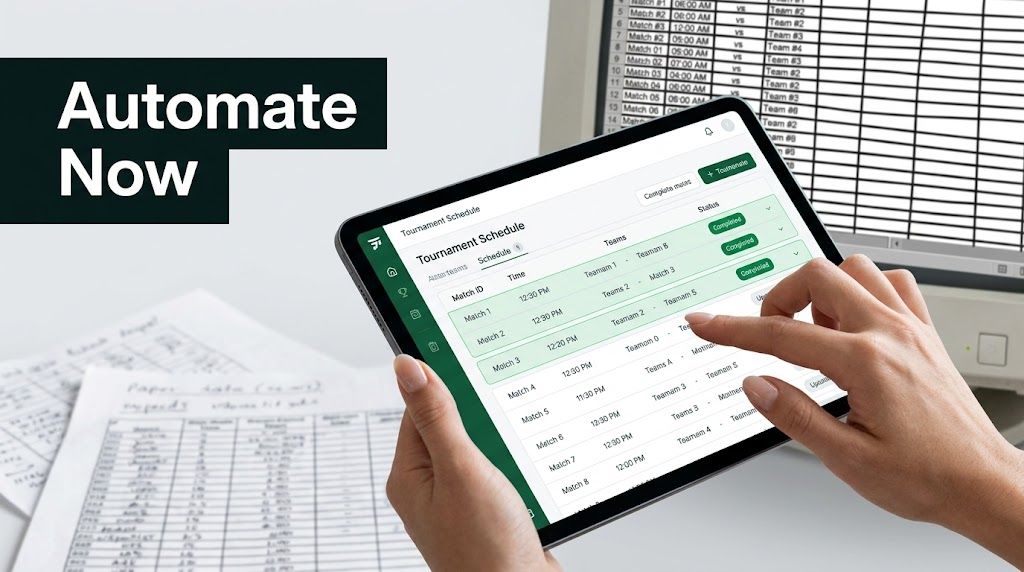
That gap shows up all over tournament operations. Many guides still treat the schedule as a simple web page with dates and basic competition details. The more useful model is a dynamic, mobile-first schedule that updates as pairings, tee times, or round status change. That need is reflected in sanctioned event guidance that emphasizes publishing schedule details, while newer tools point toward real-time visibility on any device (dynamic mobile-first scheduling need).
What automation should actually do
Software should remove repetition, not just digitize it. If you still have to rebuild pairings manually, resend PDFs, and answer the same player question twenty times, the tool isn't solving the actual problem.
A useful platform should help you:
Import and organize players without retyping rosters
Create pairings and tee assignments in a way that's easy to revise
Publish a live schedule that players can open on any device
Update pairings, times, and status quickly when the day changes
Generate event materials like scorecards, cart signs, and bag tags from the same event record
Keep scoring and leaderboard visibility tied to the schedule instead of split across multiple systems
Why mobile-first beats PDF-first
PDFs still have a place. They print well. Staff can mark them up. Sponsors sometimes want a clean attachment.
But a PDF is frozen the second you send it.
A mobile-first tournament schedule changes the experience in practical ways. Players can check their start without walking back to the shop. Staff can direct people to one live source instead of repeating updates. Last-minute pairing changes don't trigger a full communication scramble.
One option in that category is golf tournament management software from Live Tourney, which is built around web-based tournament operations, app-free live scoring, roster management, pairings, and live leaderboards. For courses and outing operators, that matters because the schedule, scoring, and player communication stay connected instead of living in separate tools.
What works in the field
The strongest setup is usually this combination:
Tool type | Best use |
|---|---|
Live web schedule | Player-facing source of truth |
Printed materials | Check-in support, carts, and operational backup |
Central admin dashboard | Staff control for edits and status updates |
Real-time leaderboard | Keeps players engaged and reduces scoring confusion |
If your current tournament schedule depends on "please ignore the earlier email," you're carrying too much friction. The event may still run, but it won't feel modern.
Post-Event Analysis and Finalizing Results
The round ends. The scheduling work doesn't.
A professional finish is fast, accurate, and quiet. Scores get verified, ties get resolved according to the posted format, payouts or prizes get checked, and players can see the final result without wondering whether another revision is coming.
Close the event cleanly
A good post-round sequence is straightforward:
Verify scores before posting finals so you don't create avoidable corrections
Finalize side games and payouts only after the main competition is locked
Send results and thank-yous promptly to players, sponsors, and staff
Archive the final tournament schedule and scoring record for future reference
The final communication should do more than announce winners. It should close the loop. Players want confirmation that the event was organized to the end, not just until the last card came in.
Use the schedule as a learning tool
Good directors differentiate themselves from busy directors. They don't just finish the event. They study it.
Look at where arrivals backed up, where pace slowed, which requests created the most rework, and how many schedule changes had to be communicated by hand. That review tells you whether next year's tournament schedule should change format, tighten registration deadlines, shorten the pre-round program, or move to a more dynamic communication setup.
A tournament schedule isn't just for today's event. It's a record of where your operation is smooth and where it still leaks time.
When you keep those notes, every event gets easier to run and looks more polished to players.
If you're ready to replace static tee sheets, scattered spreadsheets, and last-minute email corrections, Live Tourney gives you a web-based way to build, update, and share a tournament schedule in real time. It helps courses and event organizers manage pairings, scoring, leaderboards, and player communication from one place, without asking players to download an app.