Aug 19, 2026
tee sheet management, golf operations, tee time scheduling, golf course software, tournament management
Master tee sheet management with our practical guide for golf operators. Learn workflows, best practices, and KPIs to optimize tee times.

About 9% of booked tee times go unused because of no-shows, according to industry research covering more than 500 courses and over 10 million rounds. That unused inventory is associated with an estimated $1.2 billion in annual lost green-fee revenue across the industry, including roughly $103,000 in annual leakage for the average public course (Metolius Golf's tee sheet data analysis). A tee sheet isn't just a calendar with golfers' names on it. It's the operating system that connects revenue, labor, player groupings, course flow, and the decisions your staff make throughout the day.
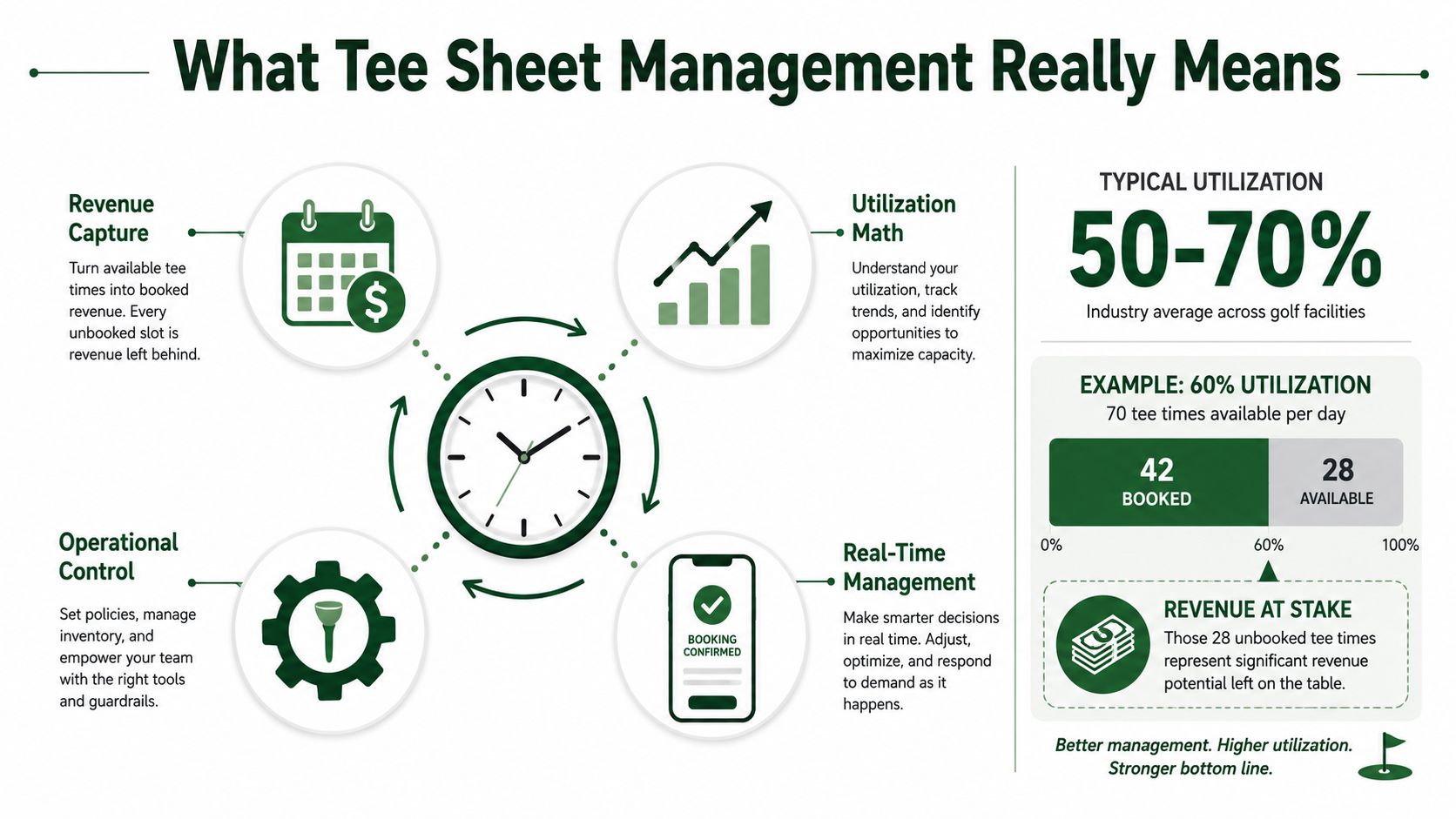
What Tee Sheet Management Really Means for Golf Operators
Tee sheet management is inventory control for golf rounds. The inventory is perishable. Once a tee time passes, an empty slot can't be sold again, and a poorly spaced booking can create congestion that affects every group behind it.
The basic utilization calculation is straightforward:
Utilization = booked rounds ÷ theoretical tee-sheet capacity
If a course can accommodate 200 possible rounds per day and has 160 booked rounds, it's operating at 80% utilization. That calculation comes from the practical definition of tee-sheet capacity and utilization described in Metolius Golf's tee sheet data resource. The important point is that utilization isn't the same as reservations volume. A busy booking channel can still produce weak results if groups don't show, prime times remain blocked, or the course schedules more demand than its pace capacity can support.
Four operators depend on the same sheet
The starter needs to know who is arriving, who is late, and which groups can tee off without disrupting the opening sequence. The marshal needs visibility into group composition and expected pace. The pro shop needs accurate rates, payments, cancellations, and walk-in availability. The general manager needs reliable reporting on revenue, labor, demand, and unused inventory.
That makes the tee sheet a shared operating picture:
The starter controls the first-tee sequence and confirms actual group size.
The marshal watches whether the field is moving within the course's practical capacity.
The pro shop manages reservations, payments, changes, and customer communication.
The general manager evaluates utilization, pricing, staffing, and policy performance.
Paper sheets and disconnected spreadsheets fail because they create competing versions of reality. A cancellation recorded at the counter may not appear in the online booking channel. A starter may be working from a printed list that no longer reflects a moved group. A manager may review a report that excludes adjustments made by phone.
Practical rule: If the starter, pro shop, and manager can't see the same current inventory, the course isn't managing one tee sheet. It's managing several conflicting ones.
The decisions that matter most
Effective tee sheet management gives operators control over three difficult trade-offs. First, dynamic intervals must protect pace without leaving unnecessary gaps. Second, cancellation and no-show rules must recover inventory without alienating reliable customers. Third, a platform migration must improve operational control, not merely provide a newer booking interface.
The tee sheet has evolved from a static paper schedule into a digital control center with real-time tee-time access, player data, price adjustments, utilization views, and reporting in one workflow, as described in No-Teefy's analysis of tee-sheet utilization. The head pro's job is to turn that visibility into consistent day-of decisions.
The Modern Tee Sheet as an Operational Control Center
At 6:30 AM on a busy Saturday, the online booking window opens for a new group of players. The pro shop sees the live grid, not a printed list. Available times, player details, rates, and restrictions update as reservations arrive.
At 7:10 AM, a foursome checks in. The front counter confirms the booking, collects any required payment, and marks the group as present. The starter sees the same status. If the group arrives with fewer players, staff can decide whether to pair another golfer into the opening or preserve the interval based on the course's traffic.
A weather hold changes the next decision. The starter updates the delay, and the tee sheet becomes the communication point for staff and players. The pro shop can see which groups are waiting, which reservations need a message, and which inventory may need to be released or rescheduled.
At 11:40 AM, two golfers are available to fill a gap. A modern system lets staff compact the pairing without creating a second version of the schedule. Later, a pace alert appears when a group falls two holes behind. The marshal receives an actionable signal instead of discovering the problem only after the backup reaches the turn.
Four views belong in the same workflow
A useful control center gives each operator the right lens without separating the data.
Live grid: Shows open, reserved, checked-in, delayed, and completed times.
Pace overlay: Adds group size, start status, round progress, and alerts.
Pricing layer: Applies rates and approved adjustments to available inventory.
Daily revenue tally: Shows what has been booked, collected, canceled, and left exposed.
The value isn't the number of screens. The value is that a change in one view updates the others. Booking affects inventory. Check-in affects staffing and starter decisions. A cancellation affects revenue opportunity. Pace information affects interval choices and marshal deployment.
Operators evaluating broader golf course technology workflows should ask whether the tee sheet remains the source of truth or whether staff must reconcile separate booking, POS, scoring, and reporting systems.
Modern platforms also expose usage by golfer status, flight, and other reporting dimensions, which turns the sheet into an analytics function rather than a reservation list. Legacy systems may still handle basic scheduling reliably, but they often require manual workarounds when a course needs live adjustments, integrated communication, or shared operational visibility.
Pairings, Intervals, and Tee-Time Policies That Protect Pace
A tee sheet can be full and still be badly managed. The critical question is whether the course is releasing groups at intervals its opening hole, fairways, greens, and staffing can absorb.
The R&A recommends intervals of at least 8 minutes for two-balls, at least 10 minutes for three-balls, and 11 to 12 minutes for four-balls in its pace-of-play management guidance. The same guidance says the starting interval shouldn't be shorter than the time required to play the quickest hole, particularly when that hole appears early in the round.
Set three interval variables
Use a base interval, a buffer, and a dynamic adjustment.
The base interval is the normal spacing for the dominant group type. A course might use 10 minutes as its working baseline, but that number shouldn't override the R&A's group-specific guidance or the actual speed of the opening holes.
The buffer protects the field from predictable variation. Add protection where the first hole is difficult, carts take longer to distribute, or the morning field contains mixed player abilities.
The dynamic adjustment responds to actual conditions. A two-ball may fit an 8-minute pattern when the course is flowing and the R&A minimum is appropriate. A three-ball may require 10 minutes, while a four-ball may need 11 or 12 minutes, particularly when traffic is already building.
Pairings matter as much as spacing. Group singles together when doing so fills inventory without forcing an awkward gap. Preserve member requests when demand allows, but don't let a preference create a hole in a peak block. Three-balls can also be useful when an opening needs filling, because they may move more efficiently than four-balls, depending on player ability and course conditions.
Pace decision: Fill an open slot when the added group fits the course's flow. Don't fill it simply because the booking screen says inventory is available.
Make the final interval operational
The last interval of the day should reflect daylight, cart-return timing, and the time required to finish the round. A late booking that looks profitable on the screen can create a poor customer experience if the group can't complete the course or staff must remain late to recover carts and close the facility.
Pairing software can help staff manage requests and group composition, but the tee sheet must remain the authority for availability and timing. The practical connection between those functions is described in Live Tourney's golf pairing software overview. Operators should measure group size and total round time directly. The R&A manual describes a simple method, staff can record the number of players at the first tee and the time each group takes to complete 18 holes, as outlined in the Pace of Play Manual.
That lightweight loop gives the head pro evidence for changing intervals instead of relying on habit.
No-Shows, Cancellation Windows, and Access-Control Rules
No-shows convert sold inventory into empty ground. Industry research associates about 9% of booked tee times with no-shows and estimates $1.2 billion in annual lost green-fee revenue across the industry, with approximately $103,000 in yearly leakage for the average public course (Metolius Golf). Those figures describe the scale of the problem, but the fix is operational. A policy must tell staff what counts as a valid cancellation, when inventory returns to market, and what happens after repeated abuse.
Use the policy levers deliberately
Cancellation windows should match the inventory. Facilities use different windows by course type and market. Examples in the gathered policies range from 1 hour on a booking-protection product to 12 hours at Monmouth County Parks, 24 hours at several public courses, 48 hours for some premium or resort bookings, and 14 days at Pebble Beach Golf Links. Monmouth County Parks' tee-time policy illustrates how a course can require cancellation before a defined cutoff so staff can return the slot to the market.
Penalty structures need to be clear. Denver Golf charges a no-show fee equal to the full adult green fee per player for cancellations or modifications made less than 24 hours in advance, while Foothills Golf Course charges the card on file for each no-show player at the full tee-time rate. Coal Creek reserves the right to charge a minimum of $25 up to the full green fee per open slot or no-show, according to the City of Denver Golf FAQ and policy information.
Behavioral limits address repeat waste. Sussex Golf and Curling Club limits members and non-members to 5 no-shows per golf season, after which booking access is reduced to 4 days in advance, as stated in its no-show and cancellation policy.
Define changes as carefully as cancellations
A reservation can be technically occupied while still damaging inventory. Reducing a foursome to a single player inside the cancellation window creates open places that may be impossible to resell. Foothills and Coal Creek require phone handling for changes inside 24 hours, while Diamond Hawk uses different lead times for groups of 1 to 4 players and larger groups, with charges for missing players or full-group no-shows. Those rules show why the system must track group size, notice, and the channel used for the change.
Don't claim that an aggressive policy automatically recovers every lost slot. The better test is whether it improves released inventory, reduces repeat no-shows, and gives staff a defensible way to apply rules consistently. Use waitlists before overbooking, and make any decision to accept excess demand only after reviewing actual show behavior and course capacity.
Integrations, Real-Time Scoring, and the Tournament Layer
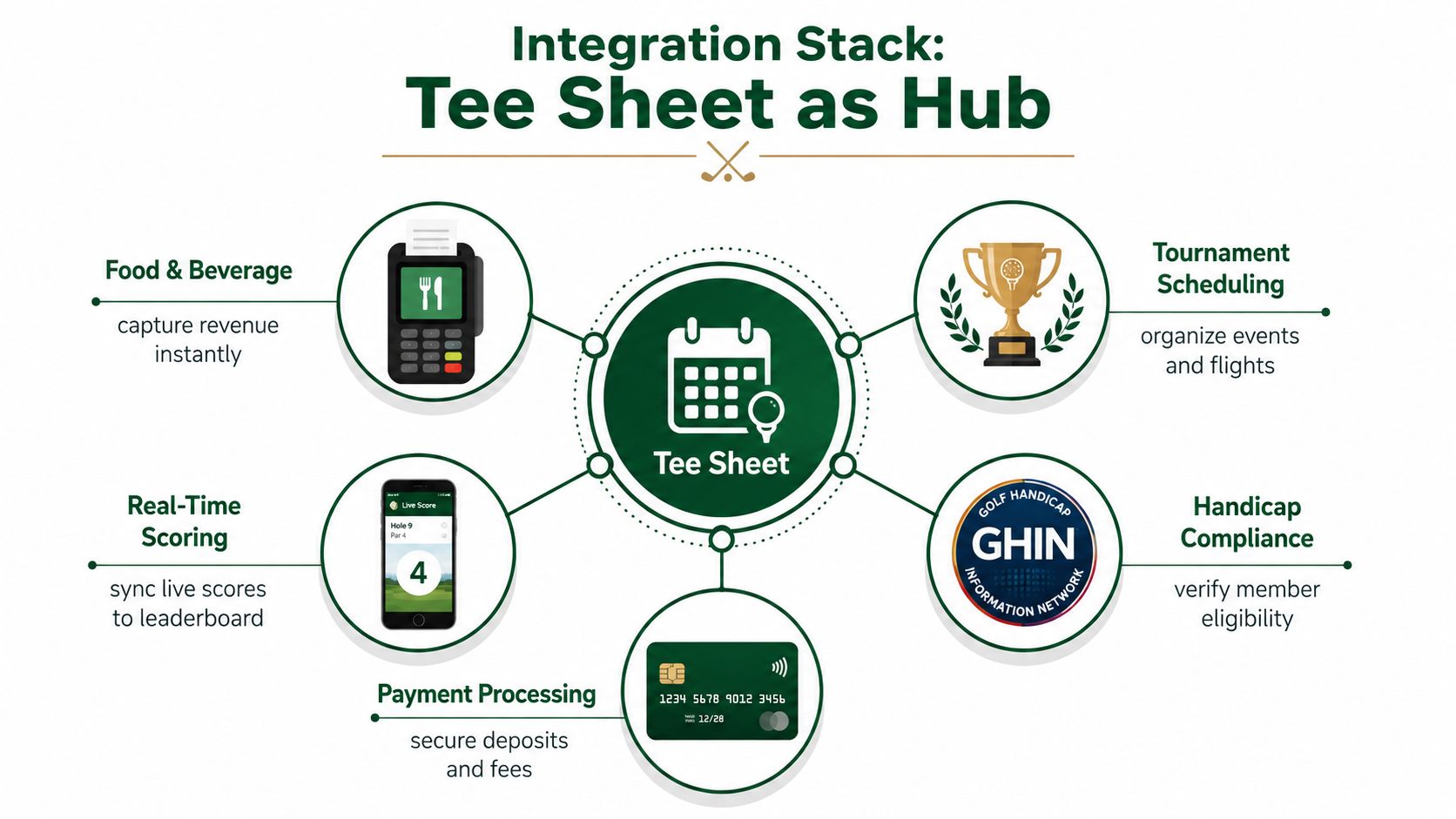
A tee sheet earns its place as an operating system only when connected tools act on the same reservation record. Each integration should have a defined job, an owner, and a failure check. A data connection that leaves staff reconciling records is still manual work.
POS and food and beverage systems should receive player and event context so staff can post purchases without re-entering names or charges. GHIN and handicap services should verify member eligibility and event compliance. Payment gateways should apply deposits, prepaid bookings, and no-show charges according to the written policy. Email and SMS tools should send confirmations, reminders, weather notices, and changes from the current booking record.
Test the workflow, not just the connection. Create a reservation, change its player count, move the time, and cancel it. Confirm that the tee sheet, payment status, event roster, printed sheet, and customer messages all show the same result. If one system misses a change, assign staff a visible exception rather than assuming the sync will repair itself.
Feed pace information back to the sheet
Real-time scoring can serve as an operating signal, not only a leaderboard. Combined with cart GPS and marshal alerts, it can identify a group falling behind before the delay reaches the turn. The operator can contact the group, reposition a marshal, adjust later spacing, or hold a release before the backup spreads across the course.
The USGA pace-of-play resource center supports measuring speed with defined references instead of relying only on subjective complaints. The PGA Tour's announced plan to publish select speed-of-play statistics in 2025 also points toward greater use of visible, measurable pace information.
For tournaments, the tee sheet must carry the event workflow beyond the starting time. Store the format, roster, flights, skins, rules, scoring, and payouts with the booking so the starter and scoring team work from the same information. Live Tourney's real-time golf tournament scoring tools provide one example built around event registration, live leaderboards, in-round rule checks, and side-game settlement.
Industry coverage reports that more than 1,000 North American golf courses changed tee sheet technology in spring 2025, while legacy platforms lost share (2025 tee sheet and booking engine market analysis). The decision rule is practical: consolidate when shared records remove duplicate entry and disconnected reports. Keep a legacy system when migration risk, staff retraining, or missing controls would cost more than the administrative work it replaces.
KPIs to Track and Common Pitfalls to Avoid
A tee sheet dashboard should answer operational questions, not merely display activity. Start with four measures and make each one useful at the staff level.
Four measures worth reviewing
Utilization rate shows how much available capacity the course sells. Review it by daypart, player type, and booking channel. Ask: which blocks remain empty because demand is weak, and which remain empty because policy or maintenance restrictions hide them?
No-show and cancellation rate exposes the cost of unreliable reservations. Compare it with the timing of cancellations and the source of bookings. Ask: are customers canceling early enough for staff to resell the slot, or are they disappearing after the market has closed?
Average interval drift measures how far actual starts move from booked starts. The R&A's interval guidance gives operators a pace-based reference point, but your own starter and round-time records should determine whether the pattern is working. Ask: do delays originate at check-in, the first tee, carts, or a slow opening hole?
Revenue per available tee time, or RevPATT, combines inventory and yield. Review it by time of day rather than relying only on the daily average. Ask: does a lower-priced block produce better realized revenue because it fills reliably, while a premium block remains exposed?
Five failures that keep appearing
Demand-blind pricing: A static rate sheet ignores daypart behavior and leaves staff guessing about when to protect price or release inventory.
Static intervals: One spacing rule ignores group size, course traffic, and the R&A guidance for different group compositions.
Weak cancellation language: If staff can't explain the cutoff, charge, or change process, customers receive inconsistent treatment.
Poor labor alignment: A back nine that regularly plays slower than scheduled needs marshal coverage and staffing based on observed flow, not last season's template.
Migration by interface alone: A modern booking page won't fix duplicate records, missing payment status, or staff who return to spreadsheets when the live system feels unreliable.
Don't create unsupported targets for these measures. Establish a baseline from your own operation, then set a review cadence. During a platform change, pilot one tee sheet for two weeks before moving events, scoring, and member portals together. That trial should test real bookings, adjustments, cancellations, check-ins, reporting, and staff permissions, not just a vendor demonstration.
Tee Sheet Optimization Checklist You Can Use This Week
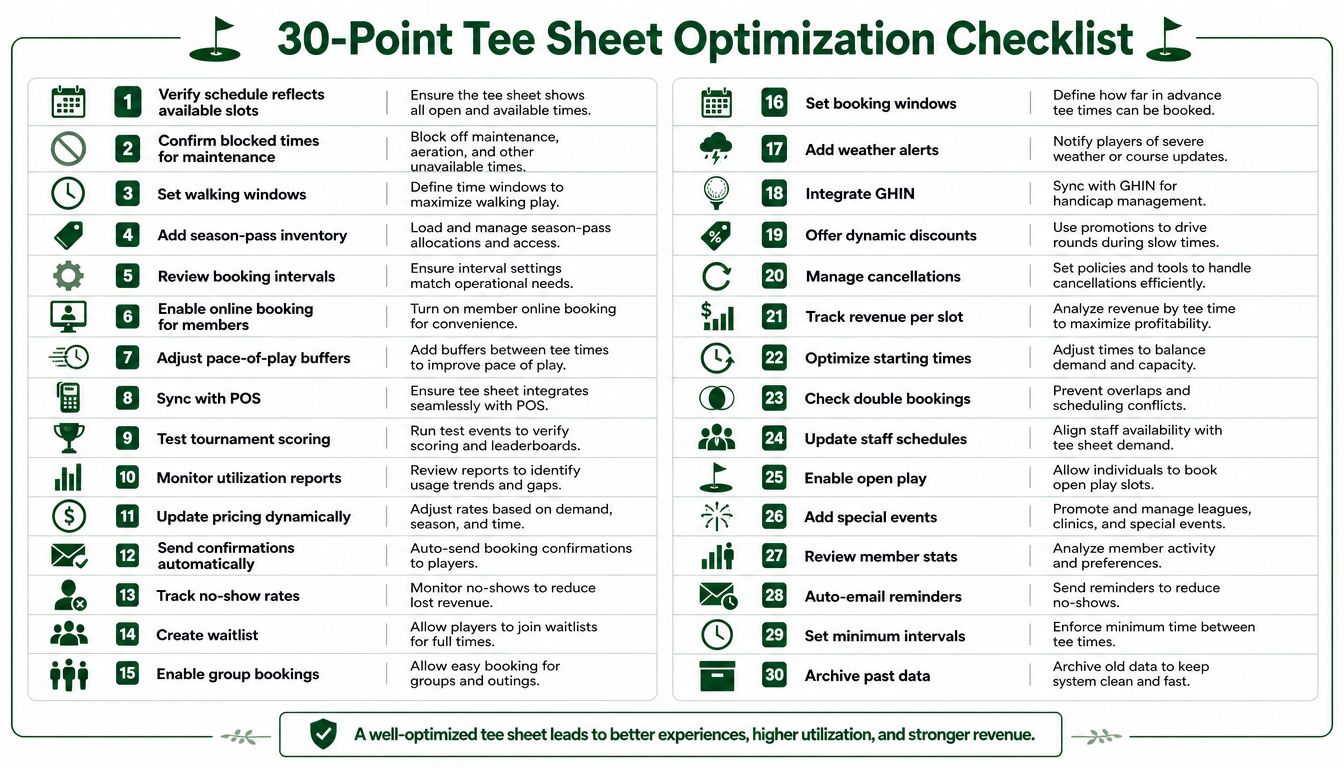
Run a 30-point tee sheet audit before changing platforms or rewriting policy. Score each item as working, inconsistent, or failed, then assign a person and deadline to every failed item.
Confirm the inventory model
Verify available slots: Make sure the schedule reflects the tee times the course can sell.
Protect maintenance blocks: Confirm blocked times are visible across every booking channel.
Set walking windows: Keep walking and cart patterns operationally realistic.
Load season-pass inventory: Separate pass-holder access from public inventory.
Review intervals: Check spacing by daypart and group composition.
Open member booking: Confirm eligible members can access intended inventory.
Add pace buffers: Place buffers where course flow and staffing require them.
Sync the POS: Test rates, charges, and booking status together.
Test tournament scoring: Verify that event starts and player records connect properly.
Monitor reports: Confirm utilization data reflects live changes.
Test the customer and staff workflow
Create a reservation, add players, apply a rate or promotion, adjust the pairing, move the time, and cancel it. Confirm that the inventory, payment record, audit trail, and customer communication update together.
Then review the control rules:
Update pricing: Make sure approved dynamic rates apply only under defined conditions.
Send confirmations: Test automatic email and text messages.
Track no-shows: Verify that staff can record attendance and missed reservations.
Create a waitlist: Confirm open inventory can return to waiting customers.
Enable group bookings: Test player additions, reductions, and restrictions.
Set booking windows: Apply different access rules where the business requires them.
Add weather alerts: Give staff a clear process for delays and closures.
Integrate GHIN: Confirm member and handicap eligibility checks.
Offer discounts carefully: Ensure promotions don't bypass inventory controls.
Manage cancellations: Test every cutoff, fee, and alternate contact channel.
Inspect the operating backbone
Review revenue per slot, starting-time performance, double bookings, staff schedules, open play, special events, member statistics, reminders, minimum intervals, and archived data. Connect the accounting system, CRM, website, payment processor, POS, email provider, text provider, and scoring tools.
Also test mobile access, role permissions, audit logs, offline recovery, and real-time scoring when tournaments are part of the operation. A system that works at the manager's desk but fails on the first tee isn't operationally complete.
Ship the highest-impact fixes first. Unreliable inventory, inconsistent policies, poor staff visibility, and disconnected reporting usually create more damage than a missing interface feature. After the pilot, compare the baseline with actual utilization, unused inventory, no-shows, booking value, pace drift, labor hours, and tournament setup time.
Live Tourney gives courses and event organizers tools for tournament registration, roster management, pairings, live scoring, leaderboards, reports, side games, and payouts, with players scoring from a web link without an app download. Visit Live Tourney to see how its event workflow can connect tournament operations to a more usable, tee-sheet-centered daily process.