Aug 17, 2026
golf course technology, tournament software, live scoring, agritech, course management
Explore how modern golf course technology transforms operations, from tee time booking and live scoring to precision irrigation and agritech.

Monday morning starts before the first tee time. A league captain is asking for a pairing change, the charity outing needs a corrected cart sign, a member has booked through the website, and the superintendent is checking whether overnight irrigation reached the greens. The pro shop has one version of the tee sheet, the tournament director has another, accounting is waiting for a payment report, and someone is still copying names between spreadsheets.
That's the golf course technology problem. The club usually doesn't lack software. It lacks a dependable way for the software, staff, and information to work together without turning every event into an administrative relay race.
What Operators Mean by Golf Course Technology
At a busy mid-sized club, several systems can touch the same day without sharing a dependable record. The tee sheet manages starting times, tournament software handles pairings, POS records purchases, accounting receives financial data, and staff fill the gaps with email or spreadsheets. Each product may perform its own job well. The operational friction sits between them.
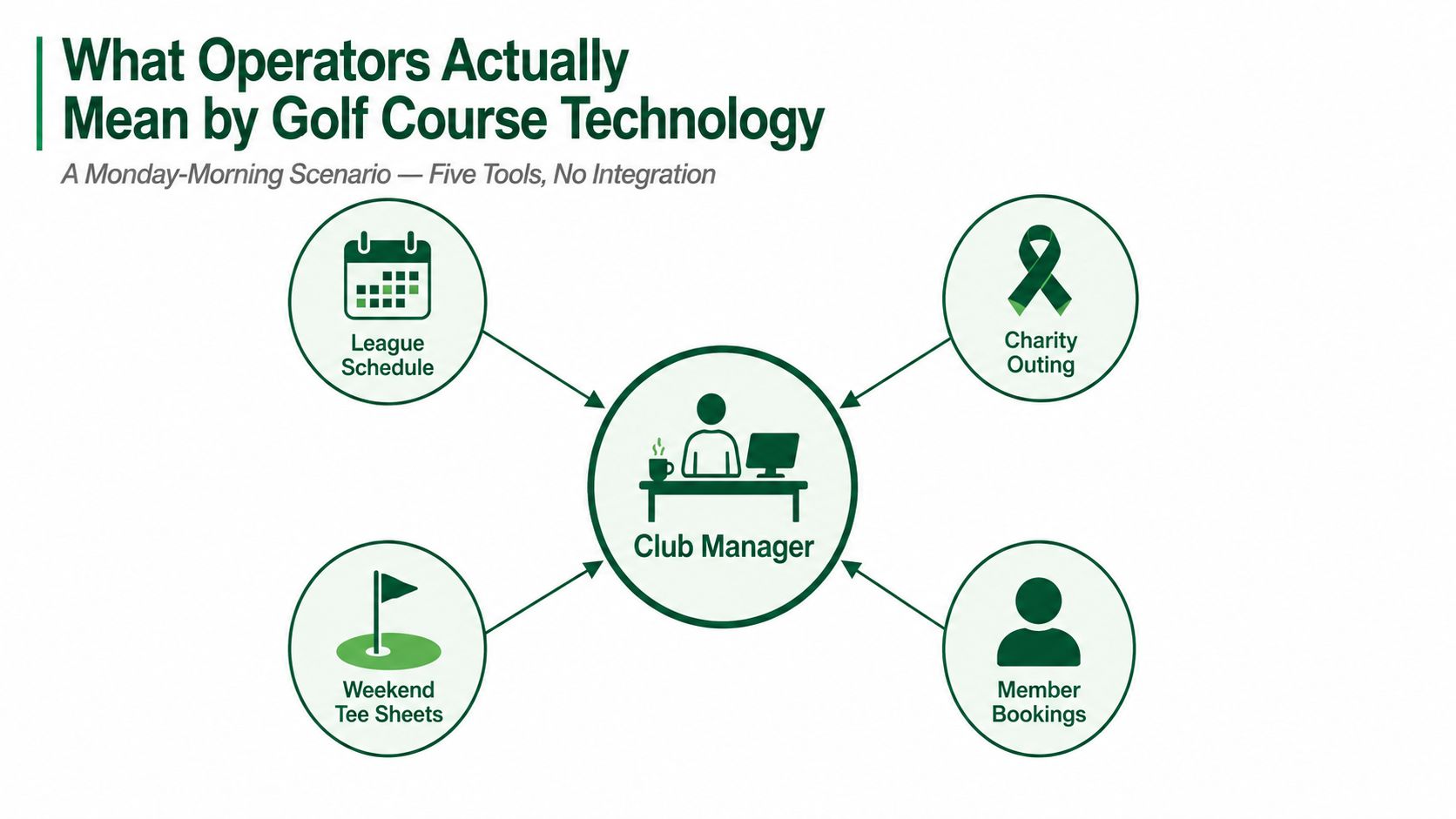
Duplicate entry is only the visible cost. Staff also check which file is current, correct names, reconcile payments, and explain why a change in one system failed to appear in another. Members encounter delayed confirmations or incorrect pairings. Operators deal with interruptions that pull attention away from the course and the customer.
The stack has three practical layers
Point solutions handle one task particularly well. A moisture meter supports a localized irrigation decision. A scoring platform publishes tournament results. A GPS system helps staff monitor cart movement and pace. These tools can deliver real value, but each becomes another data island unless it exchanges information with the rest of the operation.
Platforms bring related workflows together. A tee-sheet platform may combine online booking, customer records, waitlists, and reporting. A tournament platform may include registration, pairings, scoring, side games, and payouts. That reduces handoffs, though the platform still needs clear connections to accounting, POS, and member communications.
Integrated suites connect several departments through a shared data model. They can reduce duplicate work, but they also make implementation a larger decision. A suite that forces agronomy, retail, events, and finance into awkward processes may serve the club less effectively than a smaller stack with clean, dependable connections.
Start the review with one question: where does the same information get typed twice? Player names, tee times, cart assignments, payments, handicap details, and event results often expose the weak points. This map shows where admin time is going, which makes it more useful than a feature list.
Practical rule: Buy technology to remove a handoff, not merely to add a screen.
Golf course technology now reaches agronomy, food and beverage, retail, tournaments, membership, staffing, and accounting. The strongest stack is not the one with the most functions. It is the one that gives each department accurate information when that department needs it, without creating another manual relay.
The Core Systems Every Modern Course Runs
A busy course does not run on one application. The tee sheet handles reservations, the POS records sales, tournament software manages events, and back-office tools maintain payroll, accounting, and reports. Agronomy works in a separate operational lane, using weather, soil, pumps, and irrigation information to guide course decisions. The challenge is making these systems exchange reliable information without adding another layer of daily administration.
A practical explanation of what is system integration starts with ownership. Which system owns the customer record? Which one controls the booking? Where does payment status live? Who receives the update when a player cancels? If staff cannot answer those questions, the club has connected products, not a dependable operating system.
System Category | Primary Job | Who Touches It Daily |
|---|---|---|
Tee sheets and booking engines | Publish availability, accept reservations, and manage cancellations | Pro shop, members, public golfers, managers |
POS and pro shop systems | Record merchandise, food, beverage, and service transactions | Retail, F&B, accounting |
GPS and pace-of-play tools | Provide course-position information and operational visibility | Marshals, managers, cart staff |
Agritech and irrigation | Measure conditions and control water delivery | Superintendent, assistants, irrigation technicians |
Tournament and live scoring | Manage registration, pairings, scores, side games, and results | Tournament staff, players, pro shop |
Back-office tools | Handle staffing, payroll, accounting, reports, and administration | GM, office staff, department heads |
Sequence purchases by operational pain
The tee sheet is often the first purchase because it sits close to revenue and customer contact. That priority can create trouble if every other workflow is forced through it. A tournament team may need a dedicated event platform once registration, pairings, scoring, or payouts begin generating manual work. A golf course management software comparison can help frame those choices, but the club's handoffs should determine the decision.
GPS and agritech systems have different requirements. Their value depends on hardware placement, staff habits, and consistent data collection. A polished dashboard cannot correct missing readings, poorly placed devices, or irrigation records entered only when someone has time.
Back-office systems deserve review before payroll, scheduling, newsletters, and accounting become separate administrative chores. Fragmented records create reconciliation work and make it harder for department heads to see the same operational picture.
Start with the repeated-entry audit: where are player names, tee times, cart assignments, payments, handicap details, or event results typed twice? Follow each item from booking through play, sale, scoring, and reporting. The goal is a shorter chain of handoffs, not the largest feature list.
Practical rule: Buy technology to remove a handoff, not merely to add a screen.
The right stack connects agronomy, food and beverage, retail, tournaments, membership, staffing, and accounting at the points that matter. Each department can keep the tools suited to its work, provided the shared records stay accurate and staff are not asked to relay the same update manually.
Agritech and Irrigation as the Quietest Tech Revolution
At a busy course, irrigation problems show up as turf stress, wasted water, pump strain, and extra checks for the maintenance team. The old routine was simple: set a schedule, run the sprinklers, and inspect the result. Modern systems combine soil readings, evapotranspiration data, weather stations, central controls, pump information, and irrigation audits to decide where water is needed.
A handheld moisture meter does not measure water directly. It creates an electromagnetic field in the soil, interprets the signal, and converts the result into a percent volumetric water content reading. That number is useful only when the superintendent collects readings consistently. USGA guidance recommends roughly 3 to 4 readings per 1,000 square feet of putting surface at minimum, taken at the same time of day to account for overnight irrigation and daytime evapotranspiration effects (USGA moisture-meter guidance).
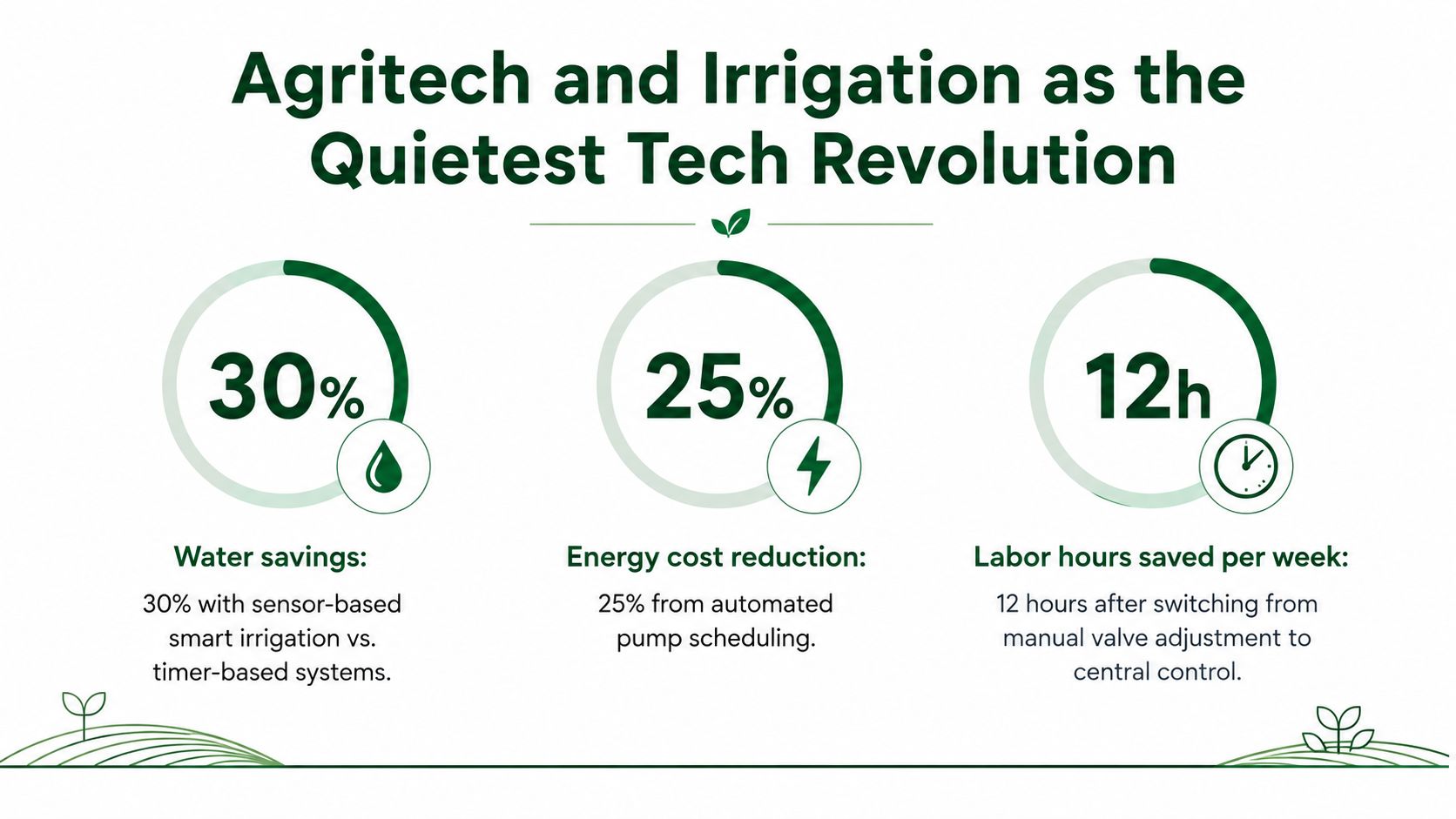
What the numbers say about adoption
National course data shows the operational shift. Projected irrigation on U.S. golf facilities declined 31% from 2005 to 2024, while applied water per acre fell 15% over the same period. Projected applied water reached 1.63 million acre-feet in 2024, down 3.2% from 2020, according to the USGA Water Summit proceedings.
Technology adoption has grown alongside that change. Fully automated irrigation systems reached 73%, and new handheld sensors used for irrigation-system improvements reached 39% by 2020, in the same USGA materials. A 2024 water-use study reported handheld soil-moisture sensors at 55% adoption and irrigation scheduling at 53%, with handheld sensors rising from 33% in 2013 to 55% in 2024 (2024 U.S. golf-course water-use study).
The broader precision-irrigation review points to a practical preference for targeted control and portable measurements. Individual head irrigation control systems reached 67.6%, handheld soil-moisture sensors without GPS reached 58.1%, and weather stations for evapotranspiration reached 41.0%. Unmanned aerial vehicles reached 9.5%, while in-ground soil-moisture sensors reached 20.0% (precision-irrigation review).
Start with decisions, not hardware
The quickest operational improvement usually comes from tightening the decision loop. Collect readings, compare them with weather and evapotranspiration conditions, review recent irrigation, then adjust the relevant heads or zones. A central controller can execute the change, but the superintendent still needs a reliable interpretation of course conditions. Our golf course management overview provides related context on keeping operational decisions connected across the club.
Rainfall shutoff devices, smart controllers, and pump monitoring work best as one process. A 2019 survey found rainfall shutoff devices on 78% of respondent courses, advanced or smart controllers on 55%, and real-time pump monitoring on 51%. Among courses with real-time monitoring, 74% had the system integrated with central irrigation control (golf-course irrigation technology survey).
USGA course-care guidance describes systems connected to sensors measuring air temperature, soil temperature, soil moisture, soil salinity, and more (USGA irrigation guidance). The integration determines the value. A sensor that produces readings nobody uses is expensive instrumentation. A modest sensor program tied to consistent decisions can change how the maintenance team works without adding another disconnected dashboard.
Live Scoring and Tournament Software in Action
A charity outing exposes weak systems quickly. Registration has to match the starting list, pairings must be clear, side games need accurate entries, and the final results have to survive last-minute corrections. Players also expect to see where they stand without waiting beside a scoring table.
With an app-free live-scoring workflow, the event team can send players a link before the round. The registration desk confirms the roster, tournament staff assign pairings, and groups enter scores from their phones as they finish holes. Players can follow the leaderboard while the event runs, while staff monitor missing scores and resolve questions before the final presentation.
The important word is app-free. Occasional players and older members may not want another download, account, password, or update. A browser-based scoring link removes one of the most common adoption barriers. It also gives the event team a simpler support script: open the link, select the group, enter the score.
Where the workflow earns its place
Paper scoring creates a delayed information cycle. A player records a score, a volunteer collects the card, someone types the result into a spreadsheet, and another person checks for errors. Side games and handicaps often require separate calculations, which increases the number of places a mistake can enter.
Live scoring moves the review closer to the action. Staff can see incomplete cards, check unusual entries, manage formats, and prepare results without waiting for every paper card to return. The result isn't just a faster leaderboard. It's a shorter path from player input to a usable operational decision.
For operators comparing event workflows, real-time golf tournament scoring is a useful reference point. The same principle applies to equipment decisions. A drone may help inspect agricultural land, but a course should first define the decision it wants improved before evaluating equipment such as the P150 Max drone for agriculture.
The best tournament system is the one a temporary event volunteer can use correctly after a short explanation.
What still requires staff judgment
Software doesn't eliminate event management. A tournament director still needs to confirm the format, validate handicaps, communicate tie-break rules, and decide how corrections are approved. Player adoption also needs planning. Put the scoring link on registration emails, cart signs, printed instructions, and the first tee briefing.
The practical test is whether the system reduces interruptions during the event. If staff spend the afternoon answering login questions, exporting files, and re-entering scores, the software has moved the work. If players enter results directly and staff handle exceptions, the course has gained a real operational improvement.
Implementation Without Burning the Course Down
A busy Saturday is a poor time to discover that the new scoring tool, tee sheet, and POS do not agree. Rollouts fail less often because a product lacks features than because the club changes too much at once. Staff have limited attention during peak periods, and a system without a clear owner becomes everyone's responsibility and nobody's priority.
Use three horizons. First, stabilize one daily workflow. Next, expand after staff understand the new process. Then connect the system to reporting, agronomy, POS, or back-office operations. This sequence keeps technology from creating another layer of administration.
Horizon one is about ownership
Choose one primary tool and assign one person to own the rollout. That person does not need to perform every task, but must understand the workflow, manage the vendor relationship, gather staff feedback, and decide when an issue needs escalation.
Write the integration plan before signing. List the systems that must exchange player, booking, payment, or results data. Confirm what synchronizes automatically, what requires an export, how often updates occur, and what happens when records conflict. A promised integration is only useful if staff know who checks it and what they do when it fails.
Keep the first month narrow:
Choose one workflow: Start with a league, recurring event, or registration process that creates visible administrative pain.
Document the current path: Record every handoff, spreadsheet, approval, and correction.
Define success qualitatively: Staff should see fewer interruptions, fewer duplicate entries, or clearer event visibility.
Create a fallback: Keep the old process available long enough to protect a live event, then retire it before parallel systems become permanent.
Horizon two tests the actual workload
Add secondary tools only after the primary workflow works under normal pressure. Train the staff who run events, not only managers who attend the vendor demonstration. Run a parallel test for a low-risk event and compare its output with the existing process.
Test the awkward cases, too. Correct a score, change a pairing, reverse a payment, and handle a player who cannot log in. These exceptions reveal whether the stack reduces work or moves it between departments.
The head professional needs confidence that the tool will not disrupt the tee sheet. The general manager needs a clear cost and ownership model. Event staff need practical training, quick support, and permission to report friction without being blamed for it.
Horizon three connects the operation
A full rollout needs a feedback loop. Review failed exports, duplicate records, missing permissions, player confusion, and staff workarounds. Improve the workflow before buying another feature. The goal is coordinated scoring, agritech, POS, and tee-sheet work with fewer manual handoffs.
Red flags include unclear data ownership, vague integration answers, unexplained manual exports, support that fades after the sale, and demonstrations that avoid the hardest operational scenario. Cautious AI adoption supports restraint. Earlier NGCOA technology research indicated interest in AI alongside incomplete confidence, so a course should test a defined use case before expanding it across the operation.
How to Choose the Right Vendor and Stack
A vendor demo rewards polished presentation. A course operation rewards reliable setup, clear ownership, and fewer exceptions. Evaluate the product against a live workflow, not a slide deck.
Ask each vendor to demonstrate your process from start to finish. Use a real league roster, a sample charity outing, a cancellation, a payment correction, and a last-minute pairing change. Watch what the staff member must do manually. That's where the true cost appears.
Use a decision matrix
Criterion | What to test | Warning sign |
|---|---|---|
Setup time | Can staff create an event or booking workflow without vendor intervention? | The demo depends on a specialist |
Integration fit | Can it exchange information with the current tee sheet, POS, and accounting tools? | The answer is “we can export a file” for everything |
Total cost | Are implementation, support, payment, hardware, and future connector costs clear? | Pricing changes after technical questions |
Human support | Can staff reach someone who understands golf operations? | Support is limited to generic documentation |
Infrastructure | Is the product maintained on current technology with a visible update process? | The vendor can't explain its product roadmap |
Staff usability | Can occasional users complete a task without extensive training? | Every action requires an administrator |
Ask questions that expose operational understanding
What happens when two systems disagree? The answer should identify the source of truth and the correction process.
Which tasks still require manual entry? Every vendor has boundaries. Honest explanations help you plan staffing.
How will you support our busiest event? Ask who responds, how issues are logged, and what backup process the vendor recommends.
Market movement supports a preference for low-friction tools, but it doesn't justify chasing every new product. Independent tee-sheet market data reported customer-base growth of nearly 7% for Lightspeed Golf, 20% net growth for Club Caddie, and expansion of Noteefy from 60 to more than 760 course locations in 16 months (SMB Golf tee-sheet market report). Those figures signal demand for automation and guest-conversion tools, not proof that any one product fits your club.
Choose the stack that your staff can maintain on a difficult Saturday. A smaller system with dependable support beats a broad suite that requires constant workarounds.
A 90-Day Starting Plan and the ROI Operators See
ROI in golf course technology starts with operational gains. Staff spend less time correcting entries, players get answers sooner, and event details reach the right person without another spreadsheet. 1021 Events helps prove event value by measuring outcomes rather than counting features.
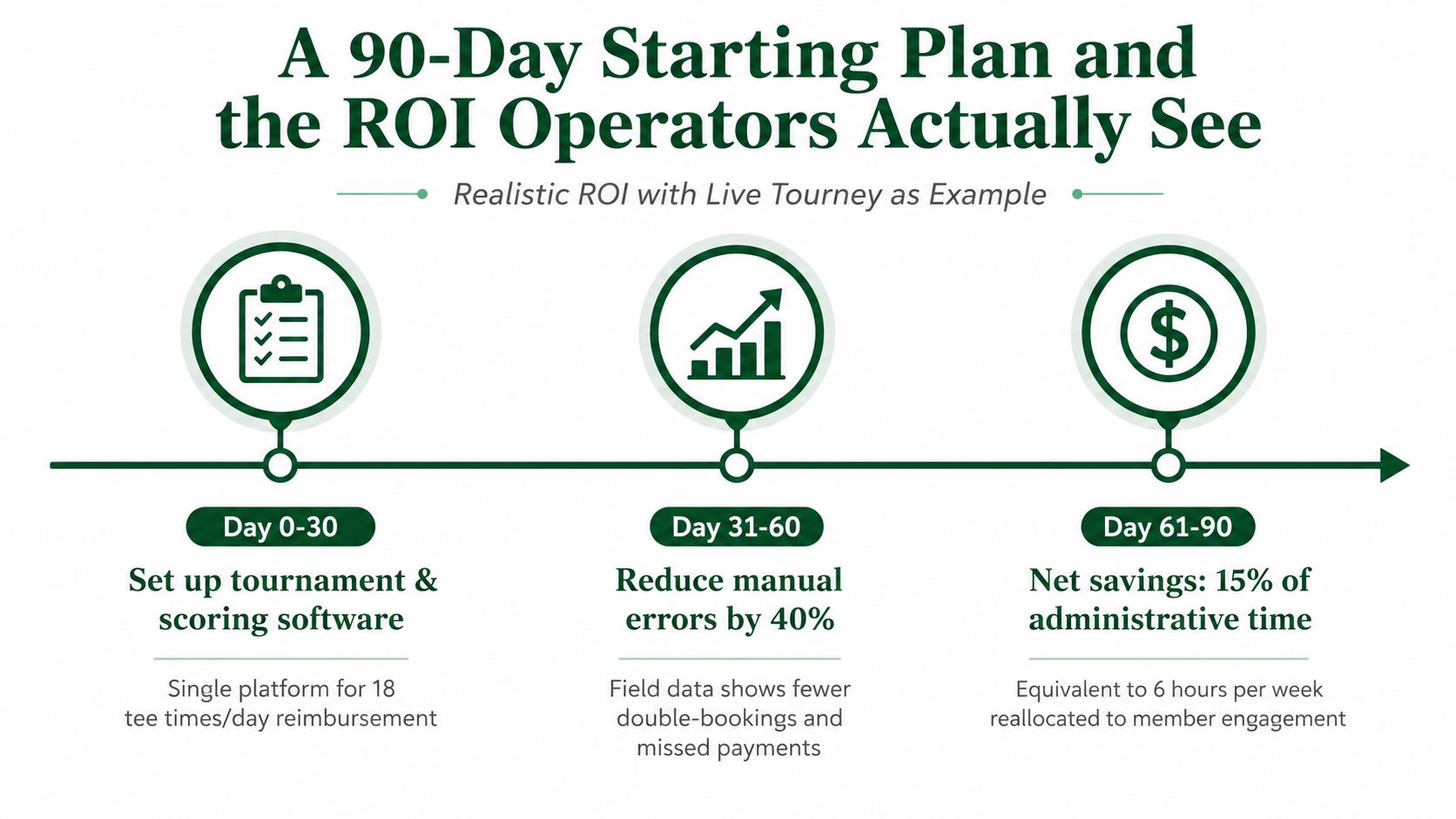
During the first 30 days, audit every handoff between the tee sheet, scoring, POS, and event staff. From days 31 to 60, pilot one high-friction workflow with a league or smaller outing. From days 61 to 90, expand only when staff can run it confidently and records show fewer corrections, clearer communication, or less duplicate entry.
Live Tourney provides registration, payments, roster and pairing management, live scoring, leaderboards, side games, payouts, and browser access without an app download. Use a focused event pilot to measure work removed before adding more systems.
Live Tourney helps golf courses and event organizers manage tournaments, leagues, registrations, payments, pairings, and live scoring from a browser-based platform. Visit Live Tourney to review the workflow and test the fit before expanding your golf course technology stack.