
Jul 26, 2026
skills challenge golf, golf event planning, live scoring golf, golf tournament software, golf course operations
Plan and run a skills challenge golf event with confidence. Covers challenge types, scoring, setup, marketing, prizes, and how Live Tourney speeds it all up.

You've got a tee sheet to fill, volunteers asking where to stand, and a last-minute rules question coming from the pro shop while players are already warming up. That's the moment a skills challenge golf event either feels sharp and professional or turns into noise. The good news is the format itself does most of the heavy lifting when you build it the right way, because it rewards accuracy, moves quickly, and keeps more people involved than a full-round grind ever will.
The smartest operators treat it as a clean, repeatable competition, not a loose collection of contests. That's why the model has stuck around for years, from simulator-based target games to the formal ADT Skills Challenge in 2003, which tested putting, driving distance, and short game and was won by Mark McGwire as documented in the event history. If you want a format that works for corporate outings, junior nights, and charity events without making staff chase chaos, this is the one.
Why Skills Challenge Golf Events Win Every Time
The turning point usually comes when a director sees the same thing happen twice. A group finishes a station, nobody agrees on the score, the line slows down, and three volunteers start asking different people for answers. A skills challenge golf format cuts through that mess because the score is tied to one task, a fixed number of attempts, and a clear result the moment the ball stops.
That clarity is why these events work for so many different groups. Players do not need a full 18-hole commitment to stay competitive, and beginners understand the game right away because the objective is simple. The target-based structure used in simulator and practice settings, where players hit to a single target over 10 shots and earn points from concentric scoring rings, is easy to standardize across venues and player groups because the score is based on accuracy over repeated attempts.
Why operators keep coming back to it
A skills event works because it lowers friction for everyone in the room. Golfers get a quick contest, sponsors get visible action, and the staff does not spend the afternoon doing scorecard triage. If you are running a corporate outing, a junior clinic, or a charity competition, you want something that can be explained in one sentence and run in a compact footprint.
Practical rule: if your format needs a long explanation before the first group tees off, it is too complicated for tournament day.
The format also has staying power because it is familiar, adaptable, and easy to package around different audiences. An ADT Skills Challenge style setup fits the same playbook as a simulator night or a sponsor-friendly side event, and if you are planning event promotion around golfer attention on property, Adwave's TV ad platform for golf is a useful reference for how that audience is reached.
For an operator, the takeaway is simple. A skills challenge is the right call when you want fast pace, broad participation, easy scoring, and repeatability, not a marathon that punishes the bottom half of the field. That is why it works so well for clubs trying to build a recurring event instead of a one-off novelty. For format ideas that match different outing goals, see formats for golf tournaments.
Picking the Right Challenge Types and Scoring Rules
The fastest way to make a skills challenge feel amateur is to stack too many contests on top of each other without a clear scoring system. Pick stations that fit the audience, then use rules that reward accuracy, not luck. If you are running skills challenge golf for a mixed group, the four standard station types are enough, and each one should be explainable in a few words.
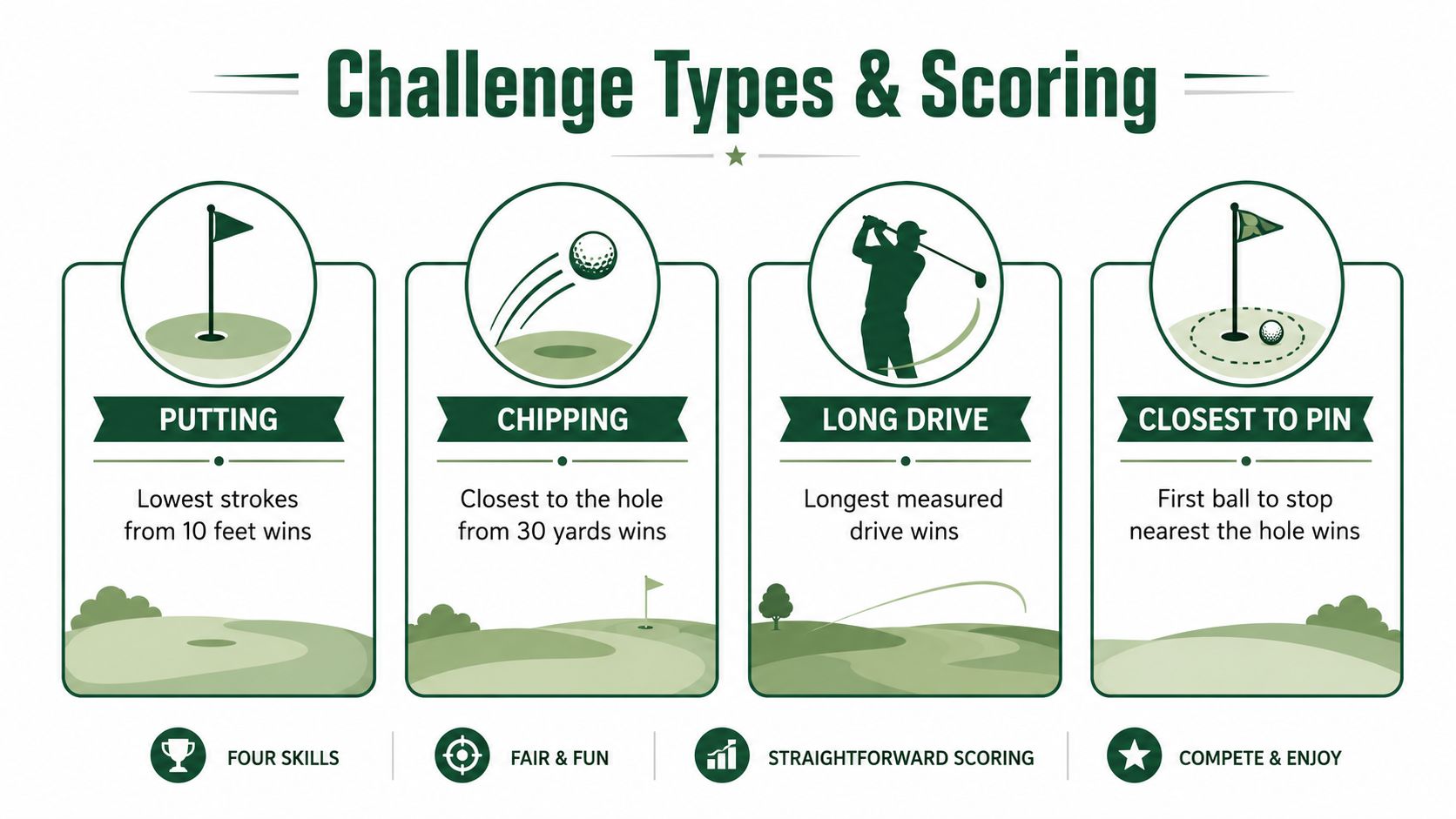
The four station types to use
Putting: score by make rate or distance windows. If you want a simple format, require a set number of holed putts from one or more fixed lengths.
Chipping: score by landing zone or proximity to the hole. Keep the target area visible, and do not rely on “closest one wins” alone.
Long drive: score by measured distance, but only if the landing area is safely controlled and the ball can be verified.
Closest to the pin: score by the single best proximity result, which works well as a side game but is weak as your only challenge.
For a 40-person corporate outing, I would run a two-station rotation, one proximity contest and one putting ladder. That keeps the pace moving and gives every player a way to contribute without turning the day into a pure test of ball-striking. For a junior skills night, use five short stations with progressive difficulty, because kids stay engaged when the task changes before fatigue does.
The cleanest structure is still the 10-shot target-ring format, because it standardizes the competition and keeps the scorecard simple with points driven by where the ball finishes inside concentric rings. That same logic lines up with the challenge-point approach, which says players learn best when the task is difficult enough to demand focus, but not so hard that every rep turns into a miss. In practice, that means a golfer should face measurable targets, get immediate feedback, and move up only when the current task is under control.
Do not build a contest around one lucky strike. Build it around repeatable reps, then raise the difficulty once the field starts running through it too easily.
The scoring mistake I would avoid hardest is over-rewarding the single closest ball while ignoring the rest of the station. That makes the event feel random. Use a clear pass-fail rule or a points window, then make the next round tougher when players start cruising through it. If you need a broader menu for matching contests to event goals, Live Tourney's tournament format guide is a useful reference.
Laying Out the Course, Stations, and Equipment
The easiest way to ruin a good idea is to crowd the stations. If chipping balls are crossing into a long-drive lane, or players can't tell where the next group should go, you've built confusion into the footprint. Keep the layout tight, visible, and safe, because the best skills challenge golf setups feel obvious the moment players step onto the property.

What the physical footprint should look like
Start with spacing. Put enough separation between your short-game and long-game areas so balls don't cross traffic, and keep a clear line of sight from the teeing area to the landing zone. A putting ladder needs a safe drop zone and a place for players to stand without blocking the next competitor.
Signage matters more than most head pros expect. One clean sign at each station, plus a directional arrow at the rotation point, lets players find their way and cuts down on staff babysitting. If you want the whole thing to feel polished, make every station look intentional, not improvised.
Equipment you already have
Range balls: use them for the long-drive and target stations.
Tee markers: define the start point so no one cheats the lane.
Paint or chalk: mark rings, landing zones, and safe boundaries.
Scorecards or tablets: keep scoring visible and immediate.
Water stations: players move faster when you keep them hydrated and near the action.
A good rule is to assign your head pro to the scoring logic and safety check, then let volunteers handle direction, setup, and cart-flow control. Spotters belong at the long-drive station, especially if your landing area is wide or shared. Accessibility matters too, so make sure walkers and carts can move through the route without needing special instructions every five minutes.
A 9-hole practice area can handle a 60-player rotation in under three hours if the stations are staged correctly and the groups are moving in clean intervals. If you want a deeper planning reference, Live Tourney's custom golf course map guide fits naturally into this process because it helps you think about the property as a sequence of controllable contest zones, not just a golf course.
Registration, Payments, and Live Scoring in One Workflow
Treat registration, payment, and scoring as one job. If you split them across three tools, you create three chances for things to break, and someone on your staff ends up retyping the same names into three places. A better skills challenge golf workflow starts with one event page, one form, and one roster that powers everything else.
What to collect and what to skip
Ask for the information you'll use on event day, then stop. You need player name, division if you're splitting fields, team name if it's a group event, and payment status so nobody is chasing money at check-in. Handicap can matter for certain formats, but don't turn the form into a census.
The friction-killer is app-free live scoring. With a shared link, players score from their phones without downloading anything, which means no app-store detours, no IT support ticket, and no excuses from the group that forgot to install software. For an operator, that's the difference between a leaderboard people use and a leaderboard people ignore.
Set the workflow before the first signup
Open the event page.
Collect registration and payment together.
Build rosters from the submitted data.
Push those rosters into scoring.
Display the side-game leaderboard the moment results are entered.
That last step is where the room comes alive. A closest-to-the-pin result should update the instant the ball stops, because delayed scoring kills energy faster than a slow group on the first tee. If you need volunteer coverage to support check-in and station flow, VolunteerBadge's volunteer software is relevant because the event lives or dies on whether the right people are standing in the right places when players arrive.
Live Tourney has powered 10,000+ events and 1M+ holes scored, with courses reporting a 40% increase in live scoring participation after switching to the platform. That matters because a contest only feels dynamic if players interact with the scoring flow. If you're looking for a single system that ties registration, rosters, scoring, reports, cart signs, and bag tags together, the platform approach is the right one and it fits neatly into the broader golf event management workflow.
Prize Structures That Match Your Audience
Prizes should match the mood of the event, not your personal preference. A club crowd wants fairness and bragging rights, a charity field wants fundraising momentum, and a competitive field wants a payout structure that feels like a real game. The wrong structure makes players feel underwhelmed even when the contest itself was solid.
What to use and when
A flat payout works when you need people to leave happy together. In a 12-team corporate scramble, splitting the top three take equally keeps the room calm and avoids the feeling that one team took everything. A tiered payout is better when the event needs more competitive energy, such as a 30-person charity outing, because the bigger top-end prize helps the format feel meaningful without making the whole table look stingy.
A skins game is the one I'd use for a 60-player competitive field that already has side-bet energy. It rewards the players who want every hole to matter and gives the field a reason to keep paying attention all day. The only mistake is trying to force skins onto a casual crowd that just wants a clean afternoon and a fair chance.
Structure | Best For | Payout Feel | Setup Effort |
|---|---|---|---|
Flat payout | Corporate outings, mixed social groups | Even, friendly, low-drama | Low |
Tiered payout | Charity events, stronger competitive fields | Top-heavy, more like a purse | Moderate |
Skins | Strong players, side-bet groups, high engagement fields | Volatile, dramatic, hole-by-hole | Moderate |
Non-cash prizes still land well at club level. A closest-to-the-pin trophy, a longest drive bottle of bourbon, or simple bragging rights in a putting contest can be better than cash when the audience values story over dollars. Use cash when the competition is serious, and use personality when the event is about community.
Marketing the Event So Registration Fills Early
Most skills events don't miss because the format is bad. They miss because the marketing starts too late. If you wait until a week out, you're asking people to rearrange their calendar for a contest they've barely heard about, and that's a weak position to be in.
Run the countdown like a campaign
At 30 days, send the save-the-date email. At 21 days, open registration and put the form in every channel that matters. In week two, publish two social posts, one for the competitive crowd and one for the casual crowd, so you don't talk to every audience like they want the same thing.
At 5 days, send the final-call email. At 24 hours, use a same-day text blast to hit the people who meant to register but didn't finish the job. If you want a clean way to manage those touchpoints without making the pro shop staff build every list by hand, Sendvo's direct mail campaign management tools fit naturally into a broader promotion workflow.
Use the right message for the right player
Competitive angle: lead with leaderboard pressure, bragging rights, and measurable stations.
Fun angle: lead with social energy, easy participation, and a fast pace.
Development angle: lead with confidence building, repetition, and junior-friendly stations.
Partnerships help fill spots faster than another generic flyer. A local restaurant can help with a post-event dinner, a beverage sponsor can make the awards feel bigger, and a simulator bay can donate a secondary prize that keeps the package interesting. Track registrations per week, not just the final headcount, because that tells you early whether your campaign is working or whether you need to change the message.
Pre-Event Checklist and the One Metric That Tells You It Worked
By the time you get to the final week, the event should feel mechanical. Every task needs an owner, every owner needs a deadline, and every deliverable needs a clear definition of done. If you print one thing and tape it to the pro shop wall, make it a countdown that covers T-30, T-14, T-7, T-3, T-1, and day-of.
The checklist that keeps you out of trouble
T-30: lock the format, station count, and promotion plan.
T-14: confirm prizes, volunteers, and scoring flow.
T-7: finalize rosters, cart signs, and station signage.
T-3: test equipment, verify weather backups, and review roles.
T-1: print scorecards, bag tags, and sponsor materials.
Day-of: stage stations, brief staff, and start on time.
The metric that matters most is live scoring participation rate. If players are using the scoring system, they're engaged, the leaderboard has energy, and your staff spends less time chasing paper. If they aren't using it, the event feels slower even when the golf is fine.
Rain, no-shows, equipment failure, and slow stations all become easier to manage when the roster, scoring, and communications live in one place. That's what turns a problem into a ten-minute fix instead of a scramble. Send the sponsors and board a short recap the next morning with attendance, winner names, and a few photos, and you'll make the event look intentional from start to finish.
If you want to run a skills challenge golf event that feels organized from the first signup to the final prize handoff, use Live Tourney to handle registration, scoring, payouts, and event-day materials in one place. Visit Live Tourney and build your next outing the way a head pro would, clean, fast, and ready for players the moment they arrive.





