May 21, 2026
custom golf events, golf tournament planning, live golf scoring, event management software, charity golf outings
Learn how to plan and execute flawless custom golf events. Our 2026 guide covers format selection, app-free live scoring, sponsorships, and logistics.
You're probably staring at the same problem most organizers hit. You want a golf event that feels custom, premium, and worth the entry fee or sponsorship spend, but you don't want your staff buried in spreadsheets, text chains, paper scorecards, and last-minute fixes.
That tension defines most custom golf events. The mistake is assuming “custom” means adding more stuff. More swag. More signage. More moving parts. In practice, the events that feel most polished usually simplify the right things and personalize the visible things. Players notice a smooth check-in, clear pairings, fast scoring, a live leaderboard, and an awards ceremony that doesn't drag. Sponsors notice clean branding, reliable visibility, and a host who can report what happened after the round.
The strongest events run like productions, not like casual outings. Tournament-planning guidance from Torrey Pines on planning a successful corporate golf tournament reflects that reality. The basics still matter: objectives, budget, committee, venue, format, sponsorships, marketing, registration, logistics, and awards. But the difference now is execution. The custom part has to be operationally clean, not just visually branded.
Blueprinting Your Event Concept and Format
Before you choose tee gifts or design sponsor signs, decide what the event is supposed to do. Fundraising. Client entertainment. Member competition. Staff appreciation. Lead generation. If you skip that step, every later decision gets fuzzy, especially pricing, field size, format, and sponsor structure.
The clearest benchmark for premium event design comes from the professional side. The PGA TOUR's 2026 Signature Events model includes eight Signature Events, each with $20 million in prize money and 700 FedExCup points to the winner. Those events are built around limited fields and a curated experience, not open-access volume. That doesn't mean your charity outing needs to imitate the TOUR. It means the market has moved toward events that feel intentional, selective, and professionally run.
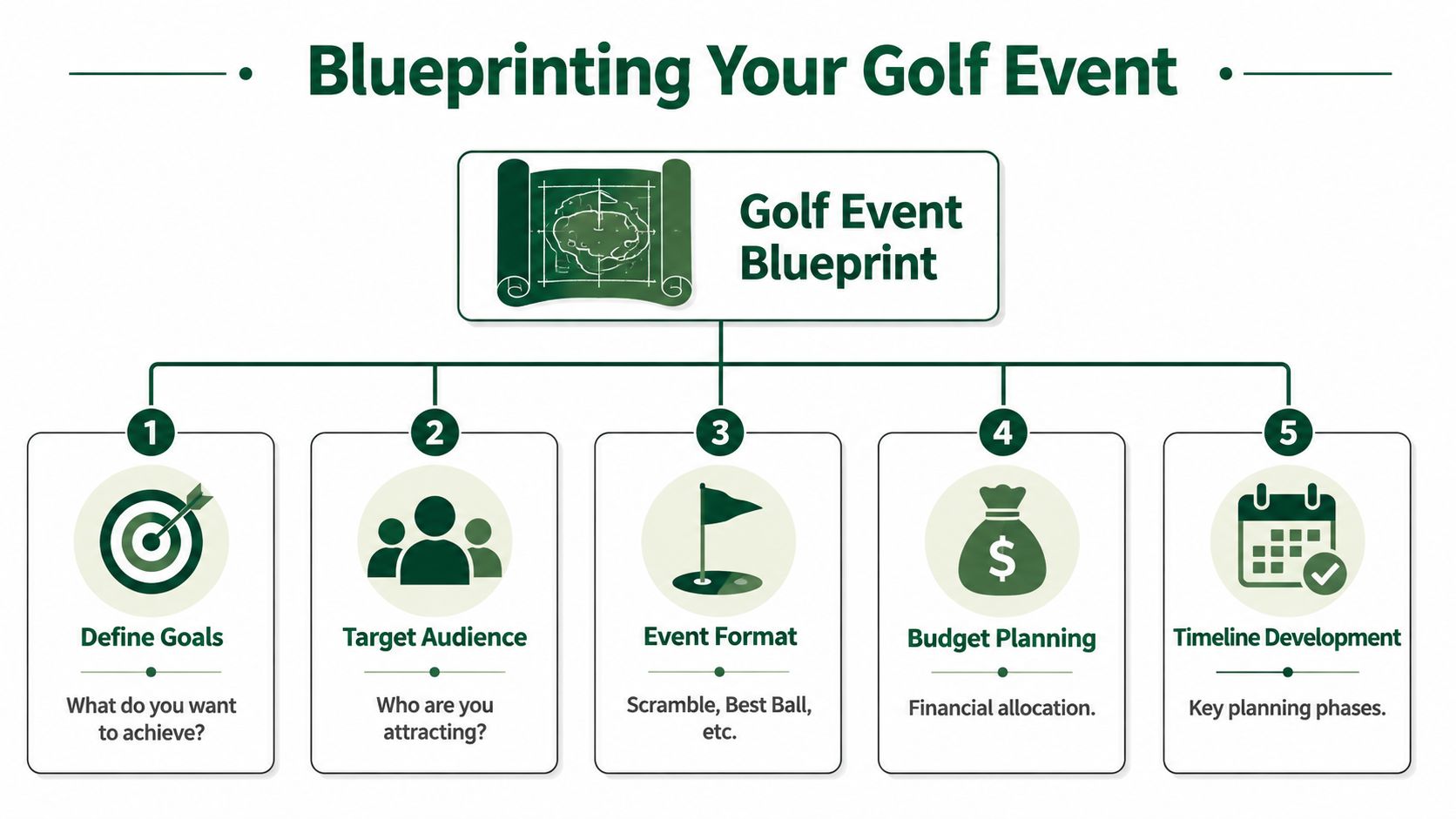
Start with purpose, then pick format
Format should match audience behavior, not organizer preference.
Event type | Format that usually works | Why it fits |
|---|---|---|
Charity fundraiser | Scramble | Keeps play social and accessible |
Corporate outing | Scramble or team-based format | Supports networking and mixed skill levels |
Member event | Best-ball or individual stroke play | Better for competitive integrity |
Invitational | Flighted team or match play | Creates stakes without overcomplicating entry |
A scramble is forgiving and social. Best-ball works better when players care about posting real scores. Match play can be great for club culture, but it adds structure you need to manage correctly. If the room is full of casual golfers and first-time guests, a hard-core format usually backfires.
Practical rule: If players need a long explanation on the first tee, the format is too complicated for that audience.
Define the tone early
Most custom golf events fail in small identity conflicts. The invitation says premium invitational, but the registration process feels like a school fundraiser. The event promises a relaxed networking day, but pairings are built like a club championship. The tone has to stay consistent from first email to final award.
Three questions settle the tone fast:
Who is this for: Existing members, donor prospects, clients, employees, or mixed guests.
What should they remember: Competition, hospitality, networking, fundraising, or exclusivity.
What are they buying into: A golf round, a hosted experience, a sponsor platform, or a club tradition.
Theme can help if it sharpens the experience instead of distracting from it. If you need inspiration, 10 unique event theme ideas can spark concepts that work for corporate hospitality, charity presentation, or seasonal club events. The key is restraint. Build the event around one clear idea, then apply it to invitations, signage, sponsor naming, and awards.
For organizers who want examples that translate well to actual tournament operations, these golf tournament ideas are useful because they connect event concepts to formats and on-course execution.
Decide what feels premium
Premium doesn't automatically mean expensive. It means edited.
Limit field size if service matters. Price around experience, not just golf. Define what's included. Set expectations around competition and hospitality. A full field with a vague schedule feels cheap, even when the budget isn't.
A tighter field, stronger sponsor presentation, cleaner logistics, and faster scoring usually create more perceived value than another logo item in the gift bag.
Building Your Registration and Sponsorship Engine
Manual registration causes more pre-event stress than almost anything else. Not because it's impossible, but because it breaks in slow, expensive ways. Someone submits a foursome by email. Another person pays by check. A sponsor wants three player names added later. Shirt sizes arrive in a separate message. Handicap notes sit in a spreadsheet tab no one updates. By the week of the event, staff are reconciling details instead of managing the event.
That's why registration and sponsorship need to be built as one system, not two separate admin tasks.
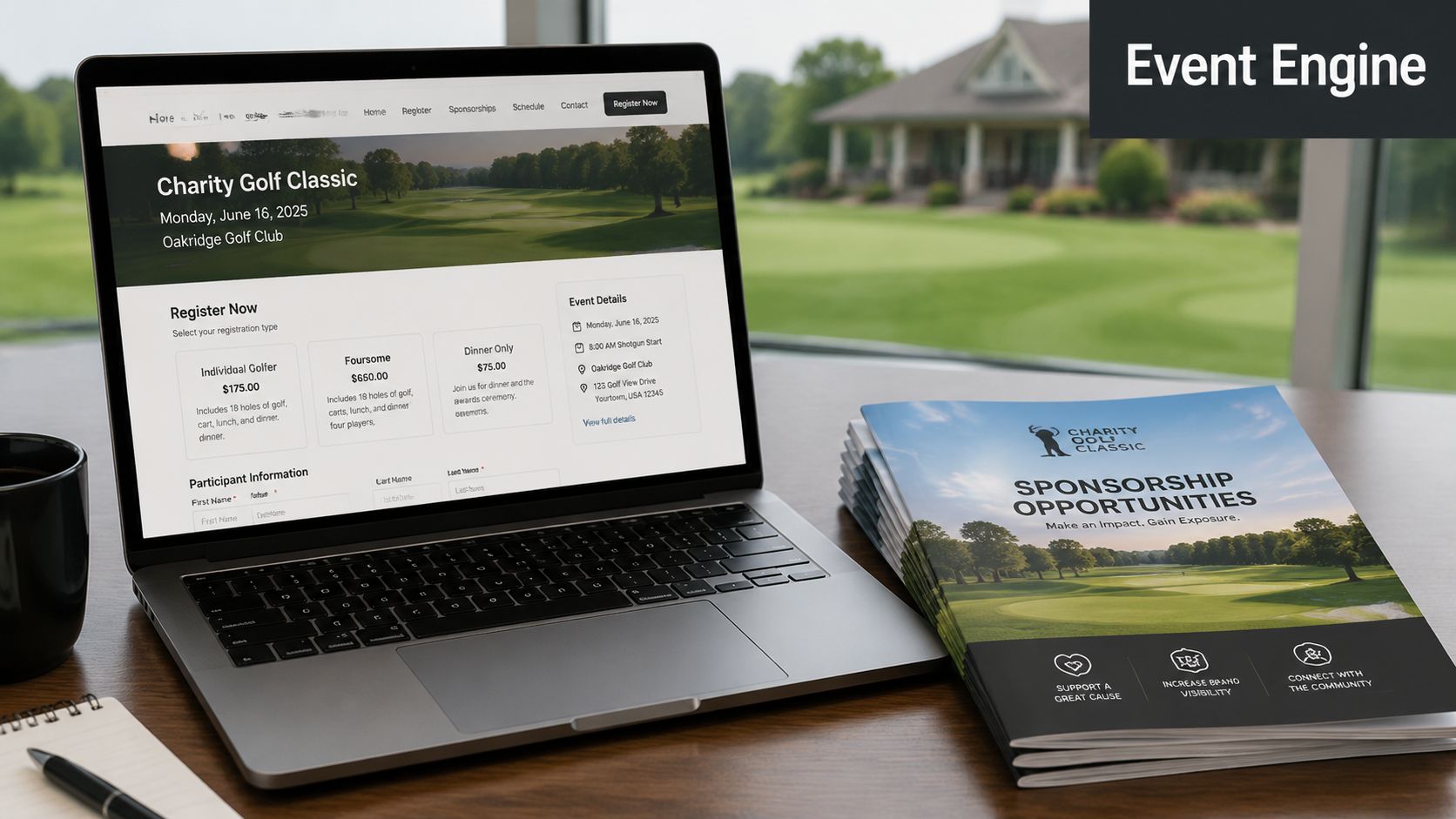
Build one intake flow
A proper golf event registration flow should capture the details you'll use on tournament day. That includes team information, handicap, dietary needs, shirt size, preferred playing partners, sponsor status, and billing data. If you collect that across forms, emails, and spreadsheets, your event already has friction baked in.
Industry guidance from Lightspeed on maximizing corporate golf event revenues suggests planning 3–6 months in advance. That timeline matters because registration and sponsorship sales feed each other. You can't market tiers well if fulfillment is vague, and you can't forecast the day if player data is incomplete.
Use one registration experience that does four jobs:
Collect player details: Get the information needed for pairings, scorecards, and hospitality.
Take payment: Remove back-and-forth invoices where possible.
Trigger confirmations: Send receipts and event details immediately.
Support updates: Let staff edit roster details without rebuilding everything.
Package sponsorships around visibility
The most effective sponsorship packages are tied to things players see and interact with. Tee signs still work. So do contest sponsors and meal sponsors. But custom golf events now have more useful inventory if the event is run digitally.
Good packages often include:
Leaderboard placement: A sponsor logo attached to live scoring screens or leaderboard views.
Email exposure: Inclusion in pre-event reminders or post-event thank-you sends.
On-course moments: Branded contests, hospitality holes, or welcome-table placement.
Awards presence: Mention in winner announcements and prize presentation.
If you need help identifying the right contact at a local business, EmailScout's guide to emails is a practical starting point for outreach research. It's not a sponsorship strategy by itself, but it helps avoid the common stall where staff know which companies they want, yet don't know who to approach.
Sponsors don't buy a logo placement. They buy confidence that the event will present their brand cleanly and follow through.
For structuring tiers, deliverables, and naming rights, these charity golf tournament sponsorship packages are useful because they frame sponsorships around tangible visibility rather than generic donor asks.
Add revenue before launch
Don't treat extras like hole-in-one contests, raffles, auctions, and on-course games as last-minute ideas. They work better when they're built into registration messaging and sponsor inventory from the start. If they appear late, staff scramble to sell them and players treat them as optional clutter.
The strongest setup is simple: one clean registration path, one sponsor deck with clear deliverables, automated confirmations, and no admin process that depends on a single person's inbox.
Perfecting Pairings and Scoring Logistics
For a golf event, a roster becomes an actual tournament. Generic event tools also falter at this stage. A golf event isn't just a guest list. It has pairings, hole assignments, cart signs, handicaps, flights, scorecards, side games, and leaderboard rules. If your system can't handle those natively, staff end up creating workarounds all week and babysitting them all day.
A more reliable way to think about custom golf events is in three layers: pre-event setup, live operation, and post-event analysis. Guidance from Golfmanager's guide to corporate golf events points to that structure and warns against forcing golf workflows into generic CRM or ticketing software. That usually creates clunky processes and more staff intervention when play starts.
Turn the roster into usable outputs
Once registration closes, your player data should feed directly into tournament materials. If it doesn't, you'll repeat the same information by hand across multiple documents.
The minimum output set usually includes:
Tee sheet with times, names, and starting assignments.
Pairings list for staff, starters, and player check-in.
Cart signs that match your course setup and sponsor plan.
Scorecards with the right format and team structure.
Bag tags or roster labels if your event uses them.
Purpose-built golf software earns its keep. It should let you upload or edit the roster once, then generate the materials from that same source of truth. If staff are typing names into scorecards after they've already built pairings elsewhere, errors are almost guaranteed.
Build pairings with intent
Good pairings solve human problems before they become operational problems.
For a corporate outing, mix ability levels and relationship goals. Don't stack all the serious golfers into one group and leave beginners feeling exposed. For a charity event, keep sponsor guests and hosts together where possible. For member events, protect competitive fairness first, then social preference.
A simple pairing checklist helps:
Respect event objective: Social groups for networking events, balanced competition for club play.
Use known constraints: Sponsor hosts, VIPs, accessibility needs, and pace-of-play risks.
Watch the bottlenecks: Par-3 contest holes, beverage stations, and crossover traffic points.
Confirm before publishing: Last-minute substitutions happen. Build for them.
Make scoring app-free
The biggest scoring mistake in custom golf events is adding friction at the exact moment you need participation. If players have to download an app, create an account, verify credentials, and learn a new interface on the first tee, a good chunk of them won't bother. Then your “live scoring” becomes partial scoring, and staff still chase paper cards.
App-free, browser-based scoring is the cleanest answer. Players get a link. They open it on any phone. They enter scores. The leaderboard updates without a software lesson.
That setup matters for more than convenience. It also protects pace of play and reduces scoring disputes because players can see standings as they go rather than handing in cards after the fact. If your event includes side games, nearest-the-pin tracking, or team standings, all of that becomes easier when scoring is live instead of reconstructed later.
For organizers comparing methods, this guide to scoring in a golf tournament is useful because it connects format choice to scoring setup instead of treating scoring as an afterthought.
If live scoring requires a training session, the system is too heavy for a mixed-skill field.
One practical option in this category is Live Tourney, a web-based platform built for golf-specific operations like roster uploads, scorecards, tee sheets, cart signs, side games, and app-free live scoring. The point isn't brand loyalty. It's fit. Golf events run better when the tool understands golf.
Elevating the On-Course Player Experience
Players don't judge custom golf events by how much effort the organizer spent. They judge them by whether the day feels smooth, visible, and worth talking about afterward.
That usually shows up in small moments. Check-in moves fast. Cart signs are correct. The first tee instructions are clear. A team enters a score on the phone in seconds and immediately sees the leaderboard shift. Someone in the clubhouse can follow the standings without chasing volunteers for updates. Those details feel modern because they remove waiting.
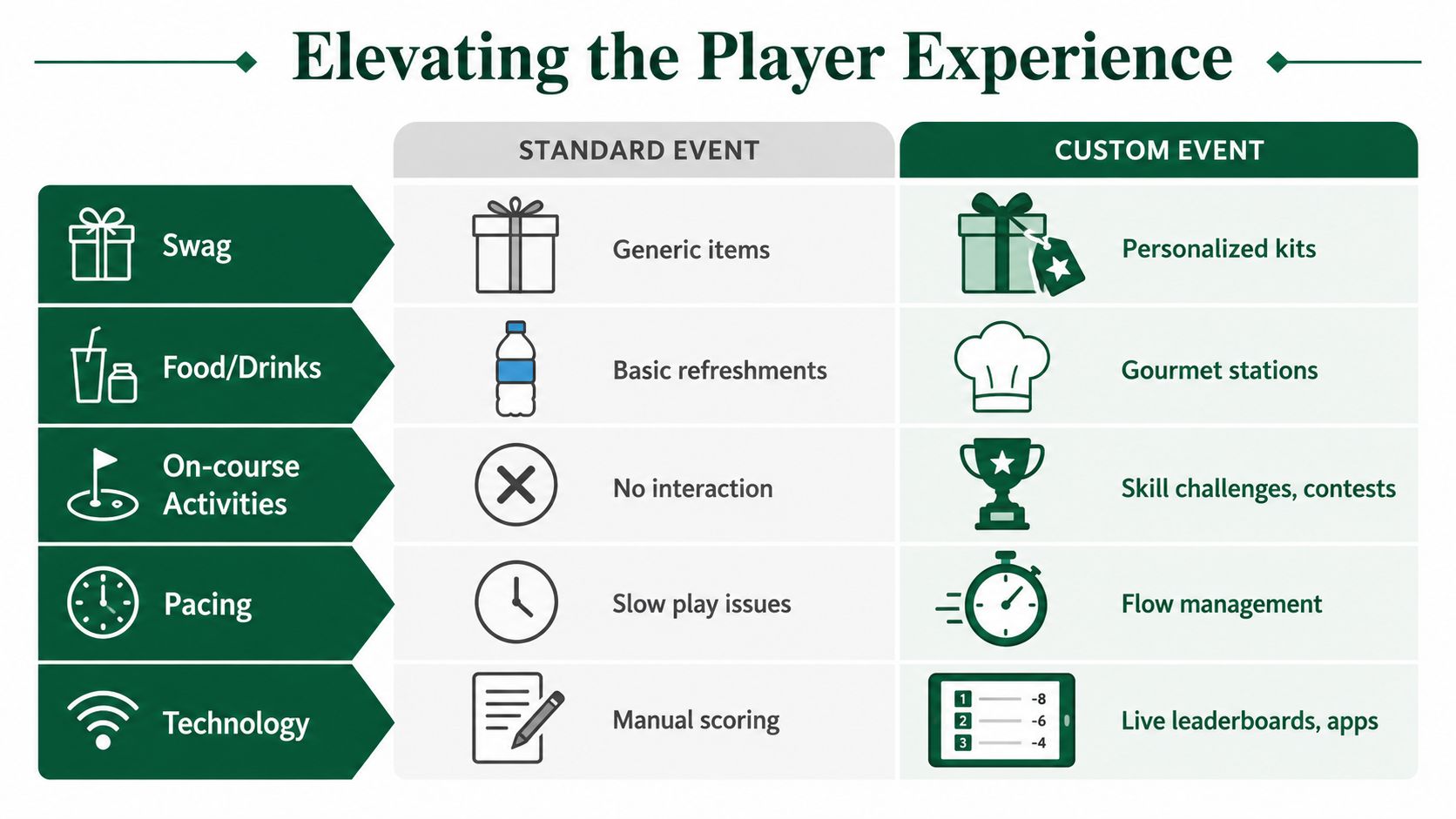
Friction ruins customization
A lot of organizers overbuild the experience in the wrong place. They spend heavily on branded extras, then force players into a separate app to access pairings or submit scores. That's a poor trade. According to Thrillforge's discussion of golf tournament activations, 72% of event organizers used dedicated event technology in 2025, while only 58% of attendees said they were comfortable using a separate event app. That gap matters on the course.
Browser-based scoring and registration fit golf better because they remove the download barrier. Players tap a link and move on. For mixed-age fields, guest-heavy invitationals, and charity outings, that matters more than a fully branded app shell.
What players actually remember
The on-course experience improves when you customize touchpoints with high visibility instead of everything at once.
A practical mix looks like this:
Leaderboards that update during play: Players engage because they can see movement in real time.
Branded tee signs and contest holes: Sponsors get seen where attention already exists.
Clear digital access to pairings and scores: Fewer questions at the starter table.
GPS or course guidance for unfamiliar guests: Less confusion on resort or host-venue layouts.
Pace management from marshals and staff: Players notice when the day keeps moving.
The best player experience rarely comes from adding more. It comes from removing the moments where players have to ask, wait, or guess.
Sponsor value improves when players engage
This is the part many events miss. Live scoring doesn't just help players. It creates sponsor inventory attached to repeated attention. If players check standings throughout the round, the leaderboard becomes a real visibility asset. If the leaderboard is stale because only a few groups submitted scores, that value disappears.
That's why the app-free approach matters. It doesn't just simplify tech. It supports the experience players want while making sponsor exposure more credible.
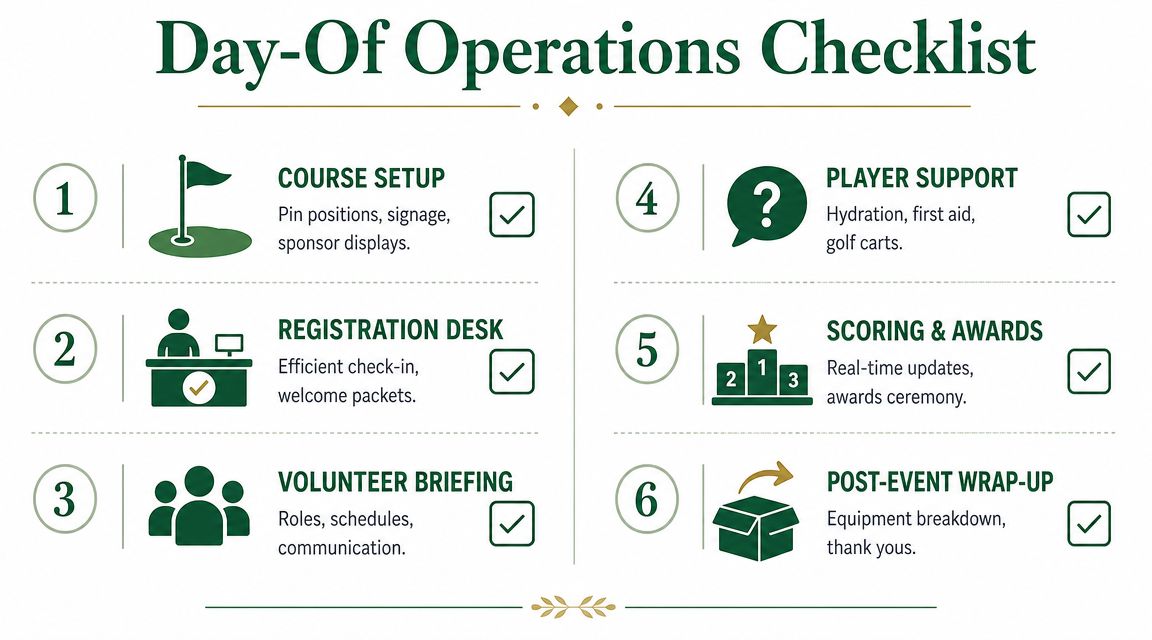
Executing Flawless Day-Of Operations
Tournament day is a logistics job disguised as hospitality. If your systems are solid, the day feels calm. If they aren't, every issue reaches the registration table at once.
The strongest day-of operations start before the first guest arrives. Staff need to know where players check in, who handles substitutions, how contests are monitored, who answers scoring questions, and when awards materials get finalized. Course staff, outside services, food and beverage, and tournament staff all need the same run of show.
Run check-in like a front desk, not a folding table
Check-in sets the tone. If players arrive and stand in a messy line while staff flip through printed lists, the event feels less premium before anyone hits a shot.
A clean check-in flow usually includes:
Separate lines or stations: Prepaid teams, sponsor guests, and unresolved payments shouldn't bottleneck each other.
Pre-sorted materials: Cart signs, player gifts, score instructions, and contest info should already be grouped.
One authority for changes: Assign one person to handle substitutions and team edits so details don't split across volunteers.
Visible scoring instructions: A QR code or short link at check-in saves repeated explanations later.
Brief the people who control pace
You can recover from a late sponsor banner. You usually can't recover from poor pacing once the course backs up.
Before the shotgun or first tee start, brief the people who influence flow:
Role | What they need to know |
|---|---|
Registration staff | Check-in flow, roster edits, payment exceptions |
Starter | Format summary, pace expectations, contest reminders |
Marshals | Slow groups, contest congestion, support calls |
Scoring desk | Tie-break method, side games, posting sequence |
Awards lead | Winner categories, sponsor mentions, timing |
If the course uses on-course contests, define who measures, who records, and where results go. Longest drive and nearest-the-pin can become small headaches when no one owns the process.
Keep the host visible and the system stable
The organizer's job on tournament day isn't to touch everything. It's to spot drift early. Walk the check-in area. Check the first tee. Confirm scoring is coming in. Watch for gaps in beverage service or sponsor activation. Stay reachable, but don't become the only decision-maker for routine issues.
A few habits help:
Print a master run sheet: Even if most details are digital.
Carry a short escalation list: Course contact, catering lead, scoring lead, volunteer lead.
Reconfirm awards timing: Players tolerate a short buffer. They don't tolerate dead air.
Prepare weather and delay messaging: Even a simple communication plan prevents confusion.
Good day-of execution feels almost invisible to players. That's the point.
Post-Event Wrap-Up and Future Planning
A golf event doesn't end at the 18th green. The most valuable work starts right after, when scores are final, sponsor visibility can be documented, and players still remember the day clearly enough to give useful feedback.
Custom golf events become repeatable or stay one-off productions based on the follow-up. If you close the loop well, next year gets easier. If you don't, staff start from zero again.
Finish scoring and payouts while the event still feels live
The first job is operational. Finalize scores, confirm tie-breaks, settle side games, and make sure awards match the published rules. If your scoring system is clean, this is straightforward. If staff are reconstructing cards, double-checking handicaps, and chasing contest results from volunteers, the awards timeline slips.
The practical standard is simple. Publish results fast, with confidence. Players will forgive a brief wait if the result feels organized. They won't forgive confusion at the podium.
Send tailored follow-up, not one generic thank-you
Post-event communication should split by audience. Players, sponsors, volunteers, and host stakeholders need different messages because they contributed in different ways and care about different outcomes.
A useful follow-up sequence often includes:
Players: Thank-you note, results, photo link, and early notice for the next event.
Sponsors: Delivery recap, placement summary, acknowledgement in results communication, and a conversation about renewal.
Volunteers and staff: Appreciation, debrief notes, and lessons for next time.
Internal stakeholders: Revenue summary, operational wins, and improvement list.
This is where documentation matters. According to Britten's analysis of custom golf events, 63% of attendees expect personalized event experiences and 64% of organizers face pressure to prove measurable business impact. That pressure is real in golf. Hosts want to know whether the custom elements improved sponsor value, player satisfaction, and staff efficiency, not just whether the day looked polished.
A sponsor recap should answer one question clearly: what did you receive, and how visible was it?
Use the data to simplify the next event
The smartest organizers don't just review feedback. They review friction.
Look at where staff had to intervene. Registration edits. Pairing exceptions. Score entry confusion. Contest administration. Awards delays. Those are the places where “custom” became expensive.
Then separate your custom elements into three buckets:
Keep | Refine | Drop |
|---|---|---|
Elements players engaged with and sponsors noticed | Features that worked but created admin load | Extras that looked good but added little value |
That exercise usually reveals something useful. The pieces worth repeating are often the operational ones. Cleaner check-in. Better pairing data. Faster score posting. More visible sponsor touchpoints. Stronger follow-up reporting. Those are the parts that make custom golf events scalable.
When you can document what players used, what sponsors saw, and where staff time went, next year's planning stops being guesswork. It becomes a tighter build with fewer moving parts and better results.
If you want a simpler way to run custom golf events without adding app friction, Live Tourney gives organizers a web-based system for registration, pairings, scorecards, live scoring, leaderboards, and tournament-day materials in one place. It's a practical fit for courses, clubs, and outing organizers who want a polished event without the usual software overhead.