
Sep 22, 2026
golf scoreboard app, live scoring, tournament software, golf apps, league management
Discover how to pick the right golf scoreboard app for live tournament tracking. Compare top scoring platforms and simplify your game in 2026.

At 6:15 a.m., a golf outing looks polished only from a distance. Up close, the head pro is answering questions, volunteers are directing carts, players are hunting for their starting holes, and someone is asking whether the leaderboard will update. The choice of a golf scoreboard app can determine whether the event feels organized or turns into a morning of troubleshooting.
The important decision isn't which platform has the longest feature list. It's whether players can score quickly, whether the system survives weak connectivity, and whether spectators can follow the action without installing anything. Native apps still have a place, particularly for golfers who want deep personal statistics, but browser-based scoring has become the smarter default for many organized events.
The Morning Your Outing Almost Fell Apart
At 6:15 a.m., the head pro was preparing a sold-out charity outing while volunteers handled arrivals. One volunteer stood near the clubhouse trying to download the event's golf scoreboard app over a weak connection. Behind him, 144 players waited at cart staging, looking for pairings, starting holes, and clear scoring instructions.
Three foursomes had taken paper scorecards. Two groups had installed the wrong app. The grille television was on, but the leaderboard showed zeros because the setup was incomplete. The brochure promised a professional tournament. The course was producing a queue, confused volunteers, and a screen that appeared broken.

Organizers recognize this problem. A platform can look simple during planning and still fail when guests bring different phones, patience levels, and expectations of “live scoring.” One volunteer may know the system. Another may be seeing it for the first time. A player may have service at the first tee and no connection on the back nine.
The right test is friction, not a feature checklist. Can a scorer open the system from a shared link without downloading anything? Can staff correct a mistaken entry quickly? Does scoring continue through a dead zone, or does every group wait for synchronization? Can family members and sponsors view results remotely?
Staff training matters just as much. A native app may offer stronger personal statistics, but every player must install it, grant permissions, and find the event. That process creates work before the first tee. Browser-based scoring removes much of that work and gives volunteers one access path to demonstrate on different phones.
A sound platform makes setup forgettable. A weak one turns installation, sign-in, and connectivity into the event itself. For organized outings, use app-free browser scoring as the default. Choose a native app when personal tracking is the priority and the field will reliably install and use it, as shown by the personal-statistics focus of Golfshot.
Organizer priority | Native golf scoreboard app | Browser-first scoring |
|---|---|---|
Player access | Requires installation and often onboarding | Opens from a shared link |
Volunteer setup | Staff must understand the app flow | Easier to demonstrate on any phone |
Live leaderboard | Strong when users are connected and signed in | Shareable across phones and screens |
Weak-signal handling | Depends on the individual app and sync design | Some platforms support offline entry and later synchronization |
Personal statistics | Often the stronger option | Usually focused on event scoring and results |
What a Golf Scoreboard App Actually Does in 2026
A golf scoreboard app is no longer just a paper scorecard on a phone. It can collect hole-by-hole scores, publish live standings, and turn completed rounds into usable event records. Some platforms also track fairways hit, greens in regulation, putting, penalty strokes, shot history, round summaries, handicaps, and performance analytics. Personal-statistics tools may offer a much broader set of metrics, but organizers should not confuse that depth with tournament scoring.
A complete system handles three jobs. It lets players or volunteers enter scores during play, displays standings for players, spectators, clubhouse televisions, and shared screens, then gives organizers results for handicaps, payouts, recap emails, and records. A product that only stores scores is a digital scorecard, not a full tournament scoreboard.
From paper to shared screens
At a traditional outing, a player marked a paper card, a volunteer collected it, and staff calculated results after play. Native apps moved entry onto phones, yet they also added practical work. Each participant had to find the correct app, install it, approve permissions, sign in, and locate the event. That friction matters on a busy first tee, especially when volunteers are training players at the same time.
Browser-first scoring removes much of that setup. The organizer shares a link, and players open a scorecard or leaderboard in a mobile browser. Leaderboard Live presents a model in which players enter scores and view a shared leaderboard without downloading software, while organizers can configure a one-off event or a multi-day tournament.
Dead zones still decide whether a platform works on the course. Check how it handles unsent entries, reconnection, and later synchronization before choosing it. Staff should be able to demonstrate the process on a phone or tablet without teaching every player a separate installation routine. For a visible scoring point, a digital leaderboard can sit alongside practical equipment such as a compact golf trolley with scoreboard.
The word “app” tells you too little. Confirm whether the product requires a native install, runs in a browser, or combines event scoring with personal statistics. For the distinction between live scorecards and tournament leaderboards, use this guide to golf tournament live scoring. For organized events, browser access is the sensible default unless personal tracking clearly outweighs download and training friction.
The Criteria That Actually Matter When You Compare Platforms
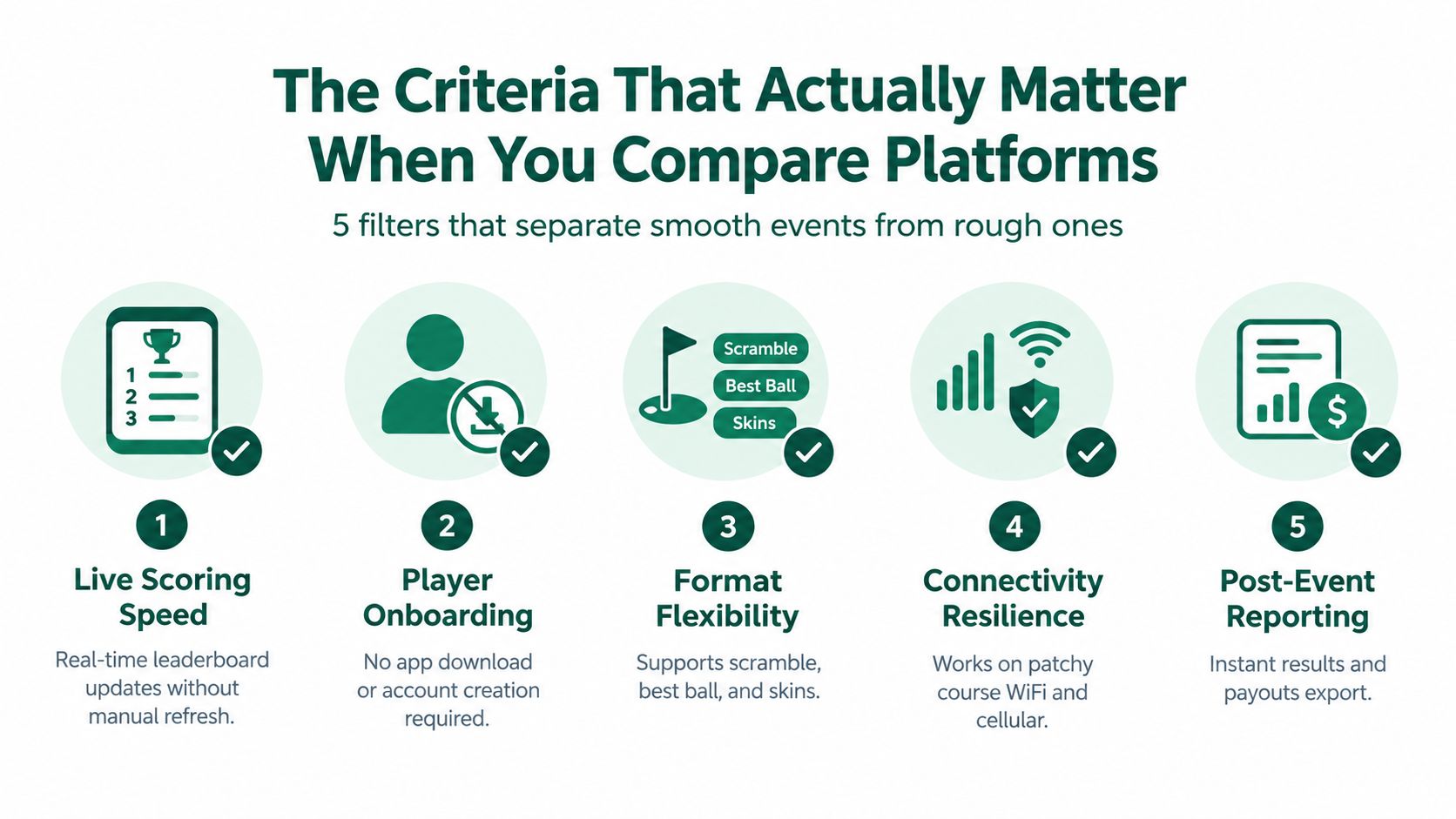
A long comparison grid can make weak software look impressive. A platform may list dozens of features and still fail when a first-time scorer enters a simple par. Rank usability, format support, leaderboard delivery, administration, and total cost above raw feature count. For an organized event, the best platform is the one staff and players can operate without extra instruction.
Start with the scorer
The scorer may be a team captain, volunteer, junior golfer, or player who does not want a technical assignment. The next action should be obvious. Corrections should be possible without calling the office, and the system should confirm that each entry was saved. If volunteers need a briefing longer than the tournament rules briefing, skip that platform.
Connectivity deserves equal weight. A browser-based product such as SoftGolf's live scoring feature set lists real-time leaderboard views, filters by round and tee, and offline scoring for areas without cellular service. Check how entries are stored, what happens after a lost connection, and whether scores synchronize automatically when service returns. Those details matter more than a decorative dashboard.
Test the competition rules
List the formats your events use before comparing products. Common requirements include stroke play, Stableford, best ball, and skins. The system must also show accurate standings when players compete under different calculations. Choose dependable support for your regular formats over a large menu of options your staff will never use.
Judge the output, not the promise
Ask where the leaderboard can appear. Can players share a public link? Can a clubhouse screen show standings without a staff login? Can the system produce pairing, payout, and result reports after play? A mobile golf scoring app guide is useful for reviewing scoring workflows, but test the actual product with your phones, staff, and event formats before committing.
Your staff sees the failure points every week. Test those first, then review secondary features and cost.
Practical rule: If your volunteers can't run a test round without help, players won't rescue the system on tournament morning.
App Versus App-Free Live Scoring on the Course
The difference between native and browser scoring becomes obvious at check-in. At 7:15 a.m., half a group may have forgotten the download, one player may have an older phone, and the volunteer assigned to scoring may not have created an account. An app can work well once everyone is inside the same system, but the installation step is itself part of your event operation.
Browser scoring removes that gate. A participant can open a link from a text message, email, QR code, or printed cart sign. Several services now emphasize scoring from any phone, shared group entry, public leaderboards, and automatic synchronization when a connection returns, including Playcleek's browser-based scoring approach.
Scenario | Native Golf Scoreboard App | App-Free Browser Scoring |
|---|---|---|
Morning check-in | Players search, download, install, and locate the event | Players open the supplied URL |
Permissions | May request notifications, location, or account access | Usually limited to browser access and event permissions |
First-time scorer | Requires familiarity with the app's navigation | Easier to demonstrate with a single link |
Weak cellular signal | Depends on whether the app supports offline capture and reliable sync | Some systems offer offline scoring and synchronization when service returns |
Score correction | May require finding a saved card or edit menu | Should be tested for direct, hole-level corrections |
Spectator following | Often requires the app or a special viewing path | A public browser leaderboard is easy to share |
Staff training | More steps to explain and troubleshoot | Fewer installation and login issues |
Personal statistics | Often stronger for ongoing player analysis | Usually centered on the event and its standings |
The back-nine dead zone is where marketing claims meet course conditions. If the scorer loses service, the important question isn't whether the leaderboard updates at that moment. It's whether the group can continue entering scores safely and whether the system syncs without creating duplicates or overwriting corrections. Live scoring scorecard guidance is useful for organizers evaluating that specific workflow.
App-free doesn't mean risk-free. A browser still needs a capable phone, and offline behavior varies by product. Test the platform on the actual course, using the same weak-signal areas your players will encounter. Also test what happens when a volunteer hands the phone to another scorer, when a player enters the wrong hole, and when the organizer needs to lock or revise a result.
For spectators, the browser advantage is decisive. Family members, sponsors, and clubhouse guests can follow a shared leaderboard without joining the player workflow. That separation keeps scoring simple while preserving the public energy that makes a tournament feel live.
Formats, Side Games, and Back-Office Features That Separate Tools
A leaderboard isn't enough. Before approving a platform, build a sample event using the exact rules your club or organization uses. Include handicaps, team combinations, side games, and the reports your staff must produce after play.
Confirm the event format first
A serious golf scoreboard app should handle more than basic stroke play. Check support for:
Stroke play: Gross and net totals with appropriate handicap handling.
Best ball: Team standings based on the designated player's score.
Scramble: A team result that follows the selected scramble rules.
Shamble: Drive selection followed by individual play, if your event uses it.
Skins: Gross or net pots with clear tie and carryover rules.
Stableford: Points-based standings rather than lowest-stroke totals.
Modified Stableford: Custom point values configured by the organizer.
Match play: Hole-by-hole results and match status.
Team combinations: Pairings that combine players, handicaps, flights, or divisions.
This breadth matters because live-scoring documentation for organized events includes formats such as stroke play, Stableford, bogey or par, foursomes, greensomes, and scrambles, along with publishing credentials and importing results into the main tournament system (live-scoring documentation). A product that shows scores but can't calculate your format still leaves the difficult work with the tournament office.
Keep side games separate
Closest-to-the-pin and long-drive contests shouldn't distort the main leaderboard. They need their own entry points, eligibility rules, and reporting. Gross and net skins should appear as configurable pots, not as a manual note that someone later copies into a spreadsheet.
Audit the office workflow
Look for a pairings generator, automated tee-time assignments, cart-sign exports, printable scorecards, custom flights, payout calculations, and post-event reports. Ask which items are included, which require a paid module, and which still need spreadsheet work.
Modern scoring platforms commonly support multiple formats beyond stroke play. For example, Golfify's format listing names Stableford, skins, and Ryder Cup formats, while its event positioning includes varied club, corporate, and league use cases. Don't accept a format list at face value. Run a test with real handicaps and a tie, then inspect the final payout report.
A polished leaderboard is the front of house. The export, correction log, and payout calculation are the work that keeps your staff out of trouble.
Pricing Models and the True Cost of Running a Season
Golf scoring platforms usually charge by event, player, club subscription, league license, or branded deployment. Choose based on event frequency and staff workload, not the lowest figure on the first pricing screen. A one-day outing and a season-long league should not be priced or evaluated the same way.
The subscription fee is only part of the bill. Confirm whether SMS notifications, support, side-game modules, payout integrations, public displays, and cart-screen features cost extra. Check registration, payment processing, roster imports, and custom reports as well. Each add-on can change the total before the first tee time.
Work through the event math
For a 144-player charity outing, list participant charges, the event fee, branded display needs, side games, text notifications, and payout tools before approving the purchase. A per-event plan often fits an annual fundraiser. A subscription can become wasteful when the platform remains unused between outings. Field size alone does not determine the cheaper option.
For a 12-week league, calculate the complete season. Include weekly standings, pairings, skins, handicap updates, player communications, and administrator seats. A league license or subscription can earn its cost when it removes repeated setup and manual updates. If staff still rebuilds the same competition each week, the fee has not solved the operating problem.
Price the work, too. Record the hours volunteers spend resolving logins, correcting scores, preparing payouts, and producing final reports. A lower license cost can disappear quickly when the system sends staff back to spreadsheets.
No universal dollar comparison works across vendors. Request a written quote using your field size, event cadence, formats, side games, and reporting requirements. Ask how pricing changes when the field grows, another event runs on the same day, or staff needs support during play. Get those answers before committing to a season.
The practical test is simple: compare the quoted fee with the administration it removes. A platform that costs more on paper may be the sounder choice if it reduces corrections, repeated data entry, and event-day troubleshooting. A cheaper plan is a poor deal when it leaves those jobs with your team.
Matching the Right Platform to Your Type of Event
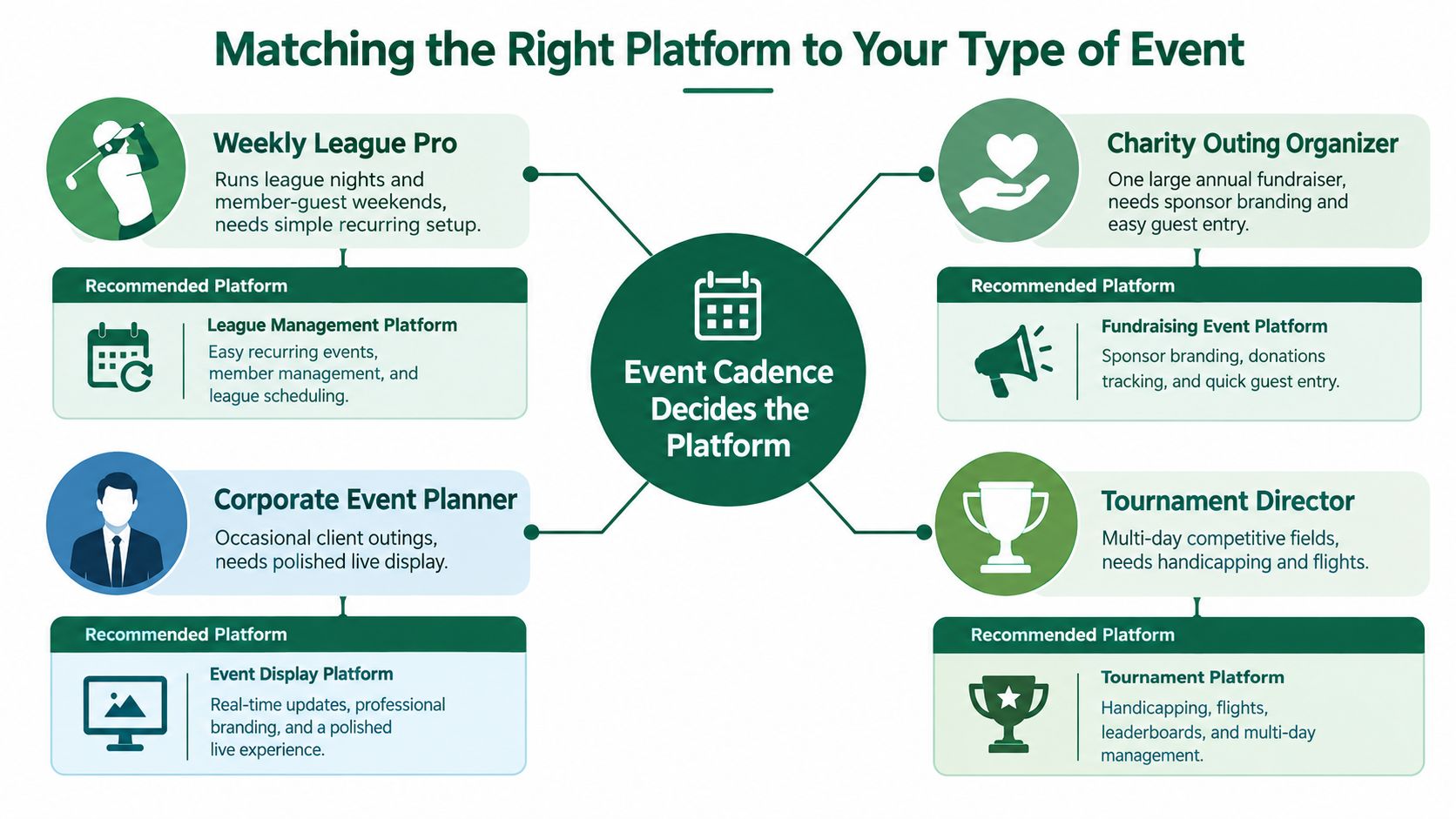
Event cadence should decide the platform. A consumer golf app can be perfectly adequate for personal rounds or a small group, but recurring organized events need templates, administration, and dependable public results.
The head pro
A head pro running weekly league nights and member-guest weekends should choose a browser-based tournament platform with strong administration. Recurring templates, stable handicap integration, pairing tools, reports, and quick edits matter more than a personal stat library. Staff shouldn't rebuild the same competition from scratch every week.
The league coordinator
A league coordinator managing 20-plus weeks of pairings, skins, and standings needs automated scheduling and a public leaderboard. That recurring workload points toward a flexible web platform with reusable event structures, clear player records, and exports that don't require copying results into a separate workbook.
The charity outing organizer
A one-off charity outing has a different problem. The organizer needs sponsor branding, donation prompts, quick guest entry, and volunteers who can help without training sessions. App-free scoring is the better fit because participants are less likely to want another download for a single day, while sponsors and donors can follow a shareable leaderboard.
The junior golf director
A junior director needs parents and guardians to follow along from the parking lot, clubhouse, or home. A public browser leaderboard handles that cleanly because families can open the standings without joining the scorer's workflow or installing the same software as the players.
For a multi-day competitive field, choose a platform with deeper handicapping, flights, format control, and back-office review. Independent comparisons show that the category serves consumer, SMB, and enterprise use cases, so the platform designed for personal statistics isn't automatically suitable for a tournament office (software category comparison).
Rule of thumb: the more repeat events and external spectators you have, the more you want app-free scoring.
Why a Modern App-Free Platform Is the Smart Default
At a busy outing, a player who cannot find the right app, a volunteer stuck on account recovery, or a scorer working in a dead zone can slow the entire event. Browser-based scoring should be the default for most organized golf events in 2026 because it removes much of that operational friction before the first tee.
A shared URL opens on the phone already in the player's hand. The scorer gets hole-by-hole entry, while spectators follow standings through the same basic access path. Keep scoring permissions limited to the assigned group or organizer, and publish the leaderboard for everyone else.
Staff training also gets shorter. Volunteers do not need to learn an app installation process, manage several versions, or explain account settings to every guest. That matters at charity outings and leagues where the scoring team changes from event to event.
Connectivity still needs a practical test. No platform can remove a dead zone, but some browser-based tools support offline entry and synchronization after service returns. A scorer can continue entering results instead of waiting for a signal, and the organizer receives updates once the connection is restored.
The old feature gap has narrowed
Native apps remain useful for dedicated golfers who want shot tracking, long-term statistics, handicap records, and a personal dashboard. They can also serve as a secondary tool for serious players who care about detailed individual analysis.
Tournament organizers need a different center of gravity. Their priority is quick onboarding, format setup, side games, pairings, payouts, reports, and a leaderboard that players and spectators can open immediately. Established tournament apps promote live score updates, public standings, and clubhouse display options, while browser products increasingly cover the same event requirements (Golfify's tournament app listing).
For an organizer comparing a native product with a browser-first platform such as Live Tourney, run the same test event on both. Use a volunteer who was not involved in setup, send players the access instructions, test phones in a weak-signal area, enter a wrong score, and produce the final payout report. Judge volunteer stress, correction speed, staff training time, and spectator access, not the number of features shown in an app store.
Run the next event on a browser-first platform and compare the morning workload with the last app-based outing. If staff spend less time installing software and more time looking after players, keep the browser workflow.
Live Tourney provides browser-based scorecards, real-time leaderboards, event management tools, side games, payouts, and reporting without requiring players to download an app. Visit Live Tourney to test whether its app-free workflow fits your next outing, league, or tournament.





