
Jun 11, 2026
golf course score cards, tournament management, golf scorecard design, live tourney, golf operations
Design & produce professional golf course score cards. This 2026 guide covers data, layout, branding, & automation with tournament software.

You know the scene. It's tournament morning, the staff is already answering cart questions, and someone realizes the scorecards still need one more pass. A handicap row is off. A sponsor logo looks fuzzy. One tee assignment changed after the cards were printed. Now the golf shop is doing emergency data cleanup with a stapler, a spreadsheet, and bad coffee.
That mess usually starts days earlier. Most operators treat golf course score cards like a print job. They're not. They're part rules sheet, part data sheet, part player guide, and part brand touchpoint. If the card is confusing, the day feels confusing. If the card is clean, players assume the event is organized, even before the first tee shot.
The hard truth is simple. A weak scorecard creates extra work everywhere else. Staff spend more time answering preventable questions. Scoring volunteers correct basic math errors. Players mark the wrong tees, miss handicap strokes, or walk off not knowing where to turn in a card. Good design fixes a lot of that before the round starts.
Beyond Just Numbers A Scorecard's True Job
A scorecard has never been just a place to write 4, 5, and 6. At any busy course, it acts as a working record of play. The USGA 2024 Golf Scorecard reported that 3.35 million golfers posted more than 77 million scores in 2024. That's a reminder that scorecards sit at the center of actual scoring, posting, competition, and course operations.
When a card is built well, players don't think much about it. That's the point. They find their tees, understand the hole order, record scores cleanly, and turn the card in without debate. When a card is built badly, everyone notices. The questions start on hole one and don't stop.
What the card is really doing
A working tournament card usually has to do several jobs at once:
Guide play: It shows hole order, pars, yardages, and handicap allocation in a format players can follow quickly.
Support scoring: It gives enough space to record hole-by-hole results without crowding the writing area.
Communicate operations: It can carry local rules, pace reminders, return instructions, and event-specific notes.
Represent the course: Players judge your professionalism by little details, and the card is one of the first details they hold.
A scorecard is one of the few pieces of tournament material every player touches multiple times during the round.
That's why I treat golf course score cards like operational infrastructure. If you build them late, you inherit stress late. If you build them early and tie them to your event data, you save yourself from the usual last-minute scramble.
What doesn't work
The same mistakes show up over and over:
Generic stock cards for every event: Fine for casual play, weak for organized competition.
Overloaded layouts: Too many logos, too much text, not enough usable scoring space.
Manual edits after printing: Every handwritten fix increases the chance of another mistake.
No thought for first-timers: Regulars may know the course. Guests usually don't.
Good scorecards feel simple because someone made careful decisions before they were printed.
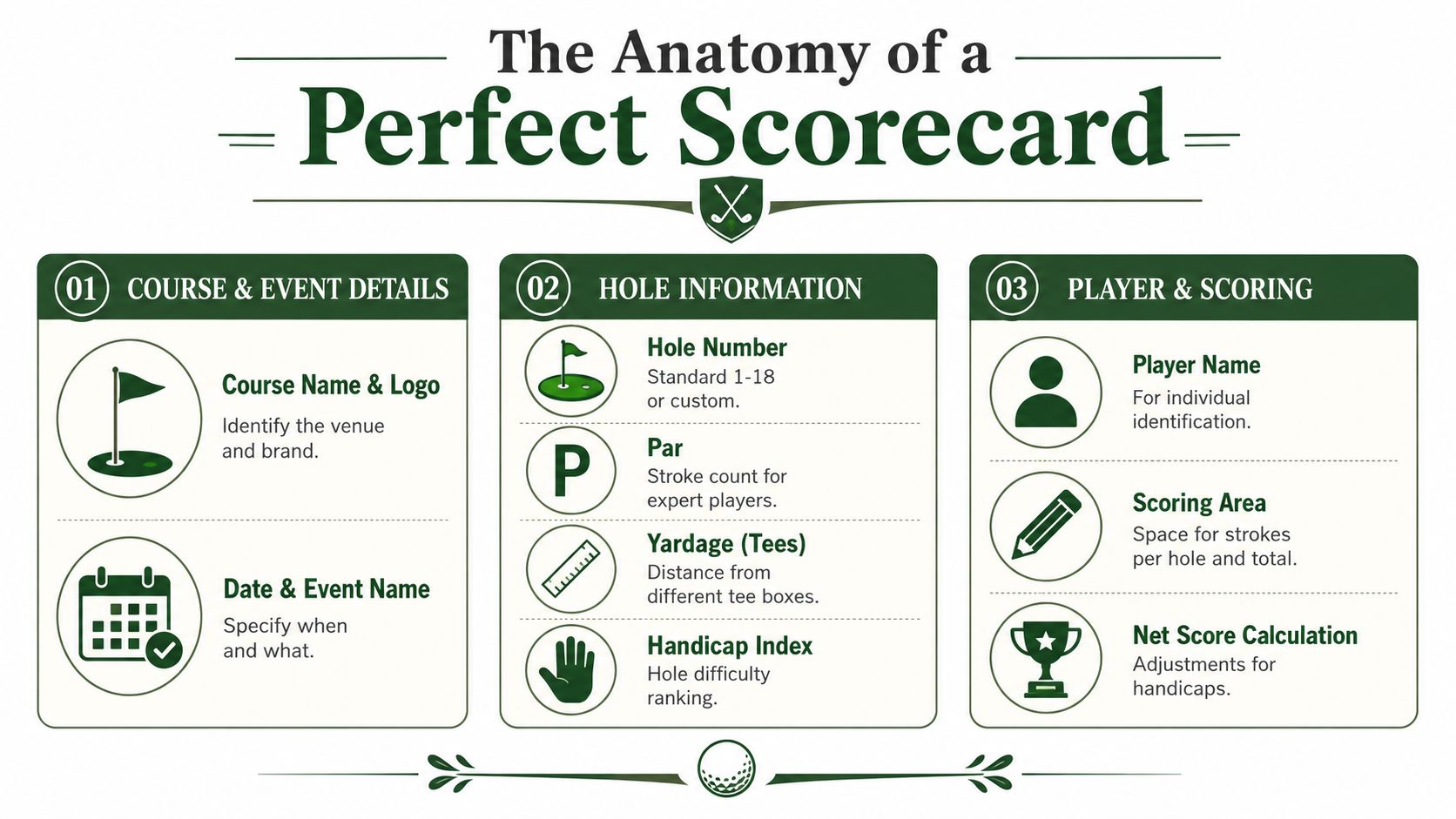
The Anatomy of a Perfect Scorecard
Before you worry about fonts, colors, or sponsor placement, get the data right. If the underlying fields are wrong or incomplete, the prettiest card in the shop still fails on the course.
The non-negotiables
Every usable card needs a clean foundation. At minimum, include:
Course and event identity: Course name, event name, and date.
Hole structure: Hole numbers, par, and tee-specific yardages.
Difficulty markers: Hole handicap allocation.
Player fields: Name line and enough scoring boxes to write clearly.
Totals: Front nine, back nine, and overall total.
That's the baseline. For competitive golf, you usually need more than the baseline.
Rating and slope must be visible
If players are posting scores or using handicaps, the card can't be vague about ratings. The USGA's Course Rating and Slope Rating appendix states that Slope Rating is scaled from 55 to 155, with 113 as the average, and that it is used to convert a player's Handicap Index into a course handicap for equitable competition. If that information is missing, you're asking players and staff to do extra work off-card.
That matters even more when you're running mixed-tee or net competitions. A card that only lists yardages but not the official rating information leaves a gap right where fairness matters most.
Practical rule: If the event uses handicaps, don't make players hunt for rating and slope somewhere else.
Mixed-tee events are where weak cards break
A lot of golf course score cards look fine until men, women, seniors, or combo-tee players all enter the same event. Then the design falls apart. Rows get cramped, labels get abbreviated beyond recognition, and the scoring table turns into a decoding exercise.
What works better is a layout that makes tee sets unmistakable. Use distinct row labels, keep rating data aligned with the correct tee, and avoid tiny type for the most important competitive information. If the card supports net scoring, give players a simple visual path from tee row to scoring box.
A practical checklist
Here's the audit I'd use before approving a card:
Element | Why it matters | Common failure |
|---|---|---|
Tee yardages by hole | Players need the correct row for the tees in play | Too many similar rows with weak labels |
Par by hole | Supports gross scoring and pace decisions | Par row blends into yardage rows |
Handicap hole allocation | Needed for net and match formats | Misread as player handicap |
Course Rating and Slope Rating | Required for handicap conversion | Printed too small or omitted |
Totals area | Prevents arithmetic confusion | No clear Out, In, and Total boxes |
The perfect card isn't the one with the most information. It's the one that carries the right information in the fewest moves.
Strategic Layout and Professional Branding
Once the data is settled, layout becomes a usability problem, not an art project. Players should understand the card at a glance. If they need to study it on the first tee, the design already lost.
Build the grid first
The most reliable scorecards start with a strong grid. Hole numbers must stand out. Par and handicap rows should sit consistently under each hole. Scoring boxes need enough room for real handwriting, not ideal handwriting.
I'd rather see one fewer sponsor placement and one larger score entry box. Players interact with the scoring area on every hole. They glance at the logo once.
A few layout habits save a lot of trouble:
Use hierarchy: Hole number first, then yardage/par, then scoring.
Protect white space: Empty space improves readability more than decorative lines do.
Keep alignment strict: If tee rows drift, players record from the wrong line.
Avoid tiny back-panel text: If staff can't read it indoors, players won't read it outdoors.
Use the back panel carefully
The back panel can help. It can also become a junk drawer. According to Lightspeed's golf scorecard design guidance, scorecards often include pace of play plus course-specific rules, but back panels are small and only essential information should be included. That trade-off is real.
The best back panels usually contain only what reduces confusion on the day:
Pace expectations: Short, direct, and readable.
Local rules: Only the rules players are likely to need.
Wayfinding or safety notes: Especially useful for guests and outing players.
Return instructions: Where signed cards go and who verifies them.
If a note won't change behavior on the course, it probably doesn't belong on the scorecard.
Branding that doesn't get in the way
Branding works when it supports trust. It fails when it crowds the card. A clean course logo, a restrained event mark, and one consistent type system usually look stronger than five competing visual ideas. If you're refreshing your visual identity, it helps to discover modern logo fonts before you drop a dated wordmark onto every printed piece.
Sponsor treatment needs the same discipline. Keep logos in predictable zones. Don't let them break the scoring grid. Don't put a dark logo behind tiny rules text. And if you're adding location context or visual orientation, a custom course map can be useful when it's handled separately, as shown in this guide to a custom golf course map.
What polished really looks like
Professional doesn't mean expensive. It means intentional. Consistent margins, readable type, accurate tee data, and clear scoring zones do more for perceived quality than glossy stock or oversized branding ever will.
Adapting Scorecards for Different Event Formats
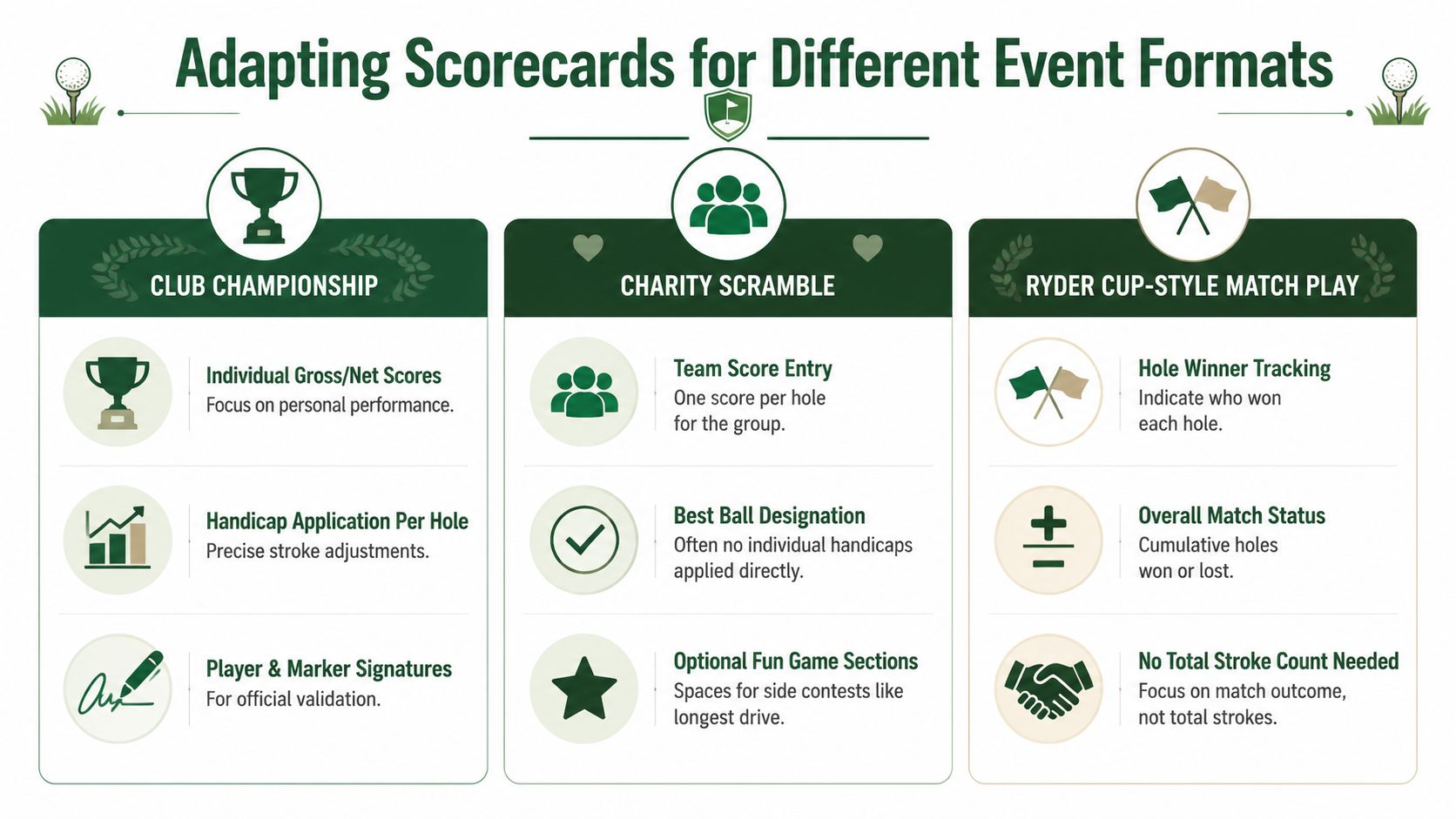
A standard daily-fee card rarely survives tournament use without modification. The format changes what players need to see, what markers need to record, and what the scoring table needs to verify later. If the card doesn't match the format, the scoring problems are predictable.
Stroke play and match play need different logic
Many operators try to run both formats on the same card layout. That's usually where confusion starts.
In stroke play, the card must support hole-by-hole numbers and accurate totaling. The scoring area matters most. In match play, the total stroke count may matter far less than hole result, handicap stroke application, and current match status. Players need a way to track who won, lost, or halved each hole without crowding the gross score area.
The clearest way to think about it is this:
Format | Primary data on card | What players need most |
|---|---|---|
Stroke play | Hole scores and totals | Clear numeric entry and easy reconciliation |
Match play | Hole result and stroke allocation | Fast read on where strokes fall |
Net competition | Gross score plus handicap impact | Simple way to apply strokes correctly |
For teams, the card should reflect the unit being scored. If the event scores the team, don't give the team a card that looks like an individual medal-play card.
Scrambles need restraint
Charity scrambles often collect too much on the card. Organizers add mulligan notes, side games, sponsor blurbs, raffle reminders, and team scoring. The result is visual traffic.
What works better is a card with one obvious team scoring line, optional side-contest notations in a separate area, and no fake precision. If the team posts one score per hole, design the card around that fact. Don't make four players stare at four empty individual scoring columns they don't need.
A good reference for choosing the right setup before you design is this breakdown of formats for golf tournaments.
Multi-round events need continuity
For multi-round tournaments, decide early whether you want separate daily cards or one consolidated sheet. Separate cards are cleaner on the course. Consolidated sheets help staff and players review progress across rounds. Neither is automatically right.
Use separate cards when:
Daily pairings change
Tee assignments shift
Course setup changes by round
Use a consolidated layout when:
The same players need a running record
The field is small enough to manage signatures and totals cleanly
You want one official document for review
The wrong card format doesn't just annoy players. It creates scoring disputes you could have prevented at the design stage.
Automate Scorecard Generation with Live Tourney
Manual scorecard production is one of the easiest places to waste staff time. Someone exports a roster, someone else adjusts pairings, another person updates handicaps, then the card template gets edited by hand. Every manual touch increases the chance of a mismatch between the event file and what lands in the player's cart.
That problem gets bigger because the volume of play is still massive. The National Golf Foundation industry research reported that 29.1 million people played golf on a course in 2025, total U.S. golf participation reached 48.1 million age 6+ when off-course activity is included, there were more than 500 million rounds played at U.S. courses in each of the past six years, and the country had about 16,000 golf courses at 14,000 facilities at the end of 2025. At that scale, scorecard workflow isn't a side issue. It's a recurring operating task.
Where automation actually helps
Most shops don't need “more design.” They need fewer handoffs.
Automation helps when the system can pull live event data directly into a print-ready template. That usually means:
Roster data populates player names automatically
Tee assignments flow into the right card version
Handicap-related fields stay tied to the current event setup
Brand elements sit in fixed template positions
Exports are ready for printing without layout repair
That's how you remove the common tournament-week scramble.
A practical workflow
One workable option is to use a report builder inside your event platform so scorecards are generated from the same source as pairings and player records. In Live Tourney, for example, the report builder can be used to create scorecards from uploaded rosters, tee assignments, and event data instead of rebuilding everything manually.

Here's what that kind of workflow looks like in practice:
Load the field once
Import or confirm player roster, divisions, and pairings in the event platform.Assign the competitive setup
Apply tee selections, groupings, and any format-specific scoring structure before touching the print layout.Use a fixed template
Start from a card template that already has the scoring grid, branding zones, and event fields in place.Map event data into the template
Player names, starting information, and other event details fill automatically from the system record.Review exceptions only
Instead of checking every card, staff can focus on late scratches, changed pairings, or special divisions.Export for print and digital backup
Produce a clean file for the printer and keep a digital version for staff reference or player access.
That same mindset also fits hybrid events where players may use printed cards and mobile scoring together. If you're planning that kind of setup, this overview of digital golf scorecards is a useful complement.
What to stop doing
If you want cleaner event prep, stop relying on these habits:
Editing cards one player at a time in design software
Maintaining separate master spreadsheets for names and handicaps
Saving multiple slightly different print files with vague filenames
Waiting until the night before to merge sponsor and event updates
Clean automation isn't about replacing judgment. It's about removing repetitive steps that create preventable mistakes.
The payoff is simple. Staff spend less time formatting and more time checking the few details that require human attention.
From Digital File to On-Course Reality
A sharp template can still fail at the printer. Thin lines disappear. Small text fills in. Fold marks cut through the wrong place. Production matters because the physical card is still where a lot of scoring discipline lives.
Operationally, the most reliable scoring process is to enter each hole's result immediately and reconcile front nine, back nine, and total before leaving the scoring area, as described in Fairlawn Golf's guide to understanding a golf scorecard. A physical card should make that easy, not harder.
Export for print, not for hope
Use print-ready files. A flattened PDF is usually the safest handoff because it protects layout and font behavior better than editable files bouncing between systems. Keep lines strong enough to survive commercial printing, and make sure small text is still readable after any folding.
Before approving the final file, print one copy in-house at actual size and test it like a player would:
Can you write a score cleanly in every box
Can you distinguish tee rows instantly
Are Out, In, and Total obvious
Can a scorer read the local notes without squinting
If any answer is no, revise the file before you send it.
Paper stock and finish choices
Cheap paper feels cheap fast, especially in carts and humid weather. But overly slick stock creates its own problem because pencils smear or skip. You want something stiff enough to survive handling and easy enough to write on in real conditions.
Ask your printer about the trade-off between durability and writability, especially if the card will be folded into a traditional booklet shape. The right answer depends on whether the card is for daily play, a member event, or a one-day outing with sponsor-heavy presentation.
A final preprint check
Use a short approval routine:
Verify data: Names, tees, date, and event title.
Verify layout: No shifted rows, clipped logos, or broken totals boxes.
Verify usability: Score entry area remains the visual priority.
Verify quantity: Include a buffer for late adds, rules officials, and shop copies.
The goal isn't perfection on screen. It's a card that survives the cart ride, gets marked clearly on every hole, and comes back easy to verify.
If you're tired of building scorecards by hand every time an event changes, take a look at Live Tourney. It gives golf courses and tournament operators a way to keep scorecard creation tied to real event data, along with pairings, scoring, and other tournament materials, so the printed card is one less thing to babysit on tournament week.





